Most companies still run core work on old systems, and that slows change, adds manual work, and drives up IT costs. My take is simple: if you want AI to help with modernization, I’d start with system mapping, risk scoring, read-only pilots, strict review rules, and a short list of metrics tied to cost, defects, and parity.
Here’s the short version:
- Nearly 70% of businesses still depend on legacy systems for revenue and compliance work.
- AI is most useful at the start, where it can scan code, map dependencies, recover missing logic, and draft tests.
- I would not use AI first for write-back changes to core systems. Read-only work is a safer place to begin.
- The best early targets are usually modules with high maintenance cost, repeated integration issues, and clear business value.
- A phased rollout works better than a full replacement: discovery, setup, pilot, then scale.
- Before cutover, I’d require behavioral parity, golden dataset checks, 8+ weeks of parallel testing, and dual sign-off.
- Success should be judged by a few plain metrics: cycle time, manual analysis hours, defect rate, reconciliation variance, and maintenance spend.
What this means for you: AI can help cut weeks of review work and lower migration risk, but it will not fix bad workflows or weak system design on its own. I’d use it to speed up analysis and testing, while keeping architecture, compliance, and final approval with people.
A few points stand out to me:
- Discovery comes first. If you don’t know your systems, interfaces, and failure impact, the pilot is guesswork.
- Path selection matters. Some systems should be retired, some rehosted, and some refactored. AI use depends on that choice.
- Governance cannot wait. RBAC, masked data, audit logs, and review rules need to be in place before deployment starts.
- Pilot wins need a playbook. If a team cannot document what worked, the next rollout will take more time and cost more money.
One example in the article makes the point well: a team thought a payment service touched 5 entities, but analysis found 11, including links to user management and notifications. That kind of hidden coupling is exactly where AI can save time and cut rework.
If I had to sum up the article in one line, it would be this: use AI to read, map, test, and compare first - then scale only after you prove parity, control risk, and show measurable results.
Using generative AI for legacy modernization - Thoughtworks Technology Podcast
sbb-itb-bec6a7e
Assess Your Legacy Systems Before Adding AI
Before you run any AI pilot, get a full inventory of your systems and dependencies. Map each part and its blast radius. That work gives you the input you need to rank use cases instead of guessing.
Map Systems, Dependencies, and Business Impact
Inventory every core application, data store, API, middleware component, endpoint, message broker, authentication method, and schema version in your environment [8]. Then map what happens if each system fails.
Focus first on systems tied to revenue, compliance, finance, operations, or customer service. If something goes wrong in those areas, the cost can get ugly fast [1].
A good example came from AltexSoft in April 2026. Its engineering team reviewed a five-year-old Node.js monolith for a client that wanted to pull out a payment service. The client team thought that service touched only five entities. The review found eleven affected entities instead, including three used heavily by user management and notification services [3].
"The engineering team believed their planned payments service touched five entities, but the analysis revealed it affected eleven entities... a web of hidden connections the client's team had never formally mapped." - Oleksandr Hryhor, Solution Architect, AltexSoft [3]
Give each system a risk score based on data sensitivity, user impact, uptime, and regulatory exposure. At the same time, record baselines for downtime, throughput, release cadence, and support effort before any AI pilot starts [1]. Without a baseline, you have no clean way to show whether AI helped [4].
Choose the Right Modernization Path for Each System
Match each system to the path with the lowest risk that still gets the job done: retire, retain, rehost, replatform, refactor, or replace.
| Path | Cost | Speed | Risk | Effort | Business Impact |
|---|---|---|---|---|---|
| Retire | Low | High | Low | Low | High (cost elimination) |
| Retain | Low | High | Low | Low | Low (stagnation risk) |
| Rehost | Low | High | Low | Low | Low (infrastructure only) |
| Replatform | Medium | Medium | Medium | Medium | Medium (cloud-native gains) |
| Refactor | High | Low | Medium-High | High | High (long-term agility) |
| Replace | Medium-High | Medium | Medium | Medium | High (SaaS features) |
This step helps you avoid putting AI on the wrong systems first. The path you pick shapes which AI use cases make sense to pilot.
If a system has no documented interfaces or no measurable baseline, it's a weak pick for immediate AI integration [4] [6]. As Michael Scranton, VP of Sales at Coderio, said:
"AI will not fix a workflow with fundamental design problems - it will only automate the broken behavior at a higher speed." - Michael Scranton, VP of Sales, Coderio [4]
Once systems are scored and paths are set, rank AI use cases by impact, effort, and risk.
Prioritize AI Use Cases and Build Your Roadmap
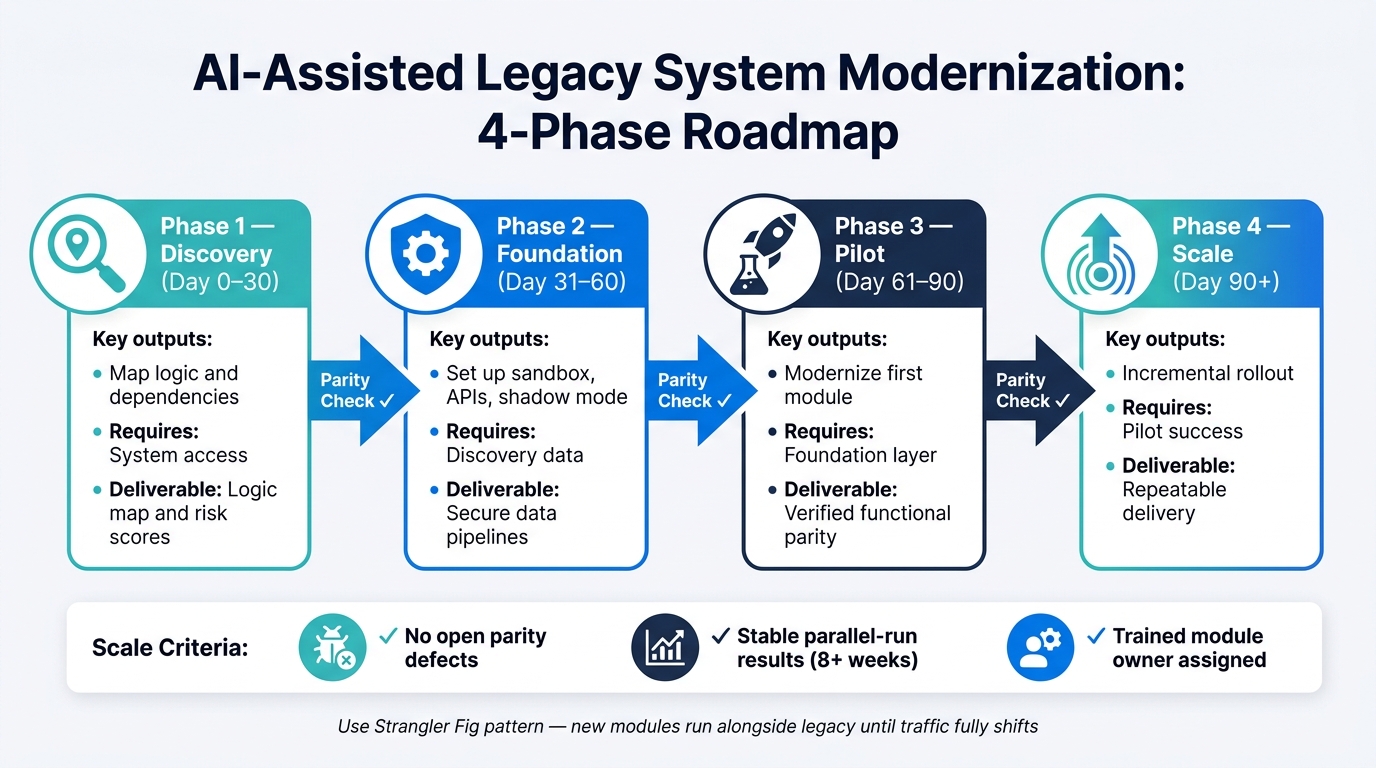
AI-Assisted Legacy System Modernization: 4-Phase Roadmap
After you score systems and pick modernization paths, the next step is simple: rank AI use cases by the value they can deliver first. Start with the work that can pay off fast without adding much risk.
Rank AI Use Cases by Impact, Effort, and Risk
Begin with modules that bring together high business value and high technical friction: high maintenance cost, blocked data access, or repeated integration failures [10]. In plain English, go after the small group of modules causing most of the debt.
For near-term wins, start with read-only use cases that don't write back to the core system [5]. That keeps the blast radius small. Codebase analysis, dependency mapping, and test case generation are strong early picks because they deal with repetitive pattern-matching work and are easier to check safely.
| Use Case | Business Impact | Implementation Effort | Data Requirements | Delivery Risk |
|---|---|---|---|---|
| Codebase Analysis | High | Low | Source code | Low |
| Test Case Generation | High | Medium | Input/output samples | Low |
| Requirements Summarization | Medium | Low | Docs/code | Low |
| Data Classification | Medium | Medium | Production data | Medium |
| Migration Pattern Detection | High | High | System logs | Medium |
Architecture choices and regulatory calls should stay with human experts. Let AI take the pattern-heavy work. Keep high-stakes decisions with people [9] [1].
Build a Phased Modernization Roadmap
The Strangler Fig pattern is the preferred architecture for incremental delivery. New AI-modernized modules run alongside the legacy system, and traffic shifts over time until the old system can be retired [7] [9]. Use your ranking to line up the work in small phases that you can check and trust.
A phased rollout works best when each stage has a clear exit point:
| Phase | Objective | Dependencies | Measurable Outcome |
|---|---|---|---|
| Discovery (Day 0–30) | Map logic and dependencies | System access | Logic map and risk scores |
| Foundation (Day 31–60) | Set up sandbox, APIs, and shadow mode | Discovery data | Secure data pipelines |
| Pilot (Day 61–90) | Modernize the first module | Foundation layer | Verified functional parity |
| Scale (Day 90+) | Incremental rollout | Pilot success | Repeatable delivery |
Each phase should pass a parity check before the next one starts. Before cutover, require behavioral parity: the new system must produce the same observable output as the legacy system for the same input and preconditions [11]. Check that parity with golden datasets - real input/output pairs from the legacy system used as a reference set [11].
Finding AI Tools for Modernization Support
Once the roadmap is in place, use curated tools to help with planning and delivery. Use AI for Businesses to shortlist tools for documentation recovery, test automation, and workflow support during the planning phase.
Manage Data, Security, and Change Risks
Once you’ve picked the pilot roadmap, set the ground rules before deployment starts. That means locking down data access, approval rules, and team roles. AI can do a lot fast: read legacy data, suggest code, and map business logic. But it also opens new attack surfaces and adds compliance risk. For SMEs, that risk climbs fast when governance trails the first rollout.
Set Data Governance and Human Review Rules
Start with read-only access. Early on, no AI system should have write access to the legacy core until it has been validated. Keep a current data dictionary in place too. Without it, AI may pull from stale or archived tables and return outputs that sound right but are wrong [13].
Past read-only access, three controls matter most for SMEs:
- Role-Based Access Control (RBAC): Limit who can use AI models, prompts, and generated artifacts.
- Environment separation: Keep production data out of the modernization sandbox. Use masked or anonymized data during development and testing [5].
- Auditability: Log every AI action and every data access. Keep a traceable audit trail for compliance and troubleshooting [12][2].
Before anything reaches production, require dual sign-off: one technical lead and one business owner [1][8].
Prepare Teams for Workflow and Role Changes
Start training and alignment sessions 1–2 months before go-live. That gives teams time to adjust, lowers pushback, and makes ownership clearer [5].
Roles will shift. Engineers spend less time writing every line of code and more time reviewing and validating AI output. Each integration should also have a model owner, the cross-functional lead who is accountable for accuracy, governance, and maintenance.
Run AI in parallel testing for at least 8 weeks before any full cutover [14]. During that window, compare outputs against the legacy workflow and look for drift, gaps, or edge-case failures. Set fallback procedures in advance too. If AI performance slips, teams need a clear runbook to switch back to legacy behavior right away [14][1].
Once governance, training, and shadow testing are stable, measure pilot results before expanding.
Measure Results and Scale What Works
Track the Metrics That Matter to SMEs
After parallel testing, go back to the same baseline you used at the start. That gives you a straight answer on whether AI improved the pilot or just added noise.
You don’t need a huge scorecard here. A small set of business metrics is enough to judge whether the pilot paid off:
| Metric | What to Measure | Why It Matters |
|---|---|---|
| Migration cycle time | Weeks from start to go-live per module | Shows if AI is cutting delivery cycles |
| Manual analysis hours | Hours saved per sprint or release | Helps put labor cost savings into numbers |
| Defect rate | Bugs introduced per release cycle | Checks code quality from AI-assisted output |
| Reconciliation variance | % of parallel-run transactions with zero variance | Verifies parity before cutover |
| Maintenance labor share | % of IT budget spent on upkeep | Target: drop from 60%–80% to 25%–35% [7] |
The point is simple: judge the pilot on your own before-and-after results. AI-assisted modernization can cut maintenance and rework costs and trim project timelines, but the numbers only matter if they hold up against your baseline.
A good example comes from a U.S. company that moved from an IBM iSeries-based ERP to Microsoft Dynamics 365 and added Copilot for Finance. Its accounting team saved 30+ hours per month, and one reconciliation process finished 80% faster [15].
Once the results are clear, write down the controls that made those results repeatable.
Turn Pilot Wins Into a Repeatable Modernization Model
A pilot should act like a model you can reuse, not a one-time win. Document the rules, team setup, testing method, and AI tools that helped the pilot succeed. When teams turn those lessons into playbooks, they cut implementation time for later integrations by 30% to 50% [5].
When you pick the next module to modernize, focus on three things:
- High maintenance cost
- Low coupling to other systems
- Clear business criticality [9]
That matters because about 80% of technical debt impact in a typical codebase comes from just 20% of modules [9]. Go after that concentrated debt first, and you’ll often get the fastest payoff.
Scale only when the exit criteria are met: no open parity defects, stable parallel-run results, and a trained owner.
FAQs
How do I choose the best legacy system for an AI pilot?
First, assess both technical and organizational readiness before you pick any tools.
Score each legacy system on:
- data accessibility
- API surface area
- integration architecture
- governance and security
- workflow observability
Some systems will be hard stops. If a system can't expose data through an API, a governed layer, or an event stream, it may block the work.
Next, focus on systems tied to high-impact use cases with clear baseline metrics, like error rates or cycle times. That gives you a clean way to judge whether the effort is working or just adding noise.
Start small. Use a contained pilot with a bolt-on integration to limit risk and keep core legacy logic intact.
Why should AI start with read-only tasks instead of write-back changes?
Starting with read-only tasks is the safest way to modernize legacy systems.
These systems are often fragile and tied to day-to-day business. If you give AI write access too early, small mistakes can spread fast. That can lead to compliance problems, bad data, and changes that are tough to roll back.
Read-only APIs give teams a safer place to start. They can still ship useful features like:
- Search
- Summaries
- Recommendations
That means they can deliver value without putting system stability at risk. It also gives them time to build trust in the setup, tighten logging, and put human checks in place before moving into assisted actions or more controlled execution.
What proves an AI-modernized system is safe to cut over?
A system is safe to cut over only after it reaches 100% functional parity with the legacy system.
The simplest way to check that? Run the same production inputs through both systems and confirm that the outputs match. You’ll also want behavioral equivalence testing and automated reconciliation to catch any gaps that don’t show up at first glance.
Cutover should happen only when reports show zero unresolved parity defects.
Before you retire the legacy system, it helps to test in production with approaches like:
- phased rollout
- API facades
- shadow testing
These let teams validate modules under live conditions without flipping everything over at once.