Modern businesses face a major challenge: 70% of Fortune 500 companies still rely on software over 20 years old. These legacy systems are costly to maintain, lack compatibility with modern technologies, and depend on outdated languages like COBOL. 67% of integration projects fail due to hidden dependencies and poor understanding of data flows. AI is changing this.
Here’s how AI makes integration faster, safer, and more efficient:
- Automated Code Conversion: AI tools translate old languages (e.g., COBOL) into modern ones (e.g., Python), reducing manual effort and speeding up timelines.
- Dependency Mapping: AI analyzes legacy data flows, uncovering hidden connections and simplifying integration planning.
- Middleware Development: AI creates bridges between old systems and modern platforms, adding features like APIs and encryption without altering original code.
- Risk Mitigation: AI predicts migration risks, automates testing, and ensures smooth transitions with rollback features.
For example, companies like Mercedes-Benz and Vector Limited have shortened migration timelines by up to 40% and cut costs by 30–35% using AI.
AI doesn’t replace legacy systems; it layers intelligence over them, reducing IT costs and enabling modernization without disrupting operations. Businesses that adopt AI now will save time, reduce risks, and stay competitive. For those just starting, following a beginner's guide to AI implementation can help navigate the initial transition.
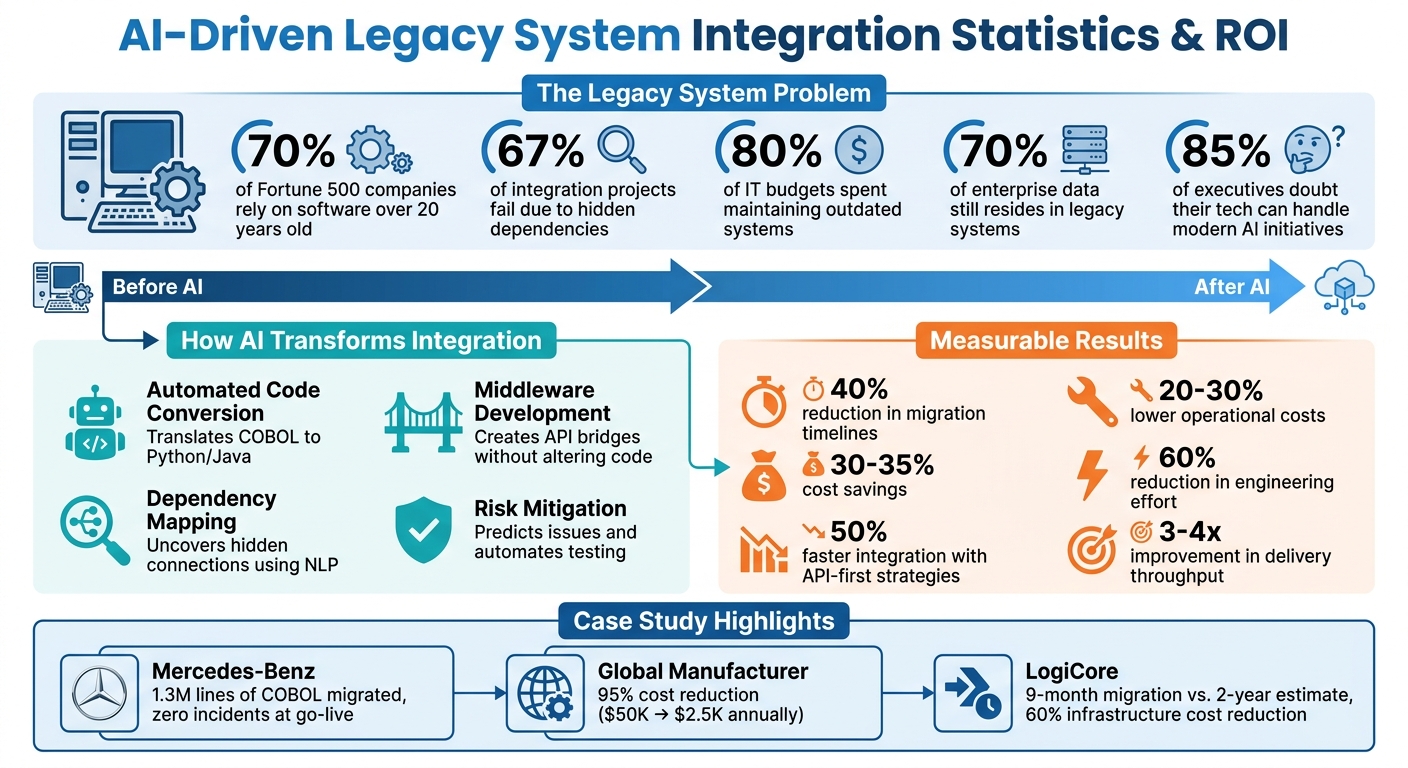
AI-Driven Legacy System Integration: Key Statistics and ROI Benefits
How AI Is Transforming Legacy System Modernisation | PhoenixDX
sbb-itb-bec6a7e
How AI Speeds Up Legacy System Integration
AI is reshaping the way legacy systems are integrated, making what used to be a tedious and time-intensive process much more manageable. Instead of spending weeks rewriting code or mapping out system dependencies manually, AI takes over the complex tasks with three main strategies: automated code conversion, dependency mapping, and middleware development. These methods not only simplify the integration process but also set the stage for smoother and safer transitions to cloud environments.
Automated Code Conversion
AI-powered tools, particularly Large Language Models, can analyze legacy codebases written in outdated languages like COBOL, Fortran, or PL/I and convert them into modern, cloud-friendly languages such as Java, Python, or C#. This process involves generating modernized code that replaces outdated constructs with streamlined equivalents, reducing the need for manual intervention.
For example, in December 2025, a FinTech company leveraged generative AI to modernize 20,000 lines of legacy code. What would normally take 30–40 hours of manual effort for relationship mapping was reduced to just 5 hours. Overall, the migration timeline was shortened by 40%. AI tools also reverse-engineer undocumented code, extracting and documenting business rules and calculations in Markdown files, creating a reliable reference point for the entire migration process.
Julia Kordick, a Microsoft Global Black Belt, shared her experience modernizing 65-year-old COBOL systems in October 2025. Using tools like GitHub Copilot and specialized agents such as COBOLAnalyzerAgent and JavaConverterAgent, her team was able to extract logic and automate the conversion process - even without prior knowledge of COBOL. Andrea Griffiths, Senior Developer Advocate at GitHub, summed it up well:
"The best time to modernize legacy code was 10 years ago. The second-best time is now".
Dependency Mapping with Natural Language Processing
While code conversion updates the language, dependency mapping provides clarity on how systems interact. AI tools using natural language processing (NLP) analyze legacy artifacts such as WSDL files, XSD schemas, and XSLT transformations to map out system relationships. These tools create structured design specifications that detail systems, protocols, endpoints, authentication methods, and field-level mappings that often lack proper documentation.
In April 2026, a global logistics company used AI agents to analyze 700 legacy electronic data interchange (EDI) integrations. By feeding the AI mapping definitions, XML/EDI files, and schemas, they discovered that these integrations followed only 12 core patterns, rather than being entirely unique. This insight allowed the team to adopt a "template-and-configure" approach, cutting build time estimates by nearly 40%.
"The role of the developer and architect shifts from building and thinking through every part to reviewing, confirming, and refining the direction and generated outputs".
AI-Driven Middleware Development
AI also plays a crucial role in creating middleware that acts as a bridge between legacy systems and modern cloud platforms. This middleware serves as a translation layer, exposing legacy functions through standardized RESTful APIs without altering the original code written in COBOL, ABAP, or .NET. By doing so, it adds modern features like authentication, encryption, and audit logging to systems that were built before these capabilities existed.
Platforms like IBM App Connect Enterprise serve as service buses, routing data, transforming formats like SOAP or XML into more modern structures, and enforcing integration rules. AI agents further enhance this process by creating an "organizational memory layer", which integrates context from legacy databases, file systems, and cloud applications simultaneously.
This approach delivers clear benefits. Organizations that adopt API-first integration strategies can reduce integration timelines by 50% and lower operational costs by 20–30%, all while maintaining the reliability of their systems.
Risk Reduction with AI in Cloud Migration
Migrating legacy systems to the cloud can be a daunting task. It comes with risks like downtime, data loss, and even cascading failures that can snowball into larger problems. But AI is changing the game, offering tools to spot potential issues early and catch mistakes that manual testing could miss. By addressing these challenges during the planning stage, teams can resolve problems in a way that's both less expensive and less disruptive.
Predictive Analytics for Migration Planning
AI excels at analyzing data from infrastructure telemetry, application traffic, and configurations to create real-time maps of how applications and data interact. These detailed maps uncover connections that manual audits often overlook - like obscure API calls or database triggers that only activate under specific conditions. Machine-learning algorithms also step in to identify risks and inconsistencies in schemas before migration even begins.
Predictive modeling takes things further by simulating migration scenarios using historical performance data and real-time usage patterns. This gives teams the ability to predict potential downtime or performance hiccups before they happen. AI-driven risk models also help prioritize workloads, ensuring that high-risk or high-value tasks are tackled in the right order to avoid cascading failures. Tools equipped with predictive validation can catch data inconsistencies - such as misplaced decimals or mismatched field types - in real time, using probabilistic matching to flag these issues.
Here's a real-world example: In May 2026, Vector Limited, New Zealand's largest electricity distributor, partnered with AWS Transform and Slalom for a cloud migration project. Led by Jerry Li, General Manager of Digital Technology, the team used AI tools to automate 60% of the wave planning and inventory collection process. The results? A migration that was 34% faster, a 35% reduction in five-year total cost of ownership (TCO), and a 30% boost in team efficiency. Jerry Li shared:
"With AWS, we gain near-real-time visibility and the agility to continually refine and improve – turning technology into a true enabler of growth and innovation".
AI-powered discovery tools can cut discovery timelines by up to 50%. Plus, they shift the focus during migrations from spending the bulk of time on coding to dedicating more effort to high-value testing and validation work. These insights, combined with AI-driven automated testing, add another layer of security to the migration process.
Automated Testing and Validation
Once the migration plan is set, AI tools take over the testing and validation phase, ensuring any errors are caught early. Unlike traditional testing methods that rely on sampling through row counts or checksums, AI performs full dataset reconciliation. It traces discrepancies back to specific transformations, catching even rare defects that might otherwise fly under the radar.
For example, Next Pathway’s "Tester" tool can automatically generate test rules from seed data, store them in reusable libraries, and integrate with DevOps pipelines via APIs to schedule jobs and send alerts. AI also enables techniques like "shadow testing", where live production traffic is mirrored to the migrated system. This allows teams to assess performance and accuracy under real-world conditions without interrupting end-users.
In February 2026, a technical team at Ralabs faced a tight deadline for a US-based client whose provider was being decommissioned. By using Cursor and GPT 5.2 Codex High in "planning mode", they slashed a 130–140-hour manual engineering estimate for code migration to under two weeks. AI identified structural constraints and generated a detailed migration script, freeing up engineers to spend 80% of their time on validation rather than repetitive coding tasks.
AI also enhances safety during migration with real-time monitoring and automated rollback features. It continuously observes application behavior during the cutover phase, and if performance issues or anomalies arise, it can trigger an automatic rollback. By automating validation tasks, AI not only speeds up the migration process but also ensures long-term stability. This proactive approach dramatically reduces the traditional migration abandonment rate, which hovers around 40%.
Steps for Implementing AI in Legacy System Integration
Transitioning from planning to action requires a structured game plan. The idea is to start small, validate your approach, and expand gradually - all while keeping disruptions to a minimum.
Assessment and Planning
Before diving into code, take time to map out all service and data interactions. This initial effort can save you from discovering hidden connections later - something that often derails integration projects. Begin by cataloging every service, data store, middleware component, and integration point in your setup. Document endpoints, message brokers, authentication methods, and schema versions. Create a detailed map of synchronous and asynchronous calls, including third-party touchpoints and undocumented connections that might only surface during live testing.
Next, assess your technical debt. Identify outdated code, custom workarounds, and fragile architecture to pinpoint areas that pose the highest risks for future upgrades. Clean and organize your data by addressing siloed information and determining what’s usable for AI training - messy data can undermine the entire integration process. Run compatibility tests to ensure modern AI SDKs can work seamlessly with your system, checking things like runtimes, libraries, and network protocols (e.g., older TLS stacks or proprietary messaging systems).
Once you’ve mapped the landscape, prioritize pilot projects. Assign risk scores based on factors like data sensitivity, user impact, uptime needs, and regulatory compliance (e.g., GDPR or HIPAA). This helps identify low-risk areas for initial deployments. Interestingly, 85% of organizations express serious doubts about their tech’s ability to handle modern AI initiatives. These steps lay the groundwork for a phased approach that minimizes risk and disruption.
Phased Implementation Strategy
Armed with a clear understanding of your legacy environment, begin by testing AI in low-risk scenarios. Start with a pilot project in a non-critical area, using adapters or sidecars to introduce AI without altering the core legacy code. Test AI models in a sandbox environment to see how they handle legacy data before moving to live testing. Once the sandbox results look solid, move to shadow testing, where AI models process real production inputs but don’t affect actual users or outputs.
When it’s time to go live, roll out AI features incrementally using canary deployments that target small user groups. Set up automated circuit breakers to quickly disable AI features and revert to legacy behavior if something goes wrong. Define clear Service Level Objectives (SLOs) for availability, latency, and model accuracy to balance innovation with reliability. Also, limit the data sent to AI models to only what’s necessary and mask or tokenize sensitive information before involving third-party APIs.
For example, HSBC partnered with Google Cloud in May 2025 to deploy an AI system that scans 900 million transactions monthly. This phased approach helped the bank detect 2–4 times more suspicious activities while cutting false positives by 60%. Similarly, TechnoFab Industries upgraded its ERP system with machine learning and sensors, reducing equipment downtime by 75% and cutting maintenance costs by 30%. Once AI features are live, continuous monitoring and optimization ensure they perform as expected.
Monitoring and Optimization
Set up performance benchmarks - like uptime, AI accuracy, and processing speed - and use automated dashboards to track real-time metadata for every AI action. Log key details such as prompts, retrieved documents, outputs, and timestamps to ensure traceability. Store summaries of AI activities in a Security Information and Event Management (SIEM) system for anomaly detection and security audits.
Keep an eye out for model drift, where AI models lose accuracy over time as data evolves. For instance, Valley Medical Center used the Xsolis Dragonfly AI tool to prioritize clinical cases, boosting clinical observations from 4% to 13% and increasing extended observation rates by 25%. Regular retraining on updated data can prevent performance dips, while automated validation systems can catch issues like data mismatches or unit conversion errors before they reach production.
Establish feedback loops to keep AI behavior aligned with business objectives. These loops help validate earlier planning decisions and guide future updates. Implement policy checks, approval workflows for high-risk actions (e.g., financial transactions), and role-based access controls. Maintain a centralized model registry with performance tests and rollback procedures to reduce risks during updates. By successfully integrating AI into legacy systems, organizations can cut operational costs by 20–30% while maintaining reliability.
Case Studies and ROI of AI-Driven Legacy Integration
AI's role in simplifying integration and reducing risks is more than just theoretical - it’s backed by real-world success stories that highlight its measurable impact on legacy system modernization.
Examples of Successful Integration Projects
In September 2025, Mercedes-Benz successfully migrated 1.3 million lines of COBOL code from its mainframe to AWS in just a few months using the AI tool GenRevive. The project achieved zero incidents at go-live and delivered improved system performance. The tool utilized a multi-agent architecture with roles like software engineer, reviewer, and tester, effectively simulating a full development team to handle code transformation.
Similarly, in January 2026, a 150-year-old global manufacturer revamped its middleware using Azure Logic Apps through CloudFronts. This modernization effort slashed annual licensing and maintenance costs by 95%, dropping from $50,000 to just $2,555, and saved $140,000 over three years.
By April 2026, Booz Allen Hamilton employed its Pseudocode & Business Logic Extractor (PBLE) to analyze legacy files. This approach reduced preparation costs from $2.28 million to $321,000 and cut analysis time dramatically - from 790 days to just 50. Reflecting on the success, Natalie Gray, Director of Marketing & Growth at Codurance, remarked:
"AI significantly changed the economics of the project, making a previously unaffordable modernization initiative viable within the client's budget constraints".
Measuring ROI and Key Benefits
One way to measure ROI is by tracking developer velocity - for instance, the rate of code commits or service migrations per sprint. A global retailer with over 25,000 employees used an AI-powered framework to migrate 800+ TIBCO services to a Kafka-centric platform. This effort resulted in a 60% reduction in end-to-end engineering effort and a 3-4x improvement in delivery throughput compared to traditional methods.
Another key metric is accuracy rates for AI-generated code. Modernization projects often aim for accuracy rates exceeding 90%, ensuring minimal need for human corrections. LogiCore’s Head of Engineering, Anja Müller, oversaw the migration of 500,000 lines of code from a 15-year-old monolith to a cloud-native React and .NET 8 platform. Completed in just 9 months - far ahead of the original 2-year timeline - the project also achieved a 60% reduction in infrastructure costs with zero downtime during the transition.
"Modernized a 12-year-old legacy system in under nine months with zero downtime. I didn't think it was possible", Müller shared.
Finally, tracking SME hours reclaimed highlights how AI reduces reliance on scarce subject matter experts. By automating repetitive tasks like manual reverse-engineering, AI tools can free up 50-70% of SME time, allowing them to focus on strategic architectural decisions rather than tedious code analysis.
These case studies demonstrate how AI transforms legacy integration, delivering measurable results and aligning seamlessly with modern cloud migration strategies.
Conclusion
AI is reshaping how organizations approach legacy system integration. Traditionally, companies have spent a staggering 80% of their IT budgets maintaining outdated systems. But with AI-driven automation, tasks that used to take 8–16 hours can now be completed in just a fraction of that time. This shift allows businesses to modernize their legacy infrastructures far more efficiently.
Adopting AI integration strategies has led to significant cost savings - companies report a 20–30% reduction in operational expenses while still maintaining system reliability. By leveraging AI, businesses can avoid the costly, high-risk full-scale system overhauls that often take 5–7 years and cost hundreds of millions of dollars. Instead, they can achieve modernization incrementally and with far less disruption.
This industry-wide transformation is best summarized by Alexander Stasiak, CEO of Startup House:
"The question is no longer whether your organization should use AI. The question is how quickly you can integrate AI with the systems that actually run your business - most of which were built before smartphones existed."
Rather than replacing legacy systems outright, AI creates a unifying "memory layer" that bridges data across databases, file systems, and cloud applications. This approach preserves institutional knowledge while unlocking modern capabilities. With 70% of enterprise data still residing in legacy systems and 85% of senior executives expressing concerns about their technology's ability to support AI initiatives, the urgency to act has never been greater.
The phased strategies discussed earlier - starting with shadow mode deployments, targeting high-impact areas, and establishing governance - ensure a smooth transition to AI-driven integration. By focusing on low-risk, high-reward initiatives, businesses can achieve rapid returns and long-term benefits. Companies that act quickly to embrace AI will outpace competitors still bogged down by technical debt and outdated processes.
FAQs
Which legacy integrations should we modernize first?
Start by addressing systems that are essential to operations but hinder flexibility or growth. These might include outdated or overly complex systems that stand in the way of adopting digital transformation initiatives or AI technologies. Target high-impact, low-risk use cases first - this helps you secure quick wins while keeping disruptions to a minimum.
Give priority to systems connected to compliance, security, or customer-facing functions. This ensures you maintain stability in critical areas while gradually modernizing. By taking this phased approach, you can build momentum and lay a solid foundation for integrating AI over the long term.
How do we keep sensitive data safe when using AI?
To keep sensitive data secure when integrating AI with legacy systems, it's crucial to implement strict access controls that limit user permissions. This ensures that only authorized individuals can access specific data.
Additionally, maintaining detailed audit logs is essential. These logs track data usage and can help identify unusual activities, making it easier to spot and address potential issues.
It's also important to adopt a strong data governance strategy. This should include principles like privacy-by-design, adherence to regulatory requirements, and the use of AI governance frameworks. Together, these measures help protect against breaches, maintain privacy, and ensure data integrity during the integration process.
What proof is needed before we cut over to the cloud?
Before moving to the cloud, it's crucial to ensure that your legacy systems can connect securely and function reliably. This often involves a phased approach to modernization, testing essential workflows, confirming data is accessible, and identifying potential risks to avoid operational hiccups. Taking these steps helps ensure a smooth and secure transition.