If your CRM, support, billing, and inventory tools don’t update each other within seconds, your team can make decisions from old data. That leads to duplicate records, stock errors, missed sales signals, and AI outputs based on data that is already out of date.
Here’s the short version: I’d use true real-time sync only for workflows that need data in milliseconds to seconds, like payments, stock updates, fraud checks, and ticket routing. For many other jobs, near-real-time or batch sync is enough and costs less. When I review vendors or plan a rollout, I’d focus on four things first: how changes are detected, how conflicts are handled, how failures are monitored, and how security is enforced.
At a glance, this guide comes down to:
- Real-time sync sends changes within seconds; batch sync runs on a schedule
- Best-fit patterns are usually CDC, webhooks, message queues, or API polling
- Bi-directional sync needs field ownership rules, loop prevention, and deduplication
- You need DLQs, retries, idempotency, and lag monitoring before launch
- Start with a two-system proof of concept, then expand in phases
- AI tools work better when synced data is checked, cleaned, and masked before use
- Results cited in the article include up to 62% higher revenue growth, 97% higher profit margins, and up to 80% less engineering time spent on integration upkeep
Building real-time data sync solutions with Remix

sbb-itb-bec6a7e
Quick comparison
| Option | Best for | Typical speed | Main issue |
|---|---|---|---|
| CDC | Internal databases with high change volume | Under 1 second | More setup work |
| Webhooks | SaaS-to-SaaS updates | Seconds | Events may arrive out of order |
| Queues | Spikes, decoupling, retry flows | Seconds to near-real-time | More moving parts |
| API polling | Cases with no push method | Minutes | Can miss deletes and adds API load |
My takeaway: keep the scope tight, assign one system to own each field, and don’t pay for second-level sync unless the business case is clear.
How to Evaluate Real-Time Sync Capabilities in Integration Vendors
For SMEs without a data engineering team, the main question is simple: can this vendor handle real-time sync without falling over? Once a workflow needs data to move in real time, the choice usually comes down to three things: latency, reliability, and control.
Technical Features That Determine Real-Time Performance
Start with how the vendor detects changes. Polling adds delay and puts more load on APIs. True real-time sync usually relies on event-driven methods like webhooks or Change Data Capture (CDC). Database-level CDC is often more dependable because it captures inserts, updates, and deletes directly, instead of relying on timestamp polling. That also helps avoid missing hard deletes.
If you need bi-directional sync, take a hard look at conflict handling. You want clear conflict rules, not just a basic last-write-wins setup. Idempotent consumers, unique job IDs, and sync loop prevention matter too. Without them, duplicate events or echoed updates can mess up data fast.
Reliability, Security, and Fit for SME Operations
Monitoring matters more than many teams expect. Look for dashboards that show sync lag, conflict rates, and DLQ depth. Built-in retries for short-term failures are also important, so pricing, inventory, and customer data do not fail without warning. Async message layers can help here too, since they smooth out traffic spikes and make recovery from short outages easier.
Security should not be vague. Require:
- TLS 1.2/1.3
- Signed webhooks
- Token-based authentication
For most SMEs, managed SaaS platforms make more sense than self-managed infrastructure. They cut down on day-to-day ops work and remove a lot of setup and maintenance pain.
Pricing can get tricky fast. Many vendors charge based on connector count, event volume, or record count. For SMEs, fixed-fee plans are often easier to budget than per-event pricing, especially as volume grows.
Once vendor fit is clear, the next call is choosing a sync pattern that keeps data current without making the stack brittle.
When Real-Time Sync Is Necessary and When Near-Real-Time Is Enough
Not every workflow needs second-level sync. If a 5-minute delay does not cause a real business issue, it usually makes sense to skip true real-time sync. It costs more and can create tight coupling, where one slow or unavailable target system holds up the system calling it.
Use true real-time only when a user action, payment, or inventory decision depends on data being fresh within seconds. For many SME workflows, near-real-time sync is enough and is often easier to keep running well over time.
Use these criteria to compare vendors on latency, conflict handling, monitoring, and day-to-day fit. The next step is matching those needs to the right architecture pattern.
Architecture Patterns That Keep Data Current and Reliable
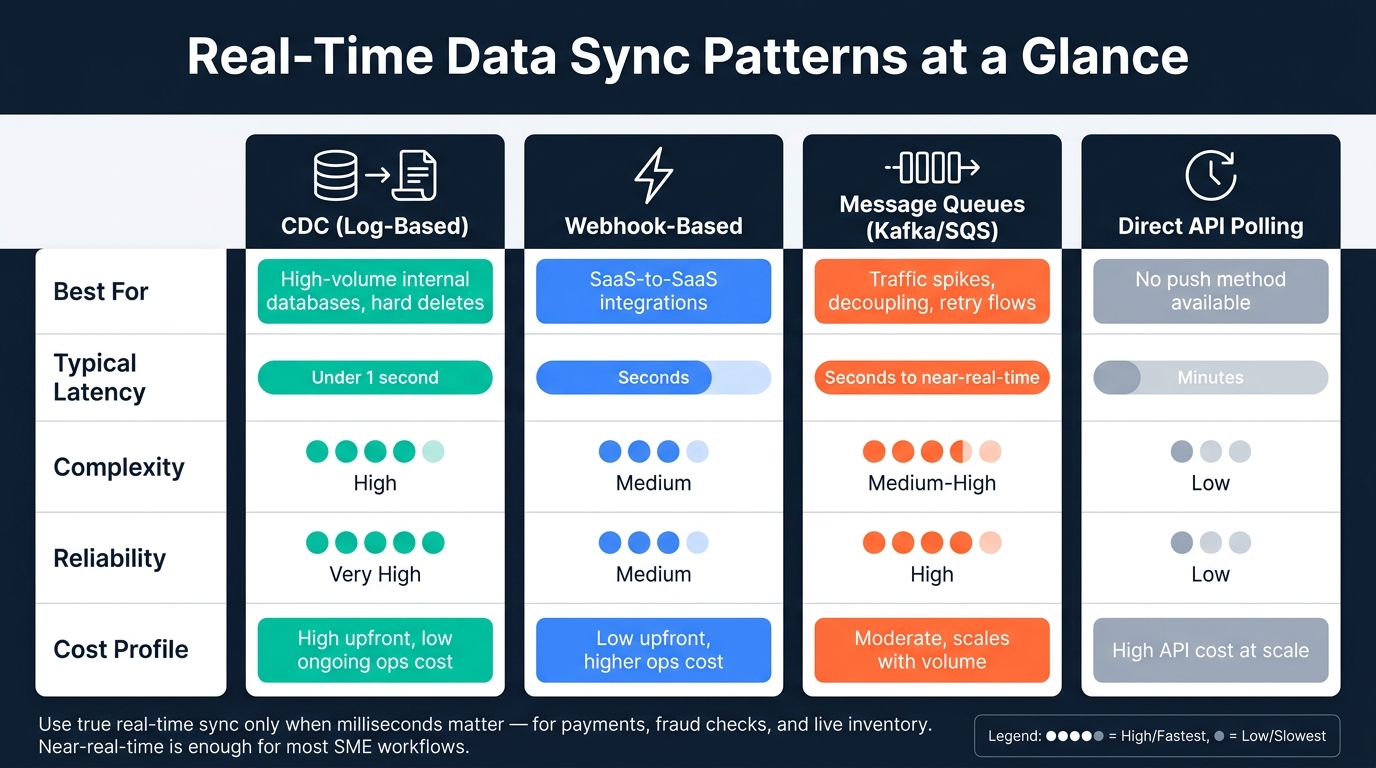
Real-Time Data Sync Patterns: Speed, Complexity & Cost Compared
Once you know what to look for in a vendor, the next step is deciding how data moves between systems. That choice affects latency, setup effort, and how much upkeep your team takes on over time.
CDC Pipelines, Webhooks, Queues, and Direct API Sync
Most SMEs run into four common patterns.
Change Data Capture (CDC) reads straight from the database transaction log, such as Postgres WAL, to catch every insert, update, and delete with under 1 second latency and little impact on source performance. It makes sense when you need every change from a high-volume internal database, including hard deletes.
Webhooks send updates within seconds and work well for SaaS-to-SaaS integrations where speed matters. The catch is that events can arrive out of order, so you need solid retry logic. Use webhooks when you want fast updates, and keep polling as a fallback.
Message queues such as Kafka, RabbitMQ, or AWS SQS act as a buffer between systems. They help when traffic spikes, systems need to stay decoupled, or you need backpressure handling.
Direct API sync is the simplest route when push options do not exist. Usually, it fetches changes with an updatedAt cursor. But it often brings minutes of latency and can miss hard deletes. Use it only when no event-driven option is on the table.
Point-to-point connections don’t age well. Every new system adds one more link to build, monitor, and fix.
Consistency, Conflict Resolution, and Schema Changes
In a one-way sync, one system owns the data. Bi-directional sync is where things get messy. You need to decide up front which system has final say over each field. A practical method is field-authority mapping. For example, the CRM owns contact email, while the billing system owns payment status.
Without that rule, bi-directional sync can turn into a tug-of-war that fills both systems with bad data. It also avoids the fuzziness of last-write-wins, which sounds simple but can go wrong when clocks are out of sync.
Deletes need care too. In a synced setup, hard deletes are risky. A safer move is to use tombstones - soft-delete markers with a TTL - so downstream systems know not to bring the record back during the next polling cycle. Set the TTL to at least the longest polling interval across connected systems, plus some safety buffer.
Schema drift is one of those problems that sneaks up on teams. One system adds or renames a field, and suddenly a strict consumer breaks the pipeline. Use tolerant field handling: read optional fields and ignore unknown ones, instead of failing on sight. Then log warnings for fields you don’t recognize so drift shows up fast.
Resilience, Observability, and Recovery Planning
Your dashboards should show sync lag in both directions and DLQ depth.
Build your Dead Letter Queue before launch, not after. Any event that still fails after retries should land in the DLQ with enough detail for someone to see what happened and replay it. Pair that with idempotent processing - using Redis deduplication caches or database-level upserts like INSERT ... ON CONFLICT DO UPDATE - so retries don’t create duplicate records.
Before go-live, make sure you have DLQ handling, monitoring, idempotency, and loop prevention in place. Tag sync-created changes with an application identifier or correlation ID so you can filter them out during ingestion.
Those controls become your production rollout checklist.
Here’s how the three main patterns stack up on the factors that matter most for SMEs:
| Pattern | Latency | Complexity | Reliability | Cost Profile |
|---|---|---|---|---|
| CDC (Log-based) | Under 1 second | High | Very high | High upfront, low ops cost |
| Webhook-Based | Seconds | Medium | Medium | Low upfront, higher ops cost |
| Polling / API-Based | Minutes | Low | Low | High API cost at scale |
Use that tradeoff to pick the rollout path before you assign owners and set test coverage.
A Step-by-Step Implementation Plan for SME Teams
Once the architecture is set, the next move is turning it into a rollout plan. A simple way to do that is in three phases: discovery, build, and deployment.
Define Systems, Data Ownership, and Priority Workflows
Start by listing every system in scope - CRM, ERP, billing, support, and analytics. Then assign a data owner for each one and map field-level authority, so one system owns each field.
That step matters more than it may seem. If two systems both try to control the same customer status, invoice field, or inventory count, things can go sideways fast.
After ownership is mapped, rank workflows by business impact. Put revenue-facing and customer-facing processes first, like:
- CRM-to-billing sync
- Real-time inventory updates
- Support ticket escalation from your helpdesk to your dev team
Lower-urgency reporting and historical backfills can wait until the core workflows are steady.
Before you connect anything, audit your data. If you sync duplicate or inconsistent records across systems, you just spread the mess around. Clean first, connect second.
Set Sync Rules, Latency Targets, and Test Coverage
For each workflow, define three things: what syncs, which direction it moves, and how fast it needs to move.
Set latency targets based on the workflow itself. Some jobs need updates in seconds for real-time use. Others can move in minutes for near-real-time needs. Low-urgency data can run on a schedule.
Your test coverage should include unit testing for transformations, integration testing with test instances, performance testing under load, and chaos testing to simulate network or system failures before go-live. That work helps surface gaps in retry logic and Dead Letter Queue (DLQ) handling before users run into them.
Roll Out in Phases and Manage Ongoing Costs
Begin with a proof of concept between two critical systems, such as your CRM and billing platform. Check that field ownership rules hold, conflicts resolve the way they should, and the Dead Letter Queue (DLQ) stays near zero. Don’t expand yet if retries, conflict handling, or monitoring still look shaky under load.
Next, move into a limited rollout for your top revenue-impacting workflows. Keep the scope tight at first. Once those flows are stable, expand from there. Pricing should match your connection count and event volume, so watch both as the rollout grows.
Modern synchronization platforms can cut engineering time spent on integration maintenance by up to 80%. For many teams, that matters more than the monthly licensing bill. Set sync lag, conflict rate, and DLQ depth as your rollout baselines. When those numbers stay steady, downstream AI workflows become more dependable too.
Using Real-Time Synchronization in AI-Driven Business Workflows
Why AI Tools Perform Better with Current, Consistent Data
Once data moves in a steady, dependable way, the next win is better AI output. AI is only as good as the data it gets. Real-time sync keeps inputs current, consistent, and easier to check before a model uses them.
Timing matters just as much as accuracy. Batch sync hands AI a stale snapshot. Real-time sync sends changes as they happen, which lets AI tools catch fraud, spot churn risk, or shift dynamic pricing in the moment, not hours later after the chance is gone.
How SMEs Can Route Synchronized Data into AI Tools
For AI workflows, the sync layer should act like a checkpoint. It should clean up and control data before any model or automation touches it. A simple way to think about it: don’t send raw operational data straight into AI tools. Route CRM, ERP, and support data through the sync layer first. Then validate it, mask sensitive fields, and check schemas before AI use.
CDC works well for AI pipelines because it captures only what changed, reduces strain on source systems, and gives models current data. From there, event-driven triggers can send updates the second a change happens instead of waiting for the next polling cycle.
The same access controls should apply to AI-facing data feeds too, especially when teams share operational data across systems.
| Business Category | AI Value Gained from Real-Time Sync | Example Use Case |
|---|---|---|
| Analytics | Higher precision in predictive models | Detecting fraudulent card payments within 200ms |
| Operations | Dynamic inventory and logistics control | Rerouting shipments based on live congestion data |
Conclusion: What to Prioritize Before You Invest
The question now isn’t whether to sync for AI. It’s which workflows need live data and which ones can handle a delay. Before you buy anything, map that out. Reserve true real-time for fraud scoring, live inventory, dynamic pricing, and incident response. Use near-real-time for dashboards, alerts, and reporting.
Then look at vendors based on the technical details covered earlier: CDC support, conflict resolution, dead-letter queue handling, and security certifications. Pick an architecture pattern that fits where you are now but won’t box you in later. Roll it out in phases, and treat data quality as a hard requirement, not a cleanup job for later.
AI for Businesses can help SMEs find the right AI tools across categories as their sync setup gets more mature.
"Organizations that excel at real-time synchronization will gain significant advantages in operational efficiency, data-driven decision making, and the ability to rapidly adapt to changing business requirements." - Alexis Favre, CTO, Stacksync
FAQs
How do I know if I need real-time sync?
You likely need real-time sync when your business relies on immediate, up-to-the-second updates across systems. That includes things like customer record changes, inventory updates, fraud detection, or support ticket status changes.
The main upside is simple: connected systems stay current. That can cut down on errors and help teams work with less friction.
If even short delays can affect decisions or hurt the customer experience, real-time sync makes sense. If your updates are less time-sensitive, like monthly reports or batch analytics, syncing less often may be enough.
What is the safest way to handle bi-directional sync?
The safest approach is to use clear conflict resolution with clock-skew tolerance, field-level authority mapping, dead-letter queues for conflicts that can’t be resolved, and idempotent consumers.
Also include solid error handling, monitoring, encryption, and role-based access controls.
What should I monitor after launch?
After launch, keep a close eye on data flow rates, processing latency, error rates, and overall system performance. Set up dashboards and alerts so your team can spot problems fast, whether that’s a jump in latency, a spike in errors, or a failed pipeline.
It’s not just about system health, either. You also need to watch data quality, especially freshness, completeness, and accuracy. Proactive anomaly detection and periodic load testing can help surface issues early and avoid bottlenecks as data volumes grow.