If I need to launch consent fast, I’d pick Cookiebot. If I need deeper control across many sites and regions, I’d pick OneTrust.
Here’s the short version: Cookiebot usually goes live in 15 to 30 minutes, often with 1 script tag. OneTrust often takes 4 to 8 weeks and needs more setup, testing, and team support. That makes the choice pretty simple for most teams: speed and lower starting cost vs. more control and stronger audit records.
What I’d look at first:
- Setup time - minutes with Cookiebot vs. weeks with OneTrust
- Script blocking - Cookiebot leans on auto-blocking; OneTrust needs more manual setup
- Consent records - OneTrust goes deeper on logs and audit trails
- Consent sync - OneTrust covers web, mobile, and CTV; Cookiebot is mostly web-focused
- Pricing - Cookiebot starts around $14 to $29/month; OneTrust starts at $10,000/year
- Scale limits - Cookiebot can get expensive on very large sites; OneTrust needs more internal time and support
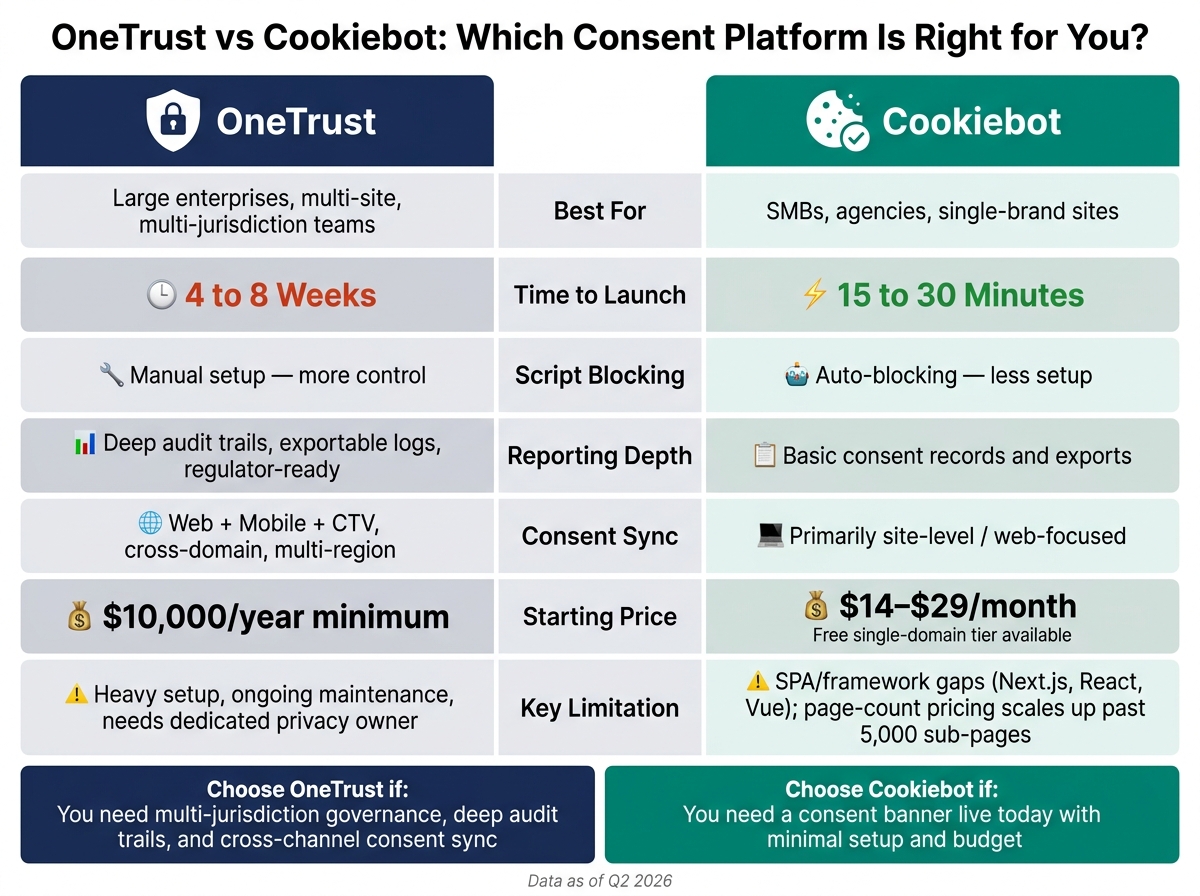
OneTrust vs Cookiebot: Side-by-Side Consent Platform Comparison
Quick Comparison
| Criteria | OneTrust | Cookiebot |
|---|---|---|
| Best for | Large teams with many sites and regions | SMBs, agencies, and single-brand sites |
| Time to launch | 4 to 8 weeks | 15 to 30 minutes |
| Blocking approach | Manual setup, more control | Auto-blocking, less setup |
| Reporting | Deeper audit trails and exports | Basic records and exports |
| Consent sync | Cross-channel and multi-domain | Mostly site-level |
| Starting price | $10,000/year | $14 to $29/month |
| Main limit | More setup and maintenance | SPA/framework gaps and page-count pricing |
My take: this is less about feature lists and more about team fit. If you have a privacy owner and a multi-site stack, OneTrust may fit. If you want a banner live today without a long project, Cookiebot is usually the simpler choice.
sbb-itb-bec6a7e
OneTrust: deeper consent controls with heavier implementation
OneTrust is more than a consent tool. It also covers data mapping, DSARs, DPIAs, and vendor risk, which makes it a fit for teams buying a full privacy stack, not just a cookie banner.[1][6] That added scope matters when consent needs to work across multiple brands, regions, and systems.
Integration scope, setup time, and tag blocking
OneTrust makes the most sense for organizations running 50+ websites, multiple brands, or complex rules across different jurisdictions. It supports granular geo-targeting and banner logic by jurisdiction, so enterprise teams get tighter control over how consent works in each region.[1][3]
The downside is implementation time. Setup tends to move slower because teams need to handle manual script categorization, geo-rule setup, vendor list management, QA across environments, and close handoffs between engineering and privacy.[1][2]
OneTrust can block scripts before consent, but setup errors can leave holes.[5] So this is not a set-it-and-forget-it tool. Regular testing is part of the job if you want to make sure blocking is working the way it should.
Reporting, consent records, and sync depth
OneTrust includes automated audit trails, retention controls, and exportable consent logs, along with reports that teams can use for regulator requests.[7] Its audit trails can cut regulator response time from days to hours.
It also supports consent orchestration across web, mobile, and connected TV (CTV), with sub-national geographic rules for markets such as California, the EU, and APAC.[9] That helps explain where OneTrust fits best: large teams that need consent synced across broad marketing and analytics stacks.
Pricing fit and business limits
Pricing is quote-based, which makes planning harder at the start. As of Q2 2026, OneTrust has a $10,000/year minimum annual contract value, which puts it out of range for many smaller businesses.[6] Enterprise deals with multiple modules often land between $40,000 and $120,000/year, and some buyers have reported renewal increases of 22% to 59%.[6]
For lean teams or single-brand sites, that cost can be tough to defend. And if there isn't a dedicated privacy owner, a lot of the setup may sit unused. In that case, the tool can end up underused within a year.[2]
Cookiebot makes the opposite trade-off: faster deployment, less control.
Cookiebot: faster deployment for site-level consent management
Cookiebot is a strong pick for fast, site-level consent management. If your main goal is to get a consent banner live without a long setup, it usually fits better than a heavier platform built for privacy program management.
Integration scope, setup time, and automatic blocking
Most sites can go live with Cookiebot in 15 to 30 minutes.[1][4] Setup usually comes down to adding one script tag in the site header or using a ready-made plugin for WordPress or Shopify.[3][4][8] Compared with OneTrust, implementation is much simpler.
Cookiebot also auto-blocks scripts without manual tagging.[1][2][3][6] That’s a big plus on standard brochure sites, content sites, and many basic e-commerce setups.
That said, there’s a catch on single-page apps. On Next.js, React, or Vue sites, teams often need to manually map trackers that the scanner misses.[2][7] So while the first launch can still be quick, maintenance can get more hands-on over time.
Reporting, consent records, and consent sync
Cookiebot stores consent records for 12 months.[1] It also supports Google Consent Mode v2 and is IAB TCF 2.2 certified.[1][2][4][9]
Reporting is fairly basic, and deeper audit work often depends on exports.[7] For teams that just need a record of consent and standard signal support, that may do the job. If you need heavier compliance workflows, though, you’ll likely feel the limits.
Pricing fit and business limits
Cookiebot has a free single-domain tier, with paid plans starting at about $14 to $29 per month.[1][4][9] That entry point is appealing for small sites and lean teams.
The pricing model scales with page count. Once a site passes 5,000 sub-pages, annual cost can climb into the five-figure range, which can make Cookiebot pricier than some enterprise tools that use flat-rate pricing at that size.[2][4]
Cookiebot also does not include DSARs, data mapping, or vendor risk tools.[1][3][6] So the fit is pretty clear: it works well for simpler consent needs, but it does not extend into full-scale privacy operations. The trade-off is straightforward - less control, faster rollout.
Side-by-side comparison: setup effort, control depth, and business fit
Comparison table: OneTrust vs Cookiebot for consent integration
Here’s the shortest way to look at the trade-offs in third-party consent integration. The same choice shows up in every row: more control or more speed.
| Criterion | OneTrust | Cookiebot |
|---|---|---|
| Setup Time | Weeks vs minutes - longer rollout with dev and privacy teams [2] | Weeks vs minutes - single script tag, live in under an hour [1][4] |
| Tag Blocking | Manual categorization; more control [7] | Automated detection; faster rollout [7] |
| Reporting Depth | Automated audit trails and exports [7] | Basic consent proof and exports [7][6] |
| Consent Sync | Cross-channel and multi-domain [3][6] | Primarily web-level [3][6] |
| Pricing Fit | Enterprise ($10,000/year minimum) [6] | Budget-friendly ($14/month starting) [1][4] |
| Best-Fit Business | Large, multi-jurisdiction enterprises [1][2] | SMBs and single-brand sites [1][2] |
Where the trade-offs show up in real adoption decisions
The gap shows up in day-to-day operations. OneTrust gives you more control. Cookiebot gets you live faster. In most cases, that’s the actual decision - not a long checklist of features.
If your team can handle a longer rollout, OneTrust makes sense. If you need to launch fast and keep setup light, Cookiebot is the easier path. That’s why this tends to be an operating model choice as much as a product choice.
OneTrust also goes deeper on reporting. Its automated audit trails and exports make it the stronger option when audit readiness is part of the buying decision [7][6].
The next step is matching each platform to the type of business it serves best.
Which platform fits which business, and the limits to watch
Best fit by company size and operating model
The choice mostly comes down to one thing: how much privacy work your team can actually support.
OneTrust fits teams that need multi-jurisdiction consent governance and cross-domain sync. It's built for organizations that have a dedicated compliance owner or privacy engineer in place. If that owner isn't there, teams often use only part of the platform while still paying the full fee [1][2][3].
Cookiebot fits SMBs, agencies, and single-brand sites with simpler marketing stacks. If your site doesn't change much and your regulatory exposure is more straightforward, Cookiebot covers the main consent needs without much overhead [1][2][7].
That fit can shift fast, though. Once a site runs on modern frameworks or needs frequent region-by-region updates, the gap between "easy to launch" and "easy to manage" gets a lot more obvious.
Integration limits that can affect ROI
OneTrust asks for more time and more hands on deck. Setup usually takes 4 to 8 weeks, needs engineering support, and brings ongoing maintenance each time you add a new region or vendor tag [2][7]. Its script also tends to run 80–200 KB, which can slow page performance [4].
Cookiebot is lighter, but it has its own ceiling. Its scanner works best on classic server-rendered sites. With Next.js and React, teams often need to map trackers by hand [2]. And if your site grows past 5,000 sub-pages, Cookiebot's volume-based pricing can get harder to defend [2].
Conclusion: choosing the right consent platform for your business
The call is pretty simple: pick the level of control your team can maintain.
If you need multi-jurisdiction control and deeper audit trails, OneTrust can earn the heavier lift [1][2][6][7]. If you need fast, simple consent coverage, Cookiebot is the easier fit [1][2][6][7].
OneTrust starts at $10,000/year and needs real internal ownership to run well [6][7]. Cookiebot starts at about $14/month, handles standard consent needs cleanly, but its reporting stays limited to site-level use [1][4][7].
FAQs
Which tool is easier to maintain over time?
Cookiebot is usually easier to maintain for small to mid-sized businesses. The main reason is simple: its automated cookie scanning and categorization cut down on manual work. Once you set it up, it tends to run with little technical attention.
OneTrust takes more work. It’s built for large organizations, and that comes with more setup and upkeep. If you add new regions or new tag-vendor pairings, you’ll likely need more configuration over time. In many cases, teams also need dedicated privacy engineering support or outside professional services to keep things running smoothly.
When does Cookiebot become too expensive?
Cookiebot often gets pricey once your site grows past its page-count limits. The main pressure point seems to be around 5,000 sub-pages. At that stage, several sources say pricing can jump fast and may end up higher than options like OneTrust’s enterprise flat-rate plan - especially for large publishing sites or sites packed with AI-generated pages.
There’s a second cost trigger too: traffic. One comparison says that once you move beyond the roughly 10,000 monthly page-view free or low-cost tiers, pricing can climb into the hundreds of dollars per month if your site reaches multi-million page views.
That means Cookiebot may look low-cost at first, then get expensive in a hurry as both page count and traffic grow.
Do I need a dedicated privacy owner for OneTrust?
Yes. In a business setting, OneTrust tends to work best when a company has a dedicated privacy or compliance owner - or support from privacy engineering.
This is not a set-it-and-forget-it tool. It takes time to configure well, and it needs steady governance after launch. Without a clear owner or team, OneTrust can turn into shelfware, especially because implementation can take a long time and the admin dashboard is complex.