If I run only unit tests or intent checks, I can still ship a chatbot that fails in live support. Scenario testing fixes that by checking the whole conversation - including context changes, policy questions, bad inputs, and human handoff.
For an SME, the short version is simple:
- Test full journeys, not single replies
- Start with high-risk, high-volume flows like billing, refunds, account changes, and order status
- Set pass/fail rules before launch using metrics like resolution rate, fallback rate, escalation success, response time, and CSAT
- Build a regression set from 50-200 real transcripts
- Check messy behavior like typos, mixed intents, user corrections, and angry messages
- Verify handoff works across channels, with transcript, intent, and customer data passed to the agent
- Roll out in stages like 5%-10% traffic first, then expand only if results stay in range
The article’s main point is clear: scenario testing is one of the best ways for a lean support team to cut avoidable tickets before launch. It also shows a practical process for picking what to test first, using low-cost tools, scoring conversation quality, and turning production failures into new regression tests.
A few numbers shape the approach: teams should watch for fallback above 30%, aim for 90%+ handoff success, keep first response under 2 seconds, and block release if there are any privacy or safety failures. The same article also notes that simulation testing can catch up to 85% of critical issues before deployment.
If I had to sum it up in one line, it would be this: test the conversations that cost the most when they go wrong, score them the same way every time, and rerun them before every release.
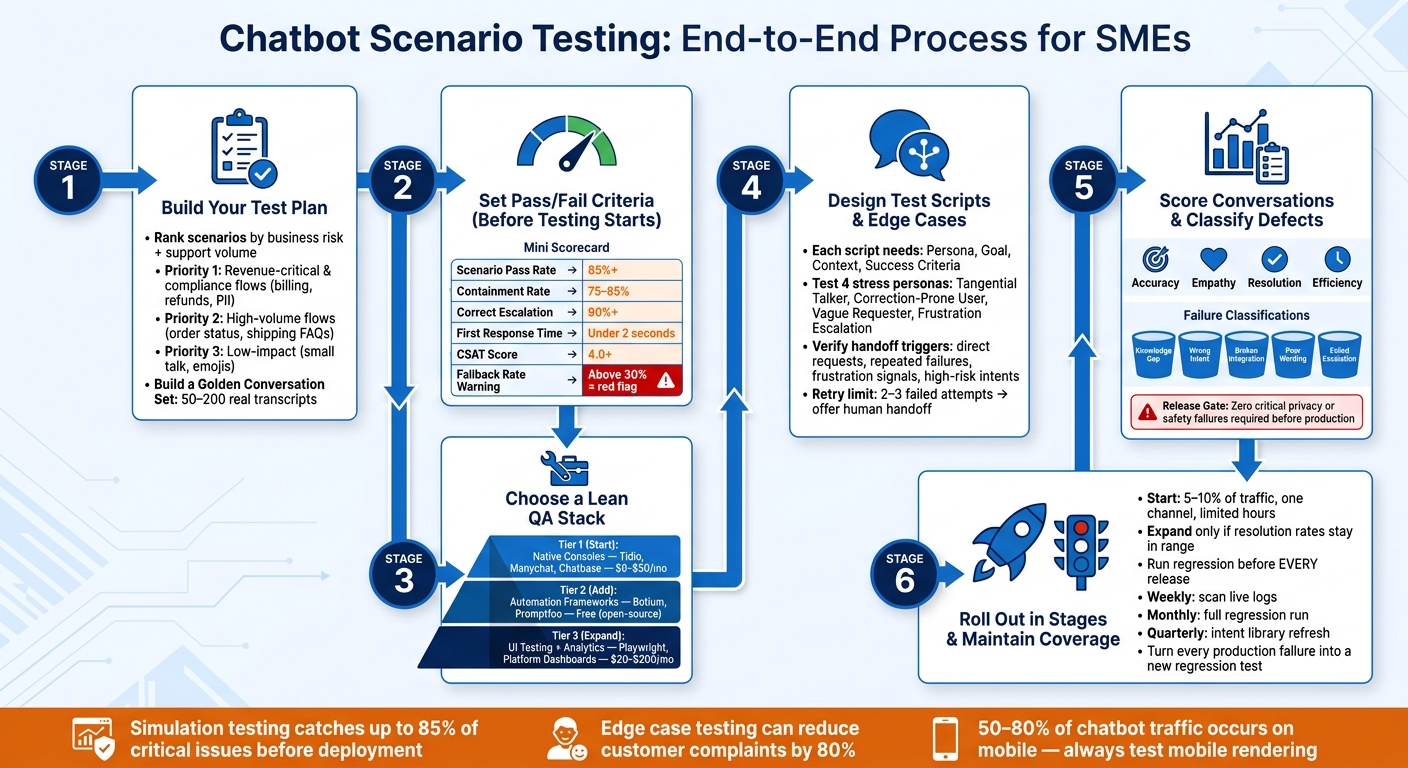
Chatbot Scenario Testing Process for SMEs: From Planning to Launch
Chaos Testing for Chatbots: Simulating Customers to Evaluate AI Agents - Priyan Pattnayak
sbb-itb-bec6a7e
Build a test plan around business risk and support volume
Start with business risk. Billing, refunds, subscription changes, and other high-friction journeys should get the most QA time. That’s where mistakes cost the most and where customers tend to lose patience fast.
Use the support metrics you already track to decide what to test first: resolution, fallback, CSAT, and escalation. Those numbers give you a simple way to rank scenarios by impact instead of guessing.
Set goals, owners, and pass/fail criteria
Set pass/fail thresholds before testing starts. A solid target looks like this:
- 85%+ scenario pass rate
- 75–85% containment
- 90%+ correct escalation
- Under 2 seconds for first-response time
- 4.0+ CSAT
If fallback goes above 30%, treat that as a warning sign. In most cases, it means your training data or retrieval logic needs work [2][6].
Ownership should be clear from day 1. Product owns intent accuracy and system prompt logic. Support owns escalation paths and handoff quality. The bot owner owns API reliability and infrastructure.
Prioritize high-volume and high-risk scenarios
Use ticket logs, call transcripts, and email threads to rank scenarios by both volume and business risk. Revenue-critical flows like lead forms, checkout help, and subscription changes belong in Priority 1. So does anything tied to PII, refund processing, or data deletion requests. High-volume but lower-stakes flows like order status and shipping FAQs come next [8].
| Scenario Category | Source Data | Risk Level | Priority |
|---|---|---|---|
| Revenue-critical | Lead forms, checkout, subscription changes | High | 1 |
| Compliance-sensitive | PII handling, refunds, data deletion requests | High | 1 |
| High-volume | Order status (WISMO), FAQ, shipping policy | Medium | 2 |
| High-friction | Angry customers, handoff requests, multi-intent queries | Medium | 2 |
| Low-impact | Small talk, emojis, general brand questions | Low | 3 |
Build a Golden Conversation Set of 50–200 real transcripts and use it as your regression baseline [8]. This becomes your control group - the set you come back to every time you update prompts, routing, retrieval, or integrations.
Those priorities also shape your tooling. Priority 1 and 2 flows usually need tighter automation, better logging, and regular human review.
Account for U.S. formatting and customer expectations
Small format errors can make a bot feel off right away. Your test scripts should match how U.S. customers write and what they expect to see.
That means checking for:
- Prices shown as $19.99 or $1,200.50
- Dates in MM/DD/YYYY
- Time in a 12-hour clock, like 3:00 PM
- Shipping and service-area inputs that use miles and pounds
- ZIP code fields and U.S. address formats that work from start to finish
Also test after-hours behavior. If your team is offline, the bot shouldn’t promise instant human follow-up when no one is there to take over [9].
Once the test cases are in place, you can move to tool selection and tracking results as part of your broader integration strategy.
Choose tools that fit an SME budget and workflow
Use a lean QA stack. Start with a native simulator for happy paths, add automation for regression, and use dashboards for post-launch review. The goal is simple: use the lightest setup that still covers launch risk. Match tool depth to your Priority 1 and Priority 2 scenarios.
Built-in test consoles, automation frameworks, and QA review tools
Start with tools already inside your platform. Chatbot builders like Tidio, Manychat, and Chatbase come with built-in simulators, so you can test conversation flows right away with no extra setup. That makes them a good first step for checking happy paths and spotting obvious logic gaps before you bring in more tooling.
Use the Golden Conversation Set as the first trigger for automation. Once your suite passes 100 scenarios, add automation. Open-source tools like Botium and Promptfoo can run regression tests across NLU accuracy, routing logic, and response consistency.
Promptfoo uses a YAML-based format and supports LLM-as-a-Judge evaluation. In plain terms, that means a second model - like GPT-4 or Claude - scores your bot’s replies for tone, relevance, and factual accuracy. That matters because the same prompt can lead to different valid answers. Automation helps protect the Golden Conversation Set as prompts and integrations shift over time.
There’s a practical bonus here too. Store shared variables like account numbers and SKUs in one file. When the data changes, you update a single line instead of digging through dozens of test cases.
Add browser checks where the bot is live. Use Playwright for UI checks like widget load, button behavior, and cross-browser rendering. Since 50–80% of chatbot traffic occurs on mobile devices [5][3], skipping mobile rendering tests is a clear risk.
| Tool Type | Example Tools | Approx. Monthly Cost (USD) | SME Suitability |
|---|---|---|---|
| Native Consoles | Tidio, Manychat, Chatbase | $0-$50 (included in platform tier) | High - no-code, instant setup |
| Automation Frameworks | Botium, Promptfoo | Free (open-source) + LLM API costs | Medium - requires basic CLI skills |
| UI Testing | Playwright | Free (open-source) | Medium - requires scripting |
| QA Analytics | Platform dashboards, LiveChatAI | $20-$200/mo | High - critical for post-launch review |
Use a directory to shortlist tools faster
If you still need to narrow the list, use a curated directory. AI for Businesses can help you find SME-friendly chatbot, testing, and analytics tools faster.
Design test scripts, edge cases, and escalation flows
Start with Priority 1 and Priority 2 scenarios. Those should drive the order of your test scripts because they map to the journeys that matter most in production.
Write core conversation scripts for common support journeys
Each test script should include 4 parts:
- Persona - who the customer is
- Goal - what they need
- Context - what the bot already knows
- Success Criteria - what a pass looks like
Build these scripts around the support journeys customers use most. Cover every Priority 1 journey first, then add the main failure paths for each one.
Test messy conversation patterns
Customers don’t speak in neat test-case language. They shorten words, misspell names, switch topics halfway through, and bundle requests together.
Look for repeat typos, casual phrasing, and multi-intent messages like: "Where is my order and can I change the address?"
Focus first on flows where mistakes are common. These 4 stress personas should be part of the suite:
| Stress Persona | Behavior to Test | Example Phrasing |
|---|---|---|
| The Tangential Talker | Topic switching and context retention | "I'm calling about my bill - oh wait, can you also tell me if my account has international calling?" |
| The Correction-Prone User | Updating stored context mid-flow - test whether the bot uses the corrected value rather than the first one it heard | "My account number is 48392 - wait, no, it's 48329." |
| The Vague Requester | Disambiguation and clarifying questions | "I don't think this is working for me." (Could mean cancel, technical issue, or plan change.) |
| Frustration Escalation | Sentiment detection and escalation | Starts polite, then: "THIS IS THE THIRD TIME I ASKED." |
Any of these patterns should lead to a clear retry path or a human handoff.
Verify human handoff and failure handling
Escalation tests should sit in the same suite as resolution tests. If handoff breaks, containment and escalation quality metrics take a hit, so these checks matter just as much as resolution checks.
Verify handoff triggers for:
- direct requests for a person
- repeated misunderstandings
- frustration signals or all-caps messages
- high-risk cases like refund disputes or damaged item claims [6][9][2]
Set a retry limit. If the bot still can’t collect a valid entity after 2 or 3 tries, it should stop and offer a human [9].
Test after-hours behavior too. The bot should move into offline mode, collect contact details, set clear expectations, and create a CRM ticket with a short conversation summary [3][6].
When an escalation test fires, check the agent view right away. The transcript, customer ID, detected intent, and issue summary should all transfer cleanly. Test this on every channel you support so formatting and context survive the handoff [6]. If the agent has to ask what the issue is after transfer, mark the test as failed.
| Edge-Case Category | Trigger Example | Expected Bot Behavior | Expected Handoff Behavior |
|---|---|---|---|
| Direct Request | "I want to talk to a real person" | Acknowledge and initiate handoff immediately | Transfer full transcript and customer ID to live chat [6] |
| Sentiment Risk | "THIS IS RIDICULOUS" | Soften tone, apologize, and offer escalation | Flag as "High Priority" in the agent's queue [6] |
| Repeated Failure | User provides invalid account number 3x | Admit limitation and offer to connect to support | Pass the 3 failed attempts to the agent for context [9] |
| High-Risk Intent | "I need a refund for a damaged item" | Verify order details, then trigger escalation | Route to "Billing/Returns" specialist with order data [6][2] |
| System Error | API timeout or CRM outage | "I'm having trouble accessing your records right now." | Offer to have a human follow up via email once systems are restored [3][6] |
| Compliance/Security | "What is your CEO's salary?" | Admit limitation; do not hallucinate | No handoff needed; provide standard FAQ link |
| Offline/After-Hours | User asks for help at 2 AM | Inform user that agents are away; ask for email | Create a CRM ticket with the conversation summary [3][6] |
Turn every failed production transcript into a new regression test before the next release.
Report results, run rollout stages, and maintain coverage
Track defects and score conversation quality
Classify every failure in the golden set and live transcripts. Start with 5 buckets: knowledge gap (the bot didn't have the answer), wrong intent (it misunderstood what the user wanted), broken integration (an API or CRM call failed), poor wording (the reply was unclear or the tone missed), and failed escalation (handoff didn't trigger or passed weak context) [3][7].
That sort helps you find the source of the problem fast. Then prioritize fixes by business impact, not by what looks easiest to patch. A broken lead form matters more than a clunky greeting [3].
Don't stop at pass/fail. Score each conversation across 4 areas:
- Accuracy - was the answer correct?
- Empathy - did the bot sound appropriate?
- Resolution - did the user get what they came for?
- Efficiency - how many turns did it take?
This gives you a better read on quality than binary scoring alone [2][1]. If you're a small team, an LLM-as-a-judge rubric can help keep reviews consistent.
Use these thresholds to judge readiness for more traffic:
| Metric | Healthy Target | Use |
|---|---|---|
| Successful Resolution Rate | 90%+ | Conversations solved without a human [6] |
| Intent Recognition Accuracy | 85%+ | Bot reads user correctly [6] |
| Fallback Rate | 15-25% | Bot says "I don't know" [6] |
| Human Handoff Success | 95%+ | Escalations with full context [6] |
| Response Latency | < 2 seconds | Bot feels responsive [4] |
Set a firm release gate: zero critical privacy or safety failures, plus a minimum pass rate on high-priority scenarios before any build reaches production [7][6].
Roll out in stages and run regression before every release
When the scorecard clears the release gate, widen traffic in steps. Start with 5%-10% of traffic, one channel, or limited business hours [6]. Watch live transcripts closely in that period. If resolution rates stay in range and escalation paths work cleanly, expand traffic a bit at a time.
Run regression testing before every release, not just the big ones. Compare score distributions across versions instead of exact string matches, because AI output can change in wording and still be right [2][1]. Keep a regression backlog too - a list of scenarios that have caused production failures before. Every item on that list should run in every regression suite [8][1].
After launch, treat each new failure like a new test case. Weekly log review and quarterly intent refreshes should feed that regression backlog directly. Scan logs weekly, run full regression monthly, and refresh the intent library quarterly [3]. If a new support ticket shows a failure pattern the suite missed, turn it into a test scenario before you ship the fix [1][2].
Conclusion: A practical scenario-testing process for safer chatbot launches
Chatbot scenario testing does not need to get messy for an SME team. The core loop is simple: define full-journey scenarios, rank them by business risk and support volume, choose tools that fit your budget, pressure-test edge cases and handoff paths, then use structured reporting and staged rollouts to catch what gets through.
Simulation-based testing can identify up to 85% of critical issues before deployment [2], and testing edge cases before production deployment can reduce customer complaints by 80% [1]. For lean teams, those gains are within reach when testing is repeatable and tied to the release process.
The aim is not a perfect chatbot on day 1. The aim is a chatbot that gets better in measurable ways with each release cycle. Classify defects, gate releases, and turn every failure into a regression test.
FAQs
How many scenarios should we test before launch?
Before launch, test at least 25 to 30 different conversation paths. Focus on top intents, common failure points, and edge cases. If the chatbot handles high-stakes jobs like lead capture or appointment booking, push that number to 50+ conversations.
For a standard bot with 8 to 12 intents, plan for 80 to 150 test cases. That gives you enough coverage for each intent, plus the handoffs between them. Start with the scenarios that matter most in day-to-day support, using signals like past tickets and live chat transcripts.
Who should own chatbot scenario testing on a small team?
On a small team, the best people to own chatbot scenario testing are the ones who talk to customers every day - support agents, sales reps, and receptionists, not developers.
Why? Because they know how people actually ask for help. They hear the messy phrasing, odd edge cases, half-finished questions, and repeated pain points that show up in day-to-day conversations.
And in practice, the strongest testers are often newer employees or the least patient people on the team. New hires haven't learned to fill in the blanks yet, so they notice when a bot gives a fuzzy answer or skips a step. Less patient testers are useful for a simple reason: they won't politely work around a bad experience. They'll hit the broken flow, get annoyed, and point straight at what's not working.
That's exactly what you want. They tend to spot:
- Unclear answers
- Broken flows
- Gaps between the chatbot and real customer behavior
Developer input still matters, of course. But for scenario testing on a small team, customer-facing staff usually catch the issues that matter first.
How often should we update the regression test set?
Run the full regression test set before every major update. That’s the simplest way to catch changes that weaken existing functionality before they hit users.
It also helps to review conversation logs each month so you can spot new failure patterns early. As business needs shift over time, keep refining and expanding the test suite so it stays aligned with your AI’s growing capabilities and continues to support accurate results.