If I want AI tools to work inside a business, I need clean API connections first. The hard part is not the model. It’s connecting CRM, ERP, support, and finance data in a way that stays stable when fields change, access expires, or traffic spikes.
Here’s the short version:
- Start with 1 use case, not 1 tool
- Audit systems before writing code - many apps still do not connect well
- Map fields into 1 internal model so “Contact,” “Person,” and “Company” don’t break the flow
- Set clear write rules for create, update, delete, and conflict handling
- Pick the lightest sync method that meets the timing need - polling, webhooks, or queues
- Use OAuth 2.0, least-privilege access, and managed secrets
- Log every step with correlation IDs, retries, and dead-letter handling
- Pilot in shadow mode first with human review and KPI tracking
A few numbers stand out. Up to 70% of AI project spend can go to integration and data prep. Only 29% of enterprise apps are connected to each other. And teams using point-to-point links can spend about 40% of AI team time on upkeep.
What I take from this is simple: keep the first rollout small, define the data contract early, and add systems only after the pilot is stable.
This article lays out that path in plain terms so I can move from idea to pilot without building a mess.
Why APIs and Tools are Critical to Your AI Strategy
sbb-itb-bec6a7e
Audit your systems and map the data contract
Start with discovery, not code. Spend 1 to 2 weeks mapping what you already have before anyone builds anything. Enterprises often use up to 70% of their AI project budget on integration and data prep, not on the AI itself [2]. That early discovery work helps you spot data silos, find the people who own each system, and verify which tools even offer usable APIs [4].
List your source and destination systems
Systems don’t connect in the same way, so group them by what they can actually support:
| Tier | Description | Examples |
|---|---|---|
| A | Modern, API-first systems | Salesforce, HubSpot, Stripe |
| B | Legacy systems with inconsistent APIs | SAP ECC, older ERPs |
| C | No API available | Flat-file tools, older databases |
| D | Direct database or data warehouse access | Databases, data warehouses |
For each system, document the protocol - REST, GraphQL, or SOAP. Note whether a sandbox exists, how auth works, whether that’s OAuth 2.0, API keys, or JWT, plus rate limits, data limits, and webhook support [7]. This part matters more than teams think. Only 29% of enterprise applications are currently connected to each other [4], so don’t assume an API is usable just because a vendor says it exists.
Map data objects and field-level transformations
After you’ve listed the systems, map the data itself. This is where teams often hit friction. The same thing can show up under different names across tools. A "Contact" in Salesforce might be a "Person" in Pipedrive. An "Opportunity" in Salesforce lines up with a "Deal" in HubSpot. Before you build the pipeline, map those into one internal model [6].
| Concept | Salesforce | HubSpot | Pipedrive | Standard Model |
|---|---|---|---|---|
| A person | Contact | Contact | Person | Contact |
| A company | Account | Company | Organization | Company |
| A deal | Opportunity | Deal | Deal | Deal |
| Deal stage | StageName | dealstage | stage_id | stage |
Naming is only part of it. You also need rules for entity matching. "Acme Corp" in the CRM and "ACME Corporation" in billing may be the same company, but your pipeline won’t know that unless you define the match logic up front [4]. If you skip this step, duplicates and bad joins pile up fast.
You also need to name the source of truth for each object and field. Inventory levels usually belong to the ERP. Customer contact details usually belong to the CRM [2]. Other systems can receive that data, but they should not write back unless you’ve set a clear validation rule.
Document the API contract and validation rules
Write the API contract down. Don’t leave it in someone’s head or scattered across Slack threads. For each connection, document the source and target systems and versions, the trigger event, field mappings, transformation rules, error-handling needs, and versioning rules [8][9]. Version every endpoint - for example, /v1/contacts - so later changes don’t break downstream consumers without warning [9].
Validation should happen at ingestion, not inside the AI model. Check for missing required fields, type mismatches like string vs. number vs. datetime, and out-of-range values before anything reaches an AI node [6]. Also assume that any "required" field might still be missing. In the wild, systems often fail to send what their docs claim they send [7].
"Most AI projects don't fail because of the model - they fail because no one figured out how to connect it to SAP or Salesforce. Integration isn't a side task. It is the project." - Jamin Mahmood-Wiebe, Founder, IJONIS [2]
Design sync rules, triggers, and security controls
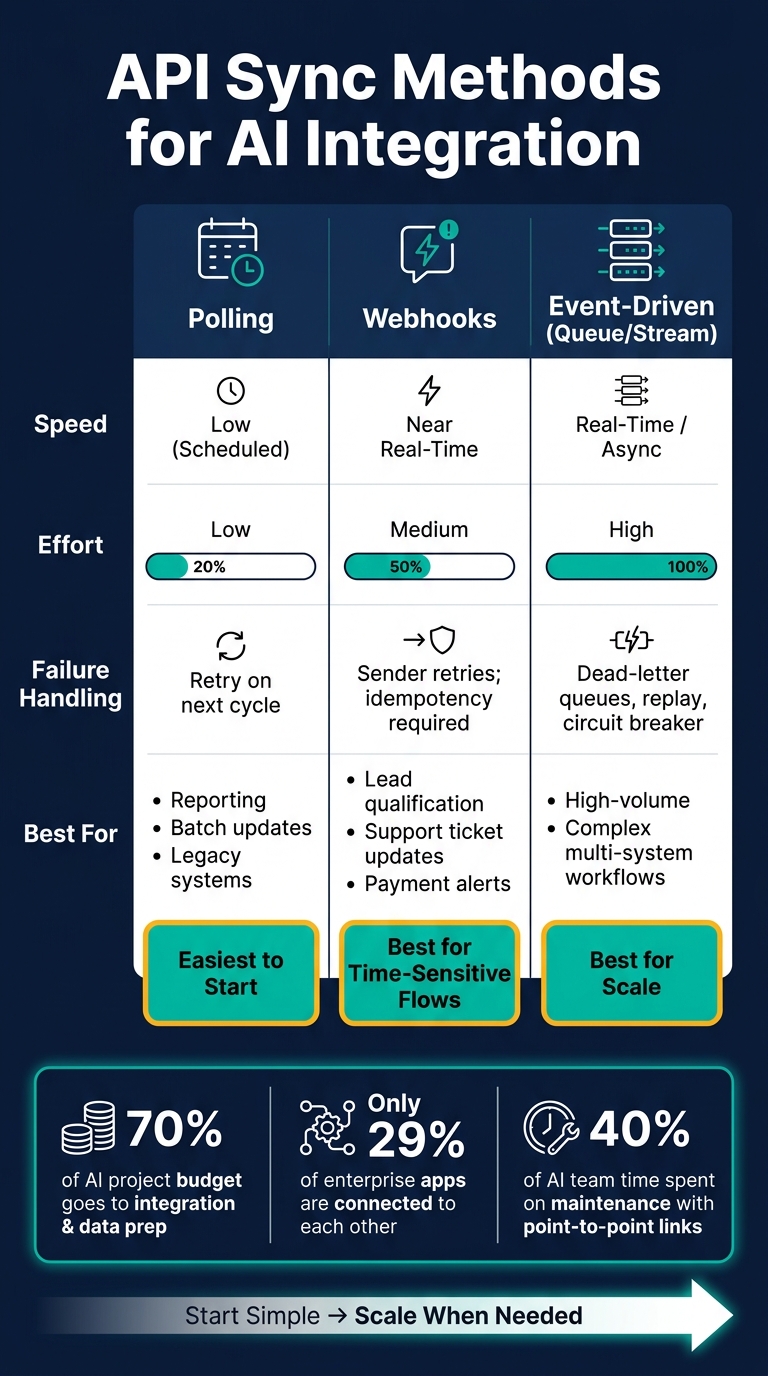
API Integration Methods for AI Tools: Polling vs Webhooks vs Event-Driven
Turn the data contract into sync rules. Decide how data moves, who can change it, and what happens when something breaks.
Choose polling, webhooks, or event-driven sync
Pick the simplest sync method that meets your freshness target. Polling is the easiest to set up. Webhooks get you near real-time updates. Event-driven sync fits high-volume or multi-system workflows.
Polling checks the source API on a set schedule. It works well for reporting, batch updates, and legacy systems. The downside is simple: it adds delay and can burn API calls even when nothing changed [1][6].
Webhooks work the other way around. The source system sends an event to your endpoint when something happens - like a new lead, a support ticket update, or a payment alert. That makes webhooks a strong fit for time-sensitive workflows. The catch is that you need a public endpoint, HMAC signature verification, and logic for duplicate deliveries. Duplicates can happen, so idempotency is REQUIRED [1][11].
Event-driven messaging uses a queue or stream platform like Amazon SQS or Kafka. This separates the sender from the consumer and gives you dead-letter queues, replay, and stronger failure handling. That makes it a better fit for high-volume or multi-system workflows. For a small internal rollout, start with webhooks. Move to event-driven when volume or system complexity starts to push back [1][2][11].
| Method | Speed | Effort | Failure Handling | Best For |
|---|---|---|---|---|
| Polling | Low (scheduled) | Low | Retry on next cycle | Reporting, batch updates, legacy systems |
| Webhooks | Near real-time | Medium | Sender retries; idempotency required | Lead qualification, support ticket updates, payment alerts |
| Event-Driven | Real-time/async | High | Queues, dead-letter queues, replay | High-volume, complex multi-system workflows |
After you choose the transport, set the write rules. Be clear about what each system can create, update, delete, and overwrite.
Set sync rules for create, update, delete, and conflict handling
Every integration needs plain rules for record creation, updates, deletes, and conflicts. If you skip this step, duplicates and overwritten data pile up fast and become messy to sort out later.
Use the ownership map to decide which system can create, update, or delete each object. Other systems can receive the data, but they should write back only through approved, validated endpoints [1][2].
For conflicts, the safest default for small teams is authoritative system wins. Last-write-wins is easier to implement, but it can quietly wipe out a valid manual change. If conflicts do not happen often, route those edge cases to human review [2].
All write operations should be idempotent. That way, retries or duplicate deliveries do not create duplicate records [1][11].
Use OAuth, least privilege, and managed secrets
Authentication is one of the most common weak spots in integrations. For machine-to-machine connections, the standard setup is OAuth 2.0 with the Client Credentials flow. The integration signs in as itself and gets a scoped token [1][12].
"Security and compliance can't be retrofitted... they need to be designed in from Phase 2." - Adam Harris, CEO, Last Rev [4]
Keep permissions as narrow as possible. If your AI tool only needs read access to CRM contacts, do not give it write access to the full account. Use a dedicated service account for each integration, and never use personal credentials. That cuts down on permission drift when people leave the company [1][12][2].
Store all secrets - client IDs, client secrets, and API keys - in a managed secrets vault. Rotate credentials every quarter [1][12]. Refresh OAuth tokens 5 to 10 minutes before they expire. Do not wait for a 401. And never hardcode credentials in source code or config files.
Once sync behavior and access rules are set, log every request and every failure so you can trace issues fast.
Add logging, error handling, and audit trails
Once sync rules and access controls are set, the next job is simple: make every failure traceable. You want to know what happened, where it happened, and who or what triggered it. Then you can decide which failures should retry on their own and which ones should stop right away.
Log requests, responses, and correlation IDs
Log every inbound and outbound API call at the boundary - the point where your integration touches another system. Each log entry should include a U.S. date and time stamp, the service account, user ID, or agent ID, the target endpoint, HTTP method and status code, latency, and a short request/response summary [1][9].
Add 1 correlation ID per workflow and pass it through every API call, adapter, and LLM step. That gives you a clean end-to-end trail for the whole workflow [9].
Do not log raw credentials, authorization headers, or PII. Mask or redact sensitive fields before logs hit storage [1][7]. For small teams, structured JSON logs with fields like request_id, user_id, and latency_ms are much easier to send into dashboards and alerts without hand-parsing text [9][3].
Log these fields for operators and compliance:
| Detail | What to Capture | Who Needs It |
|---|---|---|
| Identity | User ID, agent ID, service account, IP range | Operators, compliance |
| Action | Endpoint, method (POST/PATCH), payload summary, tokens consumed | Operators, finance |
| Timing | Timestamp (U.S. format), latency, TTL | Operators |
| Context | Correlation ID, task ID, parent workflow ID | Team leads, operators |
| Outcome | Status code, error category, retry count | Operators, team leads |
Use the log trail to split temporary failures from permanent ones. If a workflow breaks, operators should be able to follow the path in minutes, not dig through scattered app logs for half a day.
Handle retries, rate limits, and errors
Not every failure needs a person to step in. Retry temporary failures such as 5xx and 429 responses automatically. Use exponential backoff with jitter. And when you get a 429, always check for a Retry-After header - it tells you how long to wait before the next attempt [14][1].
Classify errors before handling them. Temporary errors like 5xx and 429 can be retried. Permanent errors like 401 or 400 schema mismatches should not be retried [14][1].
If a record burns through all retry attempts, move it to a dead-letter queue (DLQ). That matters even more for financial data or customer records, where silent data loss is not acceptable [13][1].
Set connect, read, and total timeouts so multi-step calls fail fast instead of hanging and tying up workers [14][9][1].
| Failure Mode | Symptom | Response |
|---|---|---|
| Rate limiting | 429 errors | Respect Retry-After; use token bucket algorithm [14][1] |
| Transient outage | 5xx errors | Exponential backoff with jitter; circuit breaker [13][14] |
| Permission drift | 401/403 errors | Service accounts; automated secret rotation [1][10] |
| Partial completion | Inconsistent state | Saga pattern with compensation actions [1] |
The goal is to keep small failures small. A short outage should retry and recover. A bad credential should stop fast. A half-finished workflow should leave a trail you can inspect and fix without guessing.
Pilot the integration and expand in phases
With the contract, sync rules, and logging set, test the workflow in a controlled pilot.
Start with one internal workflow and clear KPIs
Start with 1 manual workflow that has a clear owner and touches more than one system. Good first picks include order processing, lead routing, and product data maintenance [2]. Keep the pilot small - a limited user group and low record volume.
Use this phase to check field mapping, retries, and approval steps before anything goes live. Run the AI in shadow mode first. That means it works alongside the current process but does not take live actions [1][4]. Keep human review in place for the first 1-2 weeks before you remove that check [5][15].
Track these KPIs from day 1:
| KPI Category | Metric | Target/Success Signal |
|---|---|---|
| Business | Manual hours saved | 10-40 hours/week per FTE [15] |
| Business | Response time | Reduced from hours to minutes (for example, 4 hours to 12 minutes) [2] |
| Technical | API latency (p95) | Under 5 seconds for single-source queries [9] |
| Technical | Availability | 99.9% uptime for the query API [9] |
| Technical | Accuracy | 85%-95% on reviewed samples [9] |
Compare direct API, middleware, and gateway rollout paths
If the pilot works, pick the rollout path based on how many systems you need to connect and how much control you need.
| Integration Path | Setup Time | Control | Maintenance Load | Fit for Mid-Market |
|---|---|---|---|---|
| Direct API | Low (4-6 weeks) | Maximum | High - tight coupling [2] | Best for simple, stable 1-3 system flows [2] |
| Middleware (iPaaS) | Medium (6-10 weeks) | Medium | Low - decoupled [2] | Best for 4+ heterogeneous systems [2] |
| API Gateway | Medium | High | Low - centralized [9] | Best for governance-heavy environments [9][2] |
There’s a plain tradeoff here. Point-to-point integrations can look faster at the start, but they get messy fast in complex setups. Teams that use them spend an average of 40% of their AI team's time on maintenance instead of innovation [3].
Add systems only after the pilot is stable
Once the pilot is stable, add nearby workflows, tighten monitoring, and review permissions. Keep the current version steady. Make changes only after the pilot shows it can hold up [2].
Also, stay close to vendor updates. Subscribe to provider developer changelogs and run quarterly reviews of all active integrations so you catch deprecations before they turn into silent failures [5].
"Leave your existing systems untouched, add an intelligent layer on top, and you'll have productive AI integration in three months - no big-bang migration required." - Jamin Mahmood-Wiebe, Founder of IJONIS [2]
Every new system adds upkeep if the base is shaky [3]. So keep the rollout simple: add 1 workflow at a time, make sure it stays clean against the KPIs above, then move to the next.
FAQs
What should I integrate first?
Start with your output requirements. A good AI response should be correct, checked, and usable in the system that receives it. Get specific about format, fields, tone, latency, and what happens when the model is unsure. That work comes first. If you skip it, you can end up with answers that look fine in a demo but break in production.
Then map your current systems, data flows, and security needs. Trace where data comes from, where it goes, who can access it, and what has to be logged or blocked. That gives you a stable base for authentication, routing, and prompt design - and helps you avoid silent data loss or brittle point-to-point connections.
When should I use webhooks instead of polling?
Use webhooks when you need near-real-time updates or need to handle a large flow of events. They send data to your endpoint as soon as an event happens. That makes them faster and more efficient than polling.
Polling works the other way around. Your system keeps checking an API to see if anything changed. It can do the job, but it adds extra requests and often leaves you waiting for the next check.
Webhooks fit best for things like:
- Order status updates
- Inventory changes
- Trigger-based AI tasks
Use polling when updates are infrequent or when the source system doesn't support webhooks.
A few guardrails matter here. Add signature verification so you can confirm the request came from the right source. Use idempotency checks so the same event doesn't get processed twice. And route events through asynchronous queue processing so your endpoint can respond fast without getting bogged down by downstream work.
How do I prevent bad data from reaching the AI tool?
Use an API-first integration layer with a gateway or middleware. The goal is simple: validate JSON schemas up front and make sure every input matches the format your system expects before anything gets processed.
Just as important, don’t write straight to the database. Route every action through application APIs instead. That gives you one place to enforce rules, log activity, and control how data moves through the system.
You’ll also want to normalize data from different sources into a clean schema. If one tool sends dates one way and another uses a different field structure, clean that up before it flows downstream. Otherwise, small format mismatches turn into messy failures later.
Model outputs need checks too. Validate them for invalid structures, missing fields, and hallucinated values before they reach the next step. If the model is supposed to return structured JSON, treat that like any other input and verify it.
For customer-facing outputs, keep a human in the loop until error rates drop to an acceptable level. That extra review step can feel slow, but it’s a lot cheaper than letting bad outputs hit customers.