Most AI workflow tools fail at the same point: production. I’d judge a vendor on 6 things first - workflow fit, integrations, approvals, governance, security, and support - before I spend time on feature tours or model claims.
Here’s the short version: if a vendor can’t run 1 of your live workflows end to end, handle failed API calls, support human sign-off, export logs to your SIEM, and show SOC 2 Type II plus clear support terms, I’d treat it as a no-go. Price matters too, but I’d model the full 3-year TCO - because license cost is often only 40% to 50% of total spend, while setup services can run 1x to 3x the license and upkeep can take 0.5 to 1.0 FTE.
If I were reviewing a shortlist today, I’d focus on:
- Workflow fit - Can the tool match your steps, owners, SLAs, and failure paths?
- Integration depth - Are connectors native, and who fixes them when APIs change?
- Approval controls - Can it enforce multi-step review, overrides, and escalation?
- Governance - Can different people build, approve, deploy, and roll back flows?
- Security and logs - Does it support SSO, SCIM, encryption, SIEM export, and long-term log retention?
- Support and cost - Are response times, escalation paths, and month-12 pricing clear in writing?
A short buying rule: don’t score from slides. I’d ask for sandbox proof, a failure demo, API and webhook docs, field mapping proof, audit logs, and security evidence. That gives you a plain way to tell whether the tool fits your stack - or whether your team will end up doing the hard work around it.
Automate Third Party Onboarding with AI-Powered Vendor Reviews
sbb-itb-bec6a7e
Checklist 1: Confirm Fit With Current Workflows and Operating Model
Start with fit. If the vendor can’t support your actual process, owners, exception paths, and production controls, nothing else matters. Before you get into integrations or security, confirm the platform can run one of your real workflows from start to finish.
Map the Vendor to Current Process Steps, Owners, and Exception Paths
The core question is simple: does the tool fit your workflow, or does your team have to bend around the tool?
Work through a real use case you own:
- Process step coverage - Ask the vendor to map their tool to one specific workflow. They should spell out the trigger, each step, the output, and the owner. Push back on broad claims like "we can automate anything."
- Exception path handling - Ask what happens when a required field is missing or inventory is unavailable. Does the system stop and route the issue to an owner, or does it fail without notice? Silent failures are a major production risk [2].
- Human review support - Confirm the platform has native human review, approval, and override steps [5].
- Role fit - Check whether permissions can be scoped so junior builders can’t access or change production finance or sensitive operational flows [8].
- Named maintenance ownership - Confirm who owns maintenance when upstream APIs change [8].
Don’t test this in the vendor’s polished staging setup. That’s like test-driving a car on an empty track and assuming it’ll handle rush-hour traffic. Use a sandbox connected to your CRM or ERP, and have your team build one real workflow [8].
Once the workflow fits on paper and in practice, move to the next issue: whether the platform can hold up in production.
Check Support for Approvals, SLAs, and Production Reliability
Now test how the vendor handles approvals, SLAs, and recovery when things go wrong.
| Evaluation Area | Weak Vendor Answer | Strong Vendor Answer |
|---|---|---|
| Approval Routing | "We support approvals." | Demonstrates configurable multi-step routing with escalation and human review. |
| Exception Handling | Vague reliability claims | Provides immutable logs, automated retries, and defined escalation paths for anomalies. |
| SLA Support | Vague uptime claims | Contractual response times and resolution commitments in writing. |
| Error Handling | Silent failures or manual logs | Configurable retry logic, exception routing, and real-time alerts. |
Ask for a "failure demo". Have the vendor simulate an API failure or revoke a credential in the middle of a run. A production-ready platform should alert the process owner in real time, queue the failed record, and support a clean retry or manual intervention [2][8]. If the vendor dodges the request or points you back to slides, that’s a signal.
You should also verify peak-load behavior, not just average-case behavior. Ask for concurrency limits, rate limits, and payload-size limits. Some platforms look fine in a demo, then queue or throttle as soon as month-end processing hits or a heavy campaign goes live. That’s where SLA issues tend to show up [8].
Checklist 2: Review Connectors, APIs, Webhooks, and Data Sync
After you confirm the vendor fits your workflow, the next step is simple: can it connect to your systems and keep working under production conditions? This is where a lot of tools look fine in a demo and then fall apart in day-to-day use. The goal here is to test whether the vendor can move data and events with consistency - not just say it can.
Verify Native Connectors and Custom Integration Options
Start with connector ownership. Native connectors are the best default because the vendor maintains them when upstream APIs change. Marketplace connectors rely on third parties. Custom API work sits with your team.
Ask one direct question: when the upstream API changes, who fixes the connector? If the answer is vague, treat it as custom work and score it that way.
For your core stack, check native support for the systems you actually run - especially Salesforce, SAP, ServiceNow, DocuSign, and Microsoft 365 [2]. Then go one level deeper and verify custom-field mapping in both directions. If the connector can't read and write custom fields, you're likely heading toward workarounds [2].
For systems without native coverage, confirm support for:
- REST APIs
- SDKs in your primary language
- Middleware options
Don't stop at feature-page claims. Review the SDK docs and see whether they cover production failure patterns, not just happy-path tutorials [7].
Once you know who owns the connector, move to event handling. That's usually where the cracks show.
Confirm Webhook Event Delivery Reliability
Use webhooks or Change Data Capture (CDC) by default. Polling burns API quota and leaves you with stale data. Vendors that support event-driven triggers should rank higher [6].
Before signing anything, verify this webhook security baseline:
- HTTPS-only delivery
- HMAC signature verification
- Timestamp validation to block replay attacks
- Idempotency controls to prevent duplicate actions if a webhook fires twice
- Retry transient failures with exponential backoff and dead-letter handling
- Documented payload schema
Then ask the vendor to show a failed webhook delivery in a live setting. A production-ready platform should log the failure and allow a clean replay. If they can't show that, that's not a small miss - it's a production risk.
After that, look at sync behavior. A connector that works once isn't enough if the data drifts later.
Check Data Sync Modes, Field Mapping, and Source-of-Truth Rules
If sync is weak, approvals and exception paths break even when the connector itself works. Confirm the vendor supports real-time sync through webhooks or CDC, scheduled batch sync for non-urgent bulk transfers, and bidirectional sync for workflows where downstream systems update fields your process logic depends on [2][6].
Keep your ERP or CRM as the source of truth. The workflow platform should reference live data instead of copying it whenever possible [6]. Then ask how conflict resolution works when 2 systems update the same field at the same time. If the vendor doesn't have a clear answer, you've found a gap that will show up in production.
For any workflow that touches customer data, require field-level masking and redaction.
Use what you learn here to build your integration risk register. Document which integrations are native, marketplace, or custom. Then score each one for maintenance risk and implementation cost.
Checklist 3: Test Workflow Design, Approvals, and Governance Controls
Once data moves cleanly, the next test is control. A platform needs to do more than connect systems. It has to enforce approvals, track actions, and let you roll back when something goes wrong.
Confirm Workflow Builder Depth and Human Review Controls
Start with the workflow builder. It should support more than a basic step-by-step flow. You want to see conditional routing, multi-step approvals, and clear exception paths - not just the easy, happy-path version of a process. For high-risk work, human review checkpoints are mandatory [5][9]. Set up review steps that stop the workflow until a person signs off and records the reason.
RBAC should also be clear and strict. The platform should separate who can build a workflow, who can approve it for production, and who can only view it [3][4]. That split matters. If everyone can do everything, governance falls apart fast. Add SLA timers and escalations too, so approvals don't sit in limbo [5].
During the trial, verify controls like these:
| Use Case | High-Risk Action | Control to Verify |
|---|---|---|
| Finance | Invoice exception handling | Human review step for PO/contract mismatches [1] |
| HR | Employee onboarding | Manual verification gate after document extraction [4] |
| Customer Ops | AI-drafted follow-ups | Mandatory sales approval before send [1] |
Verify Auditability, Change Control, and Rollback Options
Next, test how the vendor manages changes in production workflows.
This is the core issue: governance breaks when one person can build and deploy a workflow without a second review. Ask the vendor to show enforced separation of duties. The builder and the approver should be different users for any workflow that touches sensitive data [3][8].
Dev, test, and production environment separation should be the baseline. Also confirm that the platform supports workflow versioning, lets you compare changes across versions, and gives you a one-step rollback to the last stable state [8]. Finally, check whether workflow definitions can be exported as JSON or YAML. That helps reduce proprietary lock-in and supports outside audit needs [3][4].
Checklist 4: Validate Security, Logging, and Compliance Readiness
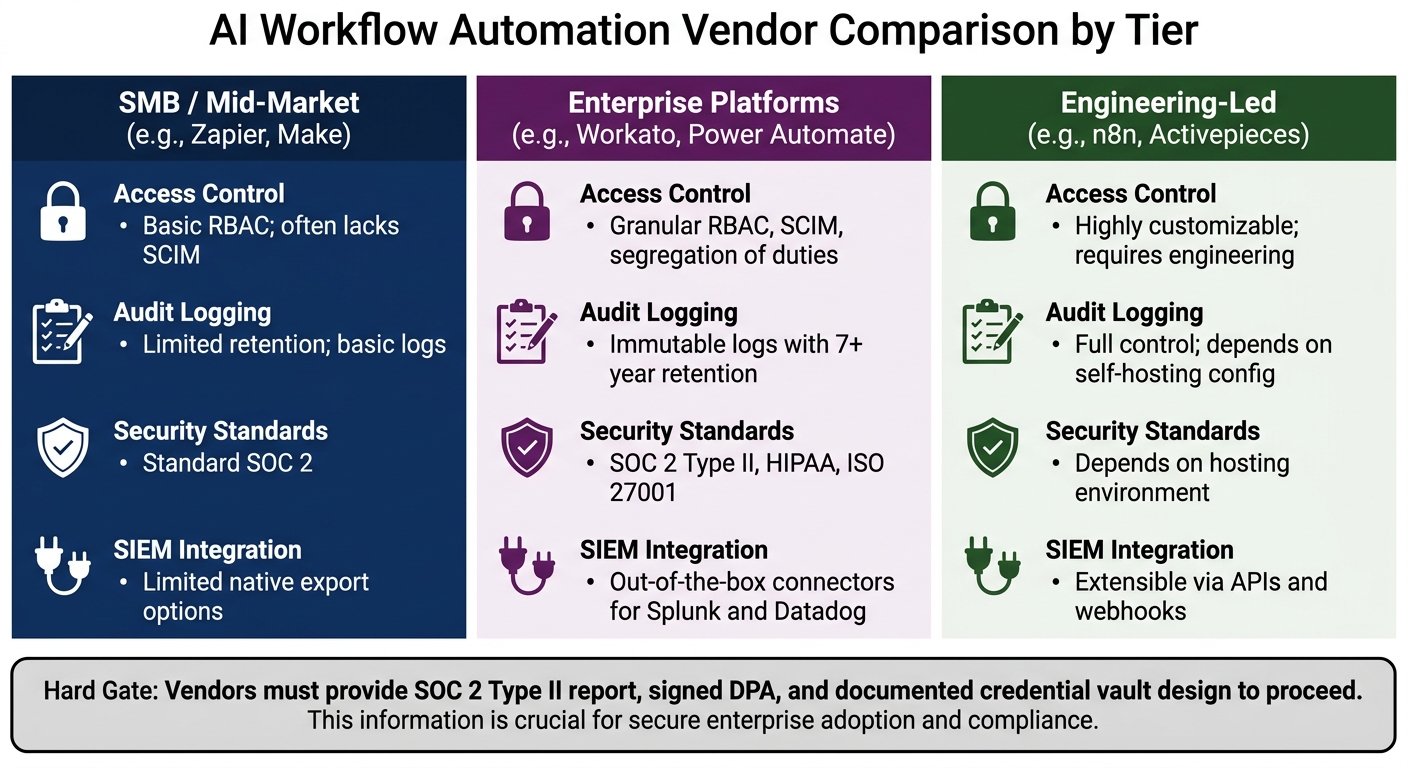
AI Workflow Automation Vendor Comparison: SMB vs Enterprise vs Engineering-Led
After workflow controls, verify the security and compliance evidence IT and legal need before production.
Review Access Controls, Data Handling, and Compliance Evidence
After workflow control, verify the security evidence that clears IT and legal review. If the vendor cannot pass IT and legal review, the workflow cannot go to production.
Start with access control. The vendor should support SAML/OIDC SSO and SCIM provisioning, along with granular RBAC that separates design, execution, and audit roles. That split matters in practice. A junior automation builder should not be able to change a production finance workflow, and SCIM should remove access automatically when someone leaves.
Then look at data handling. Confirm encryption in transit and at rest. Ask direct questions:
- Does customer data train vendor models?
- Is there a private model instance or a no-training commitment?
- Is BYOK or CMK available for sensitive workflows?
- Are the data residency controls you need in place?
For compliance evidence, ask for SOC 2 Type II, not Type I. A Type II report covers a 6- to 12-month operating period and shows controls working over time [8][4]. Then match the vendor's evidence to your required controls: SOC 2 Type II, plus HIPAA with a signed BAA, ISO 27001, PCI-DSS, or FedRAMP where needed.
Check Execution Logs, Monitoring, and AI Audit Trails
Once access and compliance are clear, test the logs that prove each run executed as expected. Every execution should produce a full log. Require logs for inputs, outputs, timestamps, model version, prompt, and confidence score [6][2][5]. You should also require alerts for failed runs and degraded performance.
Test failure behavior during the trial. Revoke a credential in the middle of a run, or send malformed data into a live workflow. Then check whether the platform alerts you within minutes instead of failing silently. That's the kind of test that shows what happens when things go sideways in production.
Also confirm that logs can be exported to your SIEM, not just viewed in the vendor dashboard. Many regulated buyers require 7 years of log retention. Use the comparison below to check the security items most likely to shape your decision:
| Feature | SMB/Mid-Market Tools (e.g., Zapier, Make) | Enterprise Platforms (e.g., Workato, Power Automate) | Engineering-Led (e.g., n8n, Activepieces) |
|---|---|---|---|
| Access Control | Basic RBAC; often lacks SCIM | Granular RBAC, SCIM, and segregation of duties | Highly customizable; requires engineering |
| Audit Logging | Limited retention; basic logs | Immutable logs with 7+ year retention | Full control; depends on self-hosting configuration |
| Security Standards | Standard SOC 2 | SOC 2 Type II, HIPAA, ISO 27001 | Depends on hosting environment |
| SIEM Integration | Limited native export options | Out-of-the-box connectors for Splunk and Datadog | Extensible via APIs and webhooks |
Checklist 5: Confirm Support for Current Business Tools, Vendor Support, and Final Scoring
Once security and logging are cleared, this last step is simple: make sure the vendor fits the stack you already use and that your buying call can hold up under scrutiny. At this point, you're checking tool fit, support terms, and cost.
Verify Ecosystem Stack Coverage, Implementation Support, and Stack Coverage
Start by mapping support for your core tools. For each integration, label it as native, marketplace, or custom.
Then audit your 3 most critical tools and mark the point where native support stops. That line matters. A vendor may say it "integrates" with your stack, but the gap between a native connector and a custom workaround can turn into more setup work, more breakage, and more upkeep.
Get support terms in writing. Ask for:
- A named escalation path
- Contractual response times for broken native connectors
- Written confirmation that U.S. business-hours coverage is included, not sold as a paid add-on [2][8]
Also confirm that your workflow configs and audit logs are portable if you need to leave later.
Score Vendors Against Must-Haves and Document the Decision
Use security and compliance as a hard gate. Everything else gets scored from 1 to 5, backed by evidence. If a vendor can't produce a current SOC 2 Type II report, a signed DPA, and a documented credential vault design, they fail the gate [8][7].
Once support terms are clear, score the shortlist against your must-haves. The table below covers the criteria that tend to matter most in production [8]:
| Criterion | Weight | Evidence to Demand |
|---|---|---|
| Connector Depth | 12 | Specific action coverage and changelog for API updates |
| Pricing Model Fit | 12 | Month-12 volume and written overage rates |
| Error Handling | 11 | Live demo of a flow failing and alerting within minutes |
| Security Posture | 11 | SOC 2 Type II report and credential vault design |
| Maintainability | 10 | Walkthrough of version control, diffing, and rollbacks |
| Support Quality | 5 | Real response-time SLA and named escalation paths |
Don't stop at license price. Model the 3-year total cost of ownership. License fees usually make up only 40% to 50% of the total spend. Implementation services often cost 1x to 3x the license, and the 0.5 to 1.0 FTE needed for upkeep adds real annual soft costs [8][3].
And price the deal based on month 12 volume, not month 1. Metered pricing can triple as usage grows [8].
Document the final call in a one-page executive memo. Keep it tight:
- State the problem as a number - hours lost or error rate
- Name the recommended platform
- Show the 3-year TCO
- Define the go/no-go criteria - the exact benchmarks the project must hit by month 6 to continue [8]
That memo is what turns a vendor pick into a decision you can defend later.
FAQs
How do I test one live workflow before buying?
Ask for a structured proof of concept or a 30-day proof of value. Keep it focused on 1 to 3 business-critical workflows that run on your actual data and in your own environment.
Then stress-test the parts that tend to break in day-to-day use.
- Test bidirectional field mapping
- Simulate an API failure and watch for visible retries and real-time alerts
- Trigger a timeout or send an invalid payload
After that, verify your team can handle issues on its own. They should be able to troubleshoot, review logs, and replay executions without vendor help.
What evidence shows an AI workflow tool is production-ready?
Look past the sales demo. Test the platform inside your own stack, with your own edge cases.
The best way to do that is to run a structured proof of concept. Have your team build 3 complex, high-stakes workflows from scratch. Track how long setup takes, where people get stuck, and how much debugging they can do without vendor help.
Then push the platform until it breaks. Revoke credentials. Send malformed payloads. Cut connections mid-run. That’s where weak tools start to show cracks.
A tool that’s ready for production should handle those failure cases with:
- Immediate alerts
- Granular retry logic
- Replay from failure points
- Audit logs
- Role-based access control
- Data residency support
If those controls are missing, your team will feel it fast once the workflows move out of a test environment and into day-to-day use.
How should I estimate the 3-year total cost of ownership?
Build a 3-stage cost model for pilot, growth, and scale. Start with the full picture - not just license fees. In many cases, software licensing is only 40% to 50% of total cost, so your model should also include implementation, training, and ongoing support.
Set aside 0.5 to 1 FTE for maintenance. That covers the day-to-day work that tends to get missed in early budgets: workflow monitoring, API breaks, and updates. If you skip this line item, the budget will look cleaner on paper and worse in practice.
For metered pricing, model overages based on month 12 volume, not month 1. Early usage can make costs look artificially low. By month 12, you usually have a much better read on what the tool will cost once teams are using it at a steady pace.
Ask the vendor for a detailed 3-year spreadsheet quote that includes:
- Base software fees
- Add-ons
- Implementation costs
- Training
- Support costs
- Metered usage and overage assumptions
That gives you a model you can pressure-test instead of a headline price that falls apart later.