I build custom AI spam models to reduce unwanted mail without blocking business messages. I start with approved, labeled email, test a simple classifier, and keep its predictions separate from delivery rules.
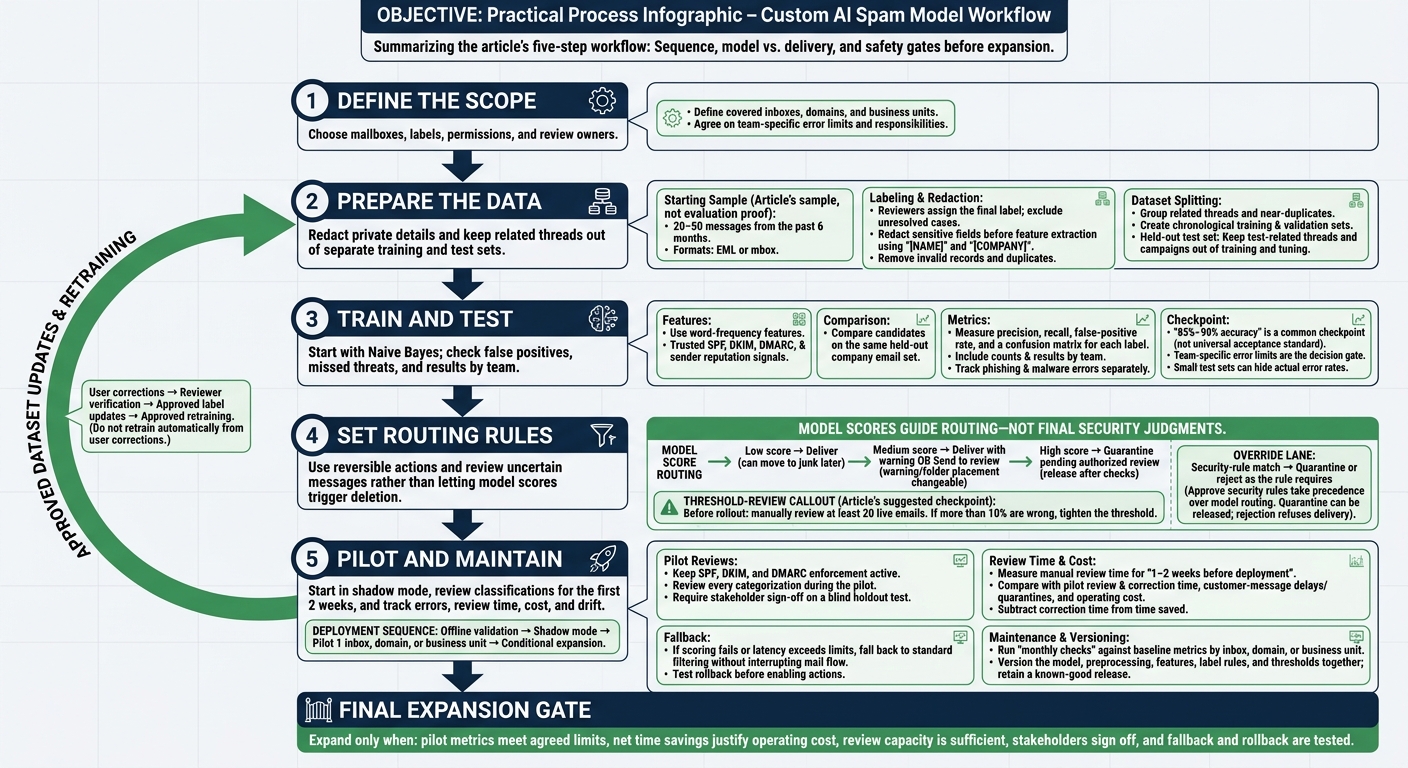
My process covers 5 steps:
- Define the scope: Choose mailboxes, labels, permissions, and review owners.
- Prepare the data: Redact private details and keep related threads out of separate training and test sets.
- Train and test: Start with Naive Bayes; check false positives, missed threats, and results by team.
- Set routing rules: Use reversible actions and review uncertain messages rather than letting model scores trigger deletion.
- Pilot and maintain: Start in shadow mode, review classifications for the first 2 weeks, and track errors, review time, cost, and drift.
<u>I expand only when the pilot meets agreed limits</u>, saves time after corrections, and has tested fallback and rollback controls.
How to Build Custom AI Spam Models: 5 Steps
Build Your Email Training Dataset
Collect Messages and Verify Labels
Sample messages for each defined label across the covered mailboxes, inboxes, domains, and business units. Start with 20–50 messages from the past 6 months in EML or mbox format [4].
Include user-reported spam, messages moved from Junk to Inbox, mail gateway verdicts, and legitimate business mail. Reports and gateway verdicts provide evidence, but reviewers assign the final label. Use your label rules to resolve disputes and record the decision source. Leave unresolved cases out of training.
Prepare Features and Protect Email Data
After verifying labels, extract only fields the model can use: message content, writing style, email authentication results, sender reputation, and routing timestamps.
Redact sensitive fields before feature extraction, using placeholders such as
[NAME]and[COMPANY][4].
Remove invalid records and duplicates.
Split Data Without Evaluation Leakage
Split cleaned records by time to establish an unbiased baseline evaluation. Group related threads and near-duplicates before creating chronological training and validation sets and a held-out test set. Keep test-related threads and campaigns out of both training and tuning.
Dataset readiness checklist:
- [ ] Disputed labels are resolved, with evidence and decision sources recorded.
- [ ] Each covered team has representative legitimate and unwanted mail.
- [ ] Recent messages are included.
- [ ] Invalid records and duplicates are removed.
- [ ] Test messages, related threads, and campaigns are isolated from training and tuning.
sbb-itb-bec6a7e
Classify Spam Emails with Natural Language Processing (NLP): A Python Coding Tutorial
Train and Test a Baseline Classifier
After splitting the dataset, train a simple baseline for business mail filtering by inbox, domain, or team. Do this before tuning thresholds or routing rules.
Train With Text and Trusted Metadata
Start with Naive Bayes using word-frequency features. It’s low-cost, interpretable, and a strong first pass [2]. Use deterministic rules for rare workflows that require exact matches [3].
Add trusted SPF, DKIM, DMARC, and sender reputation signals [2].
Compare Models and Measure Errors
Test every candidate on the same held-out company email set. Choose the simplest model that meets each team’s error limits. Review inboxes, domains, and teams separately when their tone and vocabulary differ [4][1].
Report precision, recall, false-positive rate, and a confusion matrix for each label [5]. These results show whether the model meets the intended inboxes’ needs and which labels it confuses.
                         Predicted positive   Predicted negative
Actual positive          TP                   FN
Actual negative          FP                   TN
Track phishing and malware errors separately [5]. Small test sets can hide actual error rates.
Check Whether the Baseline Is Ready
Set team-specific acceptance limits. A common checkpoint is 85%–90% accuracy on representative data [3].
- [ ] Training and scoring use the same preprocessing and feature pipeline.
- [ ] Evaluation excludes features that leak labels and uses the reserved test set.
- [ ] Per-label and team results include counts.
- [ ] End-to-end scoring latency is measured [3].
- [ ] False positives, missed threats, and unresolved errors are logged with assigned owners.
Threshold tuning requires a reproducible baseline with clear failure modes.
Tune Thresholds and Define Routing Rules
Set Thresholds for Each Inbox or Team
Choose the initial cutoff using baseline error counts and validation results. Set separate thresholds only when inbox costs differ and you have enough validation data.
Before rollout, manually review at least 20 live emails. If more than 10% are wrong, tighten the threshold [3].
Map Scores to Reversible Actions
Use score bands to guide routing, not to make final security judgments. Keep deterministic rules in place for high-stakes cases [3]. Map each band to a delivery action that can be reversed.
| Signal | Action and review | Reversibility |
|---|---|---|
| Low score | Deliver | Can be moved to junk later |
| Medium score | Deliver with a warning or send to review | Warning or folder placement can be changed |
| High score | Quarantine pending authorized review | Release after checks |
| Security-rule match | Quarantine or reject as the rule requires | Quarantine can be released; rejection refuses delivery |
Approved security rules must take precedence over model routing.
Set Up Reviews and Label Corrections
After setting the routing cutoff, start the pilot and collect correction feedback. Assigned reviewers check quarantined and disputed messages within the pilot’s scope [1].
Let authorized users release quarantined messages, report spam, and submit corrections. Treat these actions as feedback, not automatically verified labels [2]. Reviewers must check corrections against the label rules before updating training labels.
Track false positives, quarantine releases, label corrections, and review volume by team.
- [ ] Thresholds are documented.
- [ ] Review capacity is set for the pilot.
- [ ] Security overrides and release permissions are tested.
Deploy, Monitor, and Maintain the Model
Once thresholds are set, move from offline validation to shadow mode before changing mail delivery.
Start in Shadow Mode, Then Run a Pilot
Score mail in shadow mode first, then pilot 1 inbox, domain, or business unit. Keep SPF, DKIM, and DMARC enforcement active so messages that fail authentication are rejected before the model analyzes them [2]. If scoring fails or latency exceeds limits, fall back to standard filtering without interrupting mail flow. Test rollback before enabling any actions [1].
The pilot should verify routing quality and workload before you expand. Assign security and IT to integration and rollback, security to threat handling, mailbox admins to quarantine review, and business reps to customer message validation. Review every categorization during the pilot [1]. Run a blind holdout test with stakeholders and require their sign-off on the results [4]. Expand only when missed threats, complaints, false positives, and latency remain within agreed limits.
Measure results separately for each pilot unit. Track manual review time for 1-2 weeks before deployment [3]. Compare that baseline with pilot review and correction time, customer-message delays or quarantines, and operating cost. Subtract correction time from time saved, and expand only if net savings justify operating cost.
Once the pilot is stable, lock the release and monitor for changes that could reduce performance.
Track Drift and Version Changes
Version the model, preprocessing, features, label rules, and thresholds together. Keep a known-good release ready to restore.
Track drift separately for each inbox, domain, or business unit. Run monthly checks against baseline metrics, watching for changes in vocabulary and error rates [4]. Document drift triggers and approval owners. Do not retrain automatically from user corrections; require approval for every retrain.
Conclusion: Check Readiness Before Expanding
- [ ] Stakeholders have signed off on blind holdout results, and pilot metrics meet agreed limits.
- [ ] Review capacity supports the expanded scope, and net time savings justify operating cost.
- [ ] Fallback and rollback have been tested; a known-good release is ready to restore.
- [ ] Drift and retraining triggers are documented, with approval owners assigned.
FAQs
How much labeled email do I need for reliable results?
You don’t need to manually label thousands of emails. Semi-supervised learning is the most effective approach: it combines a small, high-quality labeled set with a larger pool of unlabeled emails to improve accuracy [1].
For testing and tuning, 20 emails is enough [2]. For solid training, 30–50 emails balances effort and quality. For most small to mid-sized businesses, using more than 100 emails often delivers only small gains [3].
How do I balance missed spam against blocked business emails?
Use AI to categorize and route emails, not to block them automatically. This keeps misclassified emails visible for manual review [1][2]. During the first 2 weeks of rollout, have your team review every classification and correct any errors [2].
For LLM-based triage, set the temperature to 0 and use a fixed category list to keep results consistent. Regularly audit a sample of recent emails to spot classification errors and tighten thresholds before they cause major disruptions [3].
When should I use separate models for different teams?
Use separate models when a single model can't meet each team's needs, such as different communication tones, domain knowledge, or conflicting handling rules [1]. Separate instances also make sense when privacy or compliance requirements call for keeping data isolated by department or domain [2][3][4].
With separate models, you can fine-tune control over each team's performance, security, and workflow logic [1].