If you use learning algorithms in hiring, training, or employee development, you need 3 things: pre-launch testing, production monitoring, and audit records. That is the main takeaway.
I’d sum the article up like this:
- No single tool covers every audit job
- Pre-launch tools like Aequitas, AIF360, Fairlearn, What-If Tool, and mlr3fairness help check data and model outputs before release
- Production tools like SageMaker Clarify, Fiddler AI, and Monitaur help track drift, log decisions, and support reviews after launch
- Metric choice comes first - for example, demographic parity for access decisions and equalized odds for higher-stakes routing
- U.S. teams face direct pressure from rules like NYC Local Law 144 and newer EEOC guidance tied to AI use in employment
One stat stands out: a cited 2024 study found AI screening tools favored white-associated names 85% of the time. Another example showed a recommendation system with 82% of training data from ages 35-50, while younger users saw a 37% click-through gap. That is the risk in plain terms: the system can look fine at the top level while different groups get different outcomes.
If I were shortlisting tools, I’d split them like this:
- Audit-only before launch: Aequitas, Google What-If Tool, mlr3fairness
- Testing plus mitigation: IBM AI Fairness 360, Microsoft Fairlearn
- Monitoring and reporting after launch: Amazon SageMaker Clarify, Fiddler AI, Monitaur
AI Bias Audit: How to Test AI for Fairness (34-Point Checklist)
sbb-itb-bec6a7e
Quick Comparison
| Tool | Best fit | Main strength | Main gap |
|---|---|---|---|
| Aequitas | Point-in-time audits | Group metrics and disparate impact checks | No mitigation, no live drift tracking |
| IBM AI Fairness 360 | Data science teams | Large metric library plus mitigation methods | No built-in reporting or live monitoring |
| Microsoft Fairlearn | Python ML teams | Subgroup analysis inside sklearn workflows | No native reporting or drift alerts |
| Google What-If Tool | Cross-functional review | No-code visual testing and counterfactual checks | No audit logs or live monitoring |
| Amazon SageMaker Clarify | AWS teams | Data checks, monitoring, and reports in one stack | Best fit if you already use AWS |
| Fiddler AI | Post-launch model review | Drift tracking, alerts, and explainability | Quote-based enterprise pricing |
| Monitaur | Compliance and audit teams | Decision records, reports, and traceable logs | Needs clean decision logging setup |
| mlr3fairness | R-based teams | Pre-launch checks in the R/mlr3 stack | No monitoring or business reporting |
My bottom line: pick the metric first, then the tool stack. Most teams will need more than 1 tool because testing, monitoring, and reporting are different jobs.
What Bias Audits Need To Cover In Learning Platforms
Learning-platform audits need 5 core checks: data coverage, fairness metrics, output review, drift tracking, and reporting. Each one lines up with a different tool need, and each one catches a different failure point.
Test Datasets for Learner-Group Coverage
Your test set needs to match the learner population across age, gender, and disability status. If any group makes up less than 5% of training data, flag it for oversampling review [1][3].
Why does that matter? Because aggregate accuracy can look fine while some employee groups still get worse recommendations. That gap shows up fast in learning systems, where even small skews can shape who gets seen as “ready” for a course or credential.
A 2024 recommendation system audit makes the point clearly: 82% of the training data came from the 35-50 age group, and younger users had a 37% click-through rate gap [4].
Fairness Metrics for Recommendation Decisions
Use the metric that fits the job.
- Demographic parity fits course enrollment and access decisions
- Equalized odds fits higher-stakes flows like certification routing or adaptive assessments, where false negatives matter just as much as false positives
There’s a catch: these metrics are often mathematically incompatible when base rates differ across groups [1][8]. So the job isn’t just picking a metric on paper. You also need to check whether the platform’s actual outputs line up with that metric once the system is live.
Output Review for Courses, Nudges, and Assessments
Model scores are only part of the story. Post-model rules that rank, filter, or suppress recommendations can introduce bias even when the model itself looks clean.
That means teams need to review what learners actually see in the product. Check which courses surface for different employee groups, how often certification reminders trigger across populations, and whether adaptive assessment routing shifts by group. If the front-end experience changes by segment, that’s the thing to audit - not just the score sitting in the model log.
Production Logging and Drift Tracking
Track fairness metrics on rolling 30-day windows of production decisions so you can catch drift early [1].
Feedback loop bias is a major risk here. If recommendations favor one group, that group is more likely to complete courses. Those higher completion rates then feed the next retraining cycle, which can deepen the same skew [2][4]. It’s a classic flywheel problem: the system learns from its own tilted output.
Logging helps, but raw logs aren’t enough on their own. The results need to be turned into something HR and compliance teams can act on.
Executive-Ready Reporting for HR, Risk, and Compliance
Technical findings need plain-English reporting. HR, risk, and compliance leaders need to know which workflows were affected, what the disparity was, who owns the fix, and by what date [1][5].
One more point: assign a named AI Governance Owner instead of sending alerts into a general engineering queue [1]. If everyone owns it, no one owns it.
| Report Component | Primary Audience | What It Answers |
|---|---|---|
| Fairness metric summary | HR, Risk leaders | Are recommendation rates equitable across groups? |
| Audit trail log | Compliance, Regulators | What decisions were made, when, and on what inputs? |
| Remediation plan | Executive leadership | What's being fixed, who owns it, and by when? |
| Drift alert history | AI Governance Owner | When did model behavior shift post-deployment? |
1. Aequitas
Aequitas is an open-source bias audit toolkit for checking group-level fairness in recommendations [1][6]. It’s built for auditing, not mitigation [1][6].
Pre-deployment dataset bias checks
Use Aequitas before launch to see whether course access, nudges, and assessment routing are uneven across learner groups. Load learner attributes like role, tenure, location, and accessibility needs, then run a point-in-time audit [1][4].
Aequitas surfaces group-level metrics such as disparate impact, false discovery rate, and false omission rate [1]. If a learner group falls below the 0.8 threshold used in EEOC disparate impact guidelines, the tool flags it directly [4].
That gives teams a clear starting point for deciding which recommendation errors matter most once the system is live.
Recommendation output fairness review
The right metric depends on the decision being reviewed - course access, reminders, or assessment routing [1]. Use false discovery rate parity to limit over-nudging. Use false omission rate parity to reduce missed recommendations [1].
Aequitas also gives HR, compliance, and policy teams a way to review these trade-offs in a web interface, without writing code [2][6].
That makes audit results easier to review and explain across non-technical teams.
Audit trails and business-ready reporting
The web UI helps HR, compliance, and policy teams review group disparities without code [2][6]. That’s useful for internal review, especially when teams need a clean summary of fairness checks.
But Aequitas is not built for ongoing production governance. It does not support continuous drift tracking, so teams need a separate live monitoring tool for that [1][6].
Aequitas is best for point-in-time review, not live monitoring.
| Feature | Aequitas |
|---|---|
| Primary use | Pre-deployment bias auditing [1][6] |
| Key metrics | Disparate Impact, FDR, FOR [1] |
| Interface | Web UI for non-technical users + Python/CLI for technical teams [1][2][6] |
| Mitigation support | None - auditing only [1][6] |
| Live drift monitoring | Not supported [1][6] |
| Cost | Free, open-source [6] |
2. IBM AI Fairness 360
IBM AI Fairness 360 (AIF360) does more than audit bias - it also helps fix it. While Aequitas is audit-only, AIF360 includes built-in mitigation. It is a free, open-source toolkit with 70+ fairness metrics and 10+ mitigation algorithms, which gives teams a lot of room to test for bias and act on what they find [1][2].
The big difference is scope. AIF360 covers pre-processing, in-processing, and post-processing, so teams can diagnose bias and deal with it in the same workflow [1][2].
Pre-deployment dataset bias checks
AIF360 can check training data for representation bias before deployment. It can also surface proxy bias by testing correlations between neutral features and protected attributes [1][2]. If the training set is skewed, teams can use Reweighing to rebalance it before deployment [1].
Recommendation output fairness review
AIF360 supports Demographic Parity and Equalized Odds for course ranking, nudges, and assessment routing [1]. If a team is using a third-party model or a frozen API, retraining may not be an option. In that case, post-processing methods such as Calibrated Equalized Odds can adjust outputs without changing the underlying system [1].
That makes AIF360 a better fit for teams that want one toolkit for both testing and mitigation.
Audit trails and business-ready reporting
The main weakness is governance packaging. AIF360 is technical-first: it produces fairness metrics, but it does not create audit-ready reports or live drift monitoring on its own [1][2]. Teams still need a separate layer for compliance reporting and drift tracking. In practice, many teams use AIF360 as a fairness gate in CI/CD pipelines, while another tool handles live monitoring [1][2].
| Feature | IBM AI Fairness 360 |
|---|---|
| Primary use | Pre-deployment testing, in-processing, and post-processing [1][2] |
| Key metrics | 70+ fairness metrics, including Demographic Parity and Equalized Odds [1][2] |
| Mitigation support | 10+ algorithms across the ML pipeline [1][2] |
| Target users | Data science and engineering teams |
| Live drift monitoring | Not supported natively [1] |
| Cost | Free, open source |
3. Microsoft Fairlearn
Microsoft Fairlearn is best for Python teams that want subgroup metrics and bias mitigation in the same workflow. It handles the testing side of an audit inside the ML pipeline. For teams already working in Python, it’s a clean fit: free, open source, and compatible with scikit-learn, so it drops into existing pipelines with less friction.
Pre-deployment dataset bias checks
MetricFrame is the main tool for pre-deployment checks. It breaks out common metrics like accuracy, precision, recall, and selection rate by subgroup, so teams can see where a model falls short. That’s often the first thing you need in an audit - not a vague signal, but a clear view of which group gets worse results.
Fairlearn also supports mitigation during training through ExponentiatedGradient and GridSearch. That lets teams apply fairness constraints before a model goes live [1][4].
Recommendation output fairness review
For course rankings, nudges, and assessment suggestions, ThresholdOptimizer can adjust decision thresholds for fairness on an existing model without retraining [6][5]. That matters when the model is locked, already deployed, or provided by a third party.
Audit trails and business-ready reporting
Fairlearn works well for pre-deployment testing and mitigation, but it does not handle compliance reporting or drift monitoring on its own. If HR, legal, or risk teams need executive-ready evidence, you’ll need separate governance tools.
So the practical takeaway is simple: Fairlearn is a strong engineering tool, not a full audit package for HR or compliance review.
Use it when the audit sits inside the ML pipeline. Use other tools for ongoing monitoring and reporting.
| Feature | Microsoft Fairlearn |
|---|---|
| Primary use | Pre-deployment testing and in-process mitigation |
| Key metrics | Demographic parity, equalized odds, and subgroup metrics via MetricFrame |
| Mitigation support | ExponentiatedGradient, GridSearch, ThresholdOptimizer |
| Target users | Data scientists and ML engineers on Python/Azure stacks |
| Live drift monitoring | Not supported natively |
| Cost | Free, open source |
4. Google What-If Tool
Google What-If Tool (WIT) is best for cross-functional teams that need a no-code way to visually inspect model behavior before deployment [1][6]. It’s free and open source. Unlike the previous tool, which stays inside code, WIT gives nontechnical reviewers a visual way to spot the same bias patterns.
Pre-deployment dataset bias checks
WIT gives nontechnical reviewers a browser-based interface for checking datasets and outputs without needing engineering access. You load a dataset, choose a learner profile, and change one feature at a time - role, tenure, or location - to see how recommendations shift. You can also slice results by subgroup, including accessibility needs, to look for hidden bias [5].
This is especially useful for catching proxy discrimination. That’s when a neutral feature like device type quietly stands in for a protected trait. A simple way to test for it is to swap single attributes and watch whether course or nudge outputs change [2].
Recommendation output fairness review
WIT lets teams compare confusion matrices, accuracy, and selection rates across learner subgroups in a no-code interface [1][5]. Product managers can move decision thresholds and see, in real time, how changing the score needed to recommend a course affects different segments. That makes it easier to spot fairness trade-offs before launch [1][6].
Use WIT for pre-launch review. The next tools focus on logging and continued monitoring.
Audit trails and business-ready reporting
WIT is a point-in-time review tool, not a monitoring system. It does not generate automated audit logs, compliance reports, or drift alerts. If HR or legal needs documented proof of repeated fairness checks, WIT on its own won’t be enough - you’ll need a governance platform next to it.
WIT handles visual review. It does not replace audit logging or monitoring.
| Feature | Google What-If Tool |
|---|---|
| Primary use | Visual exploration and counterfactual testing |
| Target users | PMs, compliance officers, data scientists |
| Key technique | Counterfactual analysis, threshold visualization |
| Live drift monitoring | Not supported |
| Integration | TensorBoard, TensorFlow Serving, Jupyter Notebooks |
| Cost | Free, open source |
5. Amazon SageMaker Clarify
Amazon SageMaker Clarify is the AWS pick when you need bias checks, live monitoring, and reporting in one workflow. Where Google What-If Tool works best for visual review, Clarify goes further by adding production monitoring and audit reporting. It handles 3 of the 4 audit jobs covered in this article: data checks, drift tracking, and reporting.
Pre-deployment dataset bias checks
Clarify scans training data for group imbalance and uses SHAP to show which proxy features may be driving recommendations [6][10].
Recommendation output fairness review
Clarify supports Demographic Parity, Equalized Odds, and Equal Opportunity for recommendation outputs. It also includes counterfactual tests to help spot proxy discrimination [2][1].
Production drift and monitoring coverage
Once the model is live, Clarify works with SageMaker Model Monitor to track fairness metrics against a baseline and send alerts when drift shows up [7]. Those alerts can also kick off retraining when fairness drops [7].
Audit trails and business-ready reporting
Clarify produces audit-ready reports for HR, risk, and compliance teams [6][10].
That makes Clarify the AWS option for teams that want audit, monitoring, and reporting in one stack.
| Feature | Amazon SageMaker Clarify |
|---|---|
| Primary use | End-to-end bias detection and monitoring |
| Target users | Data scientists, HR, risk, and compliance teams |
| Key technique | SHAP attribution, group fairness metrics, counterfactual testing |
| Live drift monitoring | Yes, via SageMaker Model Monitor |
| Integration | AWS ecosystem, monitoring and retraining workflows |
| Cost | Pay-as-you-go |
6. Fiddler AI
Fiddler AI is a good fit when you need fairness checks to keep running after deployment. It’s built for production logging and drift tracking, so teams can watch for bias over time instead of relying only on a one-time audit. That matters for learning platforms, where learner behavior and course demand can shift after launch [6].
Recommendation output fairness review
For learning platforms, Fiddler tracks post-launch bias in course recommendations, nudges, and assessment routing. If gaps start to show up across demographic segments, it can send alerts [6][7].
It also adds SHAP explainability, which helps teams understand what’s driving those unfair outcomes. In practice, that means you can see which features - or which learner segments - are tied to uneven recommendation patterns [6][7].
Production drift and monitoring coverage
Fiddler monitors bias drift as live data changes across structured data, unstructured data, and LLMs [6][7].
Audit trails and business-ready reporting
Fiddler includes compliance-ready dashboards and audit-ready documentation that compare model performance across demographic segments [7].
Pricing is enterprise-based and quote-only [6].
| Feature | Fiddler AI |
|---|---|
| Primary use | Continuous production monitoring [6] |
| Target users | HR, risk, and compliance teams [7] |
| Key technique | SHAP values, global/local explainability, fairness metrics [6][7] |
| Live drift monitoring | Yes, with alerts [6] |
| Data types | Structured, unstructured, and LLMs [6][7] |
| Cost | Enterprise pricing; quote required [6] |
7. Monitaur
Monitaur is the audit trail layer in the stack. Many monitoring tools flag drift. Monitaur focuses on the record behind each decision - how the audit was run, what was checked, and what evidence exists. That makes it a fit when HR, risk, or compliance teams need proof, not just a pass/fail result.
Recommendation output fairness review
Use Monitaur for course recommendations, nudges, and assessment routing when reviewers need traceable evidence. It compares decision-record outputs across learner segments against set fairness criteria [3]. Those segments can include protected categories like race or gender, along with operating cohorts such as low-engagement learners [3].
Audit trails and business-ready reporting
Monitaur can generate reports that include scope, methodology, data documentation, subgroup metrics, and residual risk [1][2]. For HR teams, that can also include impact ratios for NYC Local Law 144 reviews. Audit logs use SHA-256 checksums so teams can preserve log integrity for regulatory review [9].
Those reports can feed regular governance reviews without forcing teams to rebuild the paper trail each time.
Production drift and monitoring coverage
Monitaur also tracks fairness drift and alerts teams when metrics change [1].
| Feature | Monitaur |
|---|---|
| Primary use | Governance documentation and audit trails |
| Target users | HR, risk, and compliance teams |
| Key technique | Decision records and subgroup metrics |
| Live drift monitoring | Yes, with alerts |
| Reporting format | Audit reports with residual risk |
| Log integrity | SHA-256 checksums |
8. mlr3fairness
mlr3fairness is an R package built for pre-deployment bias audits in learning recommendations. If your team works in R, it gives you a way to run bias checks before launch - but it does not add production monitoring.
Pre-deployment dataset bias checks
mlr3fairness checks training data for representation issues, label quality problems, and proxy features [1].
Once you finish the training set review, you can use the same package to check fairness in the recommendation output.
Recommendation output fairness review
For course and content recommendations, start with Demographic Parity to see whether recommendation rates stay balanced across groups [1][2]. Then use Individual Fairness to check that similar learners get similar recommendations [1].
Production drift tracking limits
mlr3fairness does not support live monitoring or automated drift alerts [6][7].
| Feature | mlr3fairness |
|---|---|
| Primary use | Pre-deployment fairness testing |
| Live drift monitoring | No |
| Business-ready reporting | No |
| Deployment stage | Pre-deployment only |
How the 8 Tools Map to Different Audit Jobs
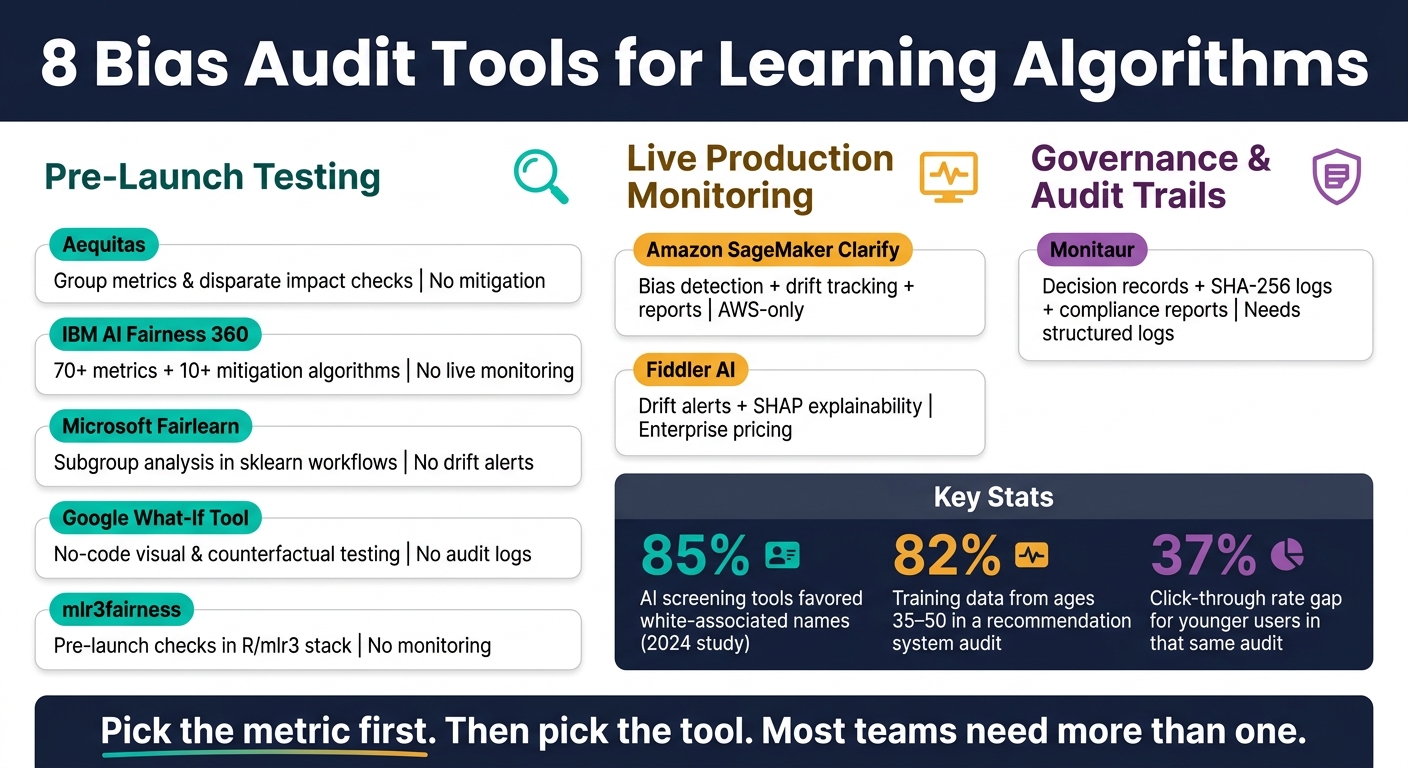
8 Bias Audit Tools for Learning Algorithms: Pre-Launch vs. Production
Use this matrix to match each tool to the audit job it handles best.
| Tool | Best For | Typical Owner | Key Limitation |
|---|---|---|---|
| Aequitas | Test datasets and disparate impact audits | Risk/compliance officers | No mitigation algorithms [6] |
| IBM AI Fairness 360 | Technical mitigation and fairness testing | Data scientists | Limited native LLM support [1] |
| Microsoft Fairlearn | Python-native model evaluation | ML engineers | Narrower metric coverage than AIF360 [1] |
| Google What-If Tool | Visual counterfactual analysis and output review | Product managers | Not for automated production monitoring [1] |
| Amazon SageMaker Clarify | AWS-native bias detection and drift tracking | DevOps/MLOps teams | AWS-specific [7] |
| Fiddler AI | Production monitoring and drift tracking | Platform operations | Enterprise pricing [6] |
| Monitaur | Governance reporting and audit trails | Internal audit, legal | Needs structured decision logs [3] |
| mlr3fairness | R-based pre-deployment fairness auditing | Statisticians, researchers | Limited to the R/mlr3 ecosystem [5] |
For learning platforms, the split is simple: pre-launch testing, live monitoring, or governance reporting.
That makes tool selection a lot easier. If you're checking a model before release, look first at tools built for dataset testing, fairness metrics, and mitigation work. If the model is already in use, drift tracking and production checks matter more. And if the main job is proving control to legal, audit, or compliance teams, reporting and traceable records should lead the shortlist.
Pick the metric first. Then pick the tool. That order matters. A team can waste a lot of time comparing vendors before getting clear on the audit job itself. This map helps narrow the field based on the work you need done and the governance setup you have today.
Where AI for Businesses Can Help Teams Shortlist Vendors
Use the matrix above to narrow your shortlist first. In practice, most tools land in 1 of 2 buckets: development libraries or production governance platforms.
At that point, AI for Businesses can help. It’s a curated directory built to help teams find and compare tools by use case. So instead of going vendor by vendor and sorting through claims one at a time, teams looking at observability, governance software, or bias audit options can use it to build a tighter shortlist.
The directory is built with a clear focus on mid-market and PE-backed companies moving AI into production. That matters when audit-ready reporting and compliance evidence are non-negotiable. For learning platform teams, it’s most useful after the audit-job mapping exercise above. From there, you can filter vendors by audit job, integration, and governance fit.
Conclusion
The choice isn’t whether to run an audit. It’s where the gap is.
Bias audits need to cover the full lifecycle: data, outputs, drift, and reporting.
Those audit jobs line up with 3 tool types: development testing, live monitoring, and governance reporting. That’s the same framework used in the comparison table above.
Use AIF360 or Fairlearn for development-time testing, Fiddler for live monitoring, and Monitaur for audit records.
Most teams will need more than one tool. Start with the audit job that matters most, then add the missing layer.
FAQs
How do I choose the right fairness metric?
Choose the fairness metric that matches the main harm your system could cause and any industry rules you need to follow. There isn’t one best metric for every case because these definitions can pull in different directions.
Here are the main options:
- Demographic Parity: equal representation in outcomes
- Equalized Odds: minimize false positives and false negatives
- Calibration: equal predictive accuracy across groups
Don’t rely on just one metric. Review several, write down the trade-offs, and set your thresholds before the audit starts.
Do I need more than one bias audit tool?
Yes. Most mature teams use a mix of tools because no single product covers every need across the machine learning lifecycle.
Open-source tools like AIF360 and Fairlearn are often used for testing during development. Platforms like Fiddler, Arthur, Holistic AI, and Credo AI are more often used for production monitoring, compliance, and audit-ready documentation.
What should I monitor after launch?
After launch, keep watching for bias drift as input data shifts. This isn’t a set-it-and-forget-it job. A model can look fine on day 1 and start drifting once user behavior, source data, or audience mix changes.
Use fairness dashboards with rolling 30-day windows. Set alerts when metrics cross your thresholds, and monitor data drift with methods like PSI.
Also, keep immutable logs of:
- Alerts
- Root cause reviews
- Fixes
Run targeted bias audits after retraining, major updates, or when new user groups start using the system. And make sure one named owner is responsible for acting on alerts, so issues don’t just sit there.