API marketing integrations are essential for connecting tools like CRMs, email platforms, and analytics systems. They enable seamless data sharing, real-time updates, and smarter marketing decisions. But without clear goals, secure authentication, and scalable design, integrations can lead to inefficiencies, downtime, or security risks. Here's what you need to know:
- Set Clear Goals: Define objectives tied to business outcomes (e.g., ROI or conversion rates) and align API capabilities with marketing strategies.
- Prioritize Security: Use OAuth 2.0, enforce TLS 1.2+, and follow the principle of least privilege to protect sensitive data.
- Plan for Growth: Implement rate limiting, error handling, and API versioning to maintain performance as demand increases.
- Test and Monitor: Conduct pre-launch testing, track metrics like error rates and latency, and use real-time monitoring to ensure reliability.
Marketing API Video 2: Core Components and Requirements
Set Clear Goals and Success Metrics
Before diving into API integration, take the time to clearly define your objectives. These goals should tie directly to your broader business priorities, such as expanding market share, boosting customer satisfaction, or strengthening your brand. This approach not only helps you measure success but also ensures you can justify the investment in integration efforts.
Think about the specific marketing activities the integration will support and outline the outcomes you want to achieve. For example, linking analytics tools could help you create a unified view of key metrics like Customer Acquisition Cost (CAC), Return on Investment (ROI), and Return on Ad Spend (ROAS). Companies that leverage API management often see integration timelines shrink from months to mere weeks.
Match Integration Goals with Marketing Plans
Your integration goals should directly support your marketing strategies. The capabilities of your APIs need to align with specific campaigns and initiatives. Each integration should have a clear purpose, such as delivering dynamic, personalized content across multiple channels or enabling new customer touchpoints like voice assistants and chatbots. For instance, if your marketing plan includes a customer lifecycle campaign, your API integration should enable real-time data processing to trigger automated responses based on user behavior.
To ensure your technical design meets market needs, foster collaboration between marketing and IT teams. Strong business sponsorship is also critical to secure funding and align the integration with your commercial objectives. Every API-enabled activity should connect to measurable results, such as generating leads, improving conversion rates, or increasing customer lifetime value.
Define Performance Benchmarks
Once your objectives are set, establish benchmarks to measure their impact. These benchmarks should cover both technical performance and business outcomes. On the technical side, monitor metrics like data sync speed (aim for latency under 100ms), API uptime, and error rates (keep an eye on 4xx and 5xx error codes). For marketing performance, track metrics such as Cost Per Acquisition (CPA), conversion rates, and the MQL to SQL ratio to evaluate how well marketing-generated leads are being qualified for sales.
Set these benchmarks before development begins to avoid focusing on vanity metrics like total API calls, which don’t provide real business insights. Instead, prioritize actionable metrics, such as how quickly your team can deploy new campaigns with the integration or the "time to working app". With organizations managing an average of over 354 APIs in their tech stack, having clear KPIs is essential to identify which integrations are delivering real value.
Protect Data and Maintain Security
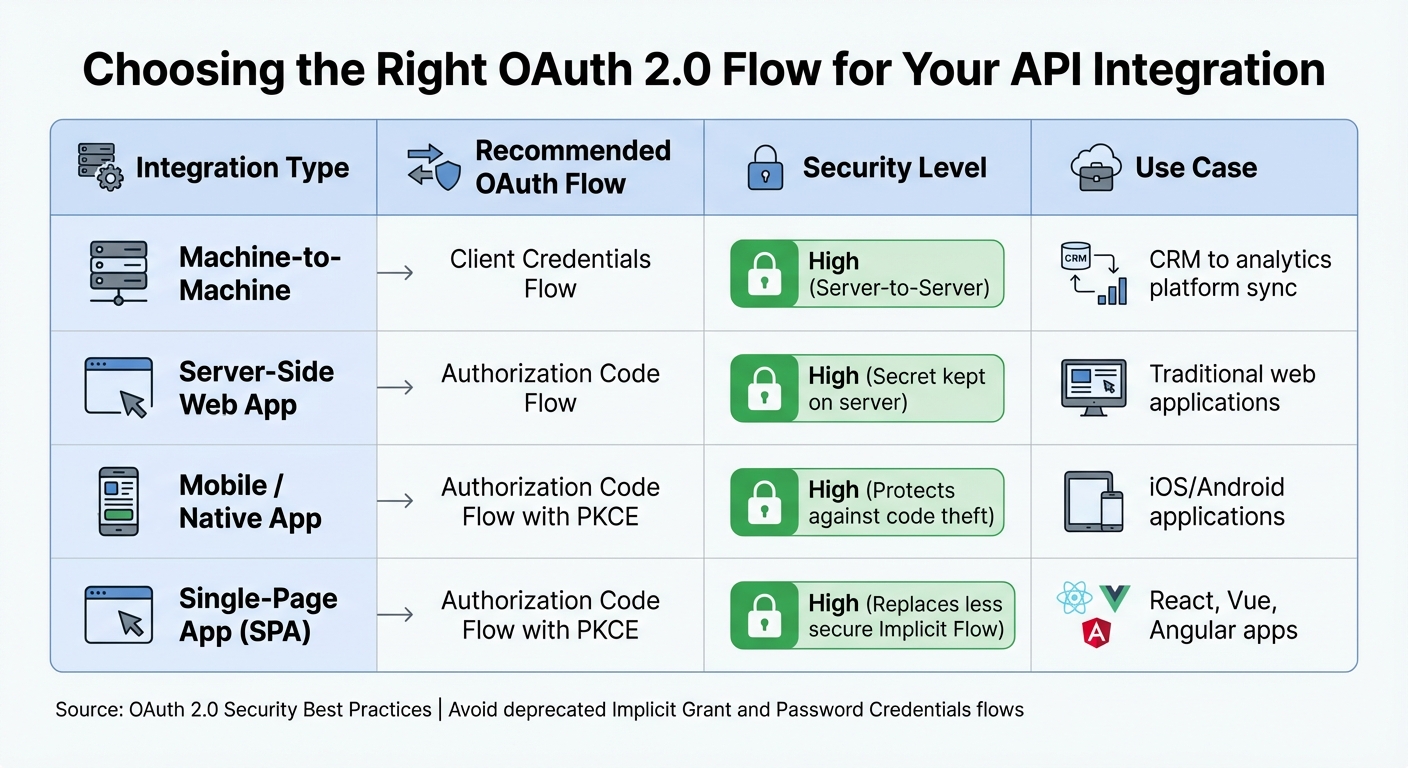
OAuth 2.0 Flow Selection Guide for API Marketing Integrations
When integrating APIs that handle customer data, it's crucial to prioritize security. Start by using OAuth 2.0, the standard for secure authentication. This framework ensures you choose the right method based on your application's needs.
For machine-to-machine integrations - like syncing data between your CRM and analytics platform - go with the Client Credentials Flow. If you're working on mobile or single-page applications, use the Authorization Code Flow with PKCE for added security. For traditional web apps running on secure servers, the Authorization Code Flow is ideal, as it keeps the client secret safe on the backend.
"Request minimum required scope for the OAuth token for your app API token. This follows the principle of least privilege and reduces risk associated with the API token." – Salesforce Developers
To further secure your API calls, enforce TLS 1.2 or higher, send access tokens only in authorization headers, store refresh tokens on secure servers, and regularly rotate API keys.
Use Secure Authentication
Some older authentication methods, like the Implicit Grant flow, are no longer recommended. These methods expose access tokens in URLs, making them vulnerable to interception. Similarly, the Resource Owner Password Credentials Grant is being phased out because it requires users to provide their passwords directly to your application.
Modern security practices favor methods like Mutual TLS (mTLS) or private_key_jwt, which use asymmetric authentication and eliminate the need to store shared secrets. Additionally, sender-constrained tokens - enabled by mTLS or OAuth DPoP - help prevent token replay attacks.
Never hardcode API keys or client secrets in your client-side code or store them in version control repositories. Treat API keys as sensitive credentials, as they can be used to impersonate the associated account if stolen. Always request only the minimum OAuth scopes necessary to limit access.
| Integration Type | OAuth Flow | Security |
|---|---|---|
| Machine-to-Machine | Client Credentials Flow | High (Server-to-Server) |
| Server-Side Web App | Authorization Code Flow | High (Secret kept on server) |
| Mobile / Native App | Authorization Code Flow with PKCE | High (Protects against code theft) |
| Single-Page App (SPA) | Authorization Code Flow with PKCE | High (Replaces less secure Implicit Flow) |
By combining these authentication strategies with robust data protection protocols, you can meet both technical and regulatory standards.
Meet Data Protection Requirements
Securing data isn’t just about technology - it’s also about compliance. Failing to meet regulations like GDPR or CCPA can result in hefty penalties. For instance, GDPR fines can reach up to €20 million or 4% of global annual turnover, whichever is higher [28,30]. Under California's CCPA/CPRA, violations can cost up to $7,988 per incident [29,30]. In one case, Sephora paid $1.2 million in 2022 for failing to disclose the sale of personal data and ignoring opt-out requests.
Here’s how to stay compliant:
- Track Data Collection: Document every instance where your API collects personal data, whether it’s through analytics, tracking pixels, or third-party platforms like CRMs and email tools.
- Sign Data Processing Agreements (DPAs): Ensure all third-party API providers comply with recognized security standards like SOC 2 or ISO 27001.
- Use Consent Management Platforms (CMPs): Adapt consent requests based on user location - opt-in for GDPR regions and opt-out for CCPA.
- Automate DSARs: Set up workflows to handle Data Subject Access Requests within the required 30-day (GDPR) or 45-day (CCPA) deadlines. Manual processing can cost an average of $1,524 per request.
- Recognize Global Privacy Control (GPC) Signals: This will become a key enforcement focus for regulators in the coming years.
- Encrypt Sensitive Data: Never store Social Security numbers or credit card details on third-party marketing servers. Instead, keep this information encrypted on your own secure systems.
sbb-itb-bec6a7e
Build for Growth and Scalability
When designing your API integration, always think ahead to support growth. As your marketing operations grow, you’ll handle more customer data, run additional campaigns, and connect with more platforms. The API design market itself is on the rise, growing at an annual rate of 15% and projected to hit $7 billion by 2033. By planning for scalability and implementing solid error management, your integration can remain efficient even as demands increase.
Add Rate Limiting and Error Handling
Rate limiting is essential to prevent your system from being overwhelmed by excessive requests. It controls the number of requests a client can send within a specific timeframe. For instance, Marketo allows 50,000 API calls per day for standard subscriptions, with a maximum of 100 calls every 20 seconds. Exceeding these limits triggers a 606 error code. Similarly, GitHub enforces a limit of 5,000 requests per hour for authenticated users.
To handle rate limits effectively, implement exponential backoff. This method delays retries incrementally - 1 second, 2 seconds, 4 seconds, and so on - when limits are reached, helping to avoid overwhelming the API during recovery periods.
Leverage headers like X-RateLimit-Limit, X-RateLimit-Remaining, and X-RateLimit-Reset to provide clear communication about rate restrictions. For error handling, return responses in a structured JSON format with both machine-readable codes and human-readable messages. Assigning a unique correlation ID (e.g., X-Request-Id) to each request can significantly simplify the process of tracing and debugging failures across systems.
Batching is another way to optimize API usage. Instead of making 50,000 individual requests, you can group records into 100 requests with 500 records each. Pair this with caching tools like Redis or CDNs to further enhance performance and conserve your API quota.
Manage API Versions
As your system grows, maintaining clear and consistent API versioning becomes critical. Breaking changes - such as removing resources, modifying data types, or altering response formats - must be handled through new API versions. Poorly managed API changes account for 40% of integration failures and can cost development teams 15 to 20 hours per incident for emergency fixes.
Use URI path versioning for clarity, such as api.example.com/v1/resource. Follow Semantic Versioning (SemVer), which uses the MAJOR.MINOR.PATCH format. A MAJOR version signals breaking changes, a MINOR version adds backward-compatible features, and a PATCH handles bug fixes. Retain older versions for 6–18 months to allow clients enough time to migrate.
Organizations that actively manage API changes experience 70% fewer update-related issues and can cut migration time from three weeks to as little as 3–5 days. When rolling out a new version, provide detailed migration guides, including side-by-side code comparisons of old and new implementations. Utilize API gateways for canary releases, which route a small percentage of traffic to the new version before a full rollout. Notify users well in advance through email, dashboard alerts, or in-API warnings to ensure they’re prepared.
"A well-defined versioning policy signals professionalism and a commitment to stability, which is crucial for building a healthy developer ecosystem." – Statisfy
Test and Monitor Performance
Once you've established secure and scalable integrations, the next step is to ensure everything runs smoothly. Testing and monitoring are critical for maintaining reliable performance. As Google for Developers highlights, "Testing is an important step in building a successful Google Ads API integration, whether you're just getting started, maintaining an app, or adding new features to an existing integration". The stakes are high - companies managing between 26 and 50 APIs per application report that one in five has faced a serious API-related outage in the past three years.
Complete Pre-Launch Testing
Before you go live, thorough testing can save you from costly errors. Start by using separate test and production credentials to prevent any accidental changes to live accounts. Leverage sandbox accounts to simulate live ads and test campaign logic safely. If you need to test features that require production access, such as performance reports, set a low daily budget to limit expenses.
Check that your data mappings function as intended. For instance, verify that input fields, dropdowns, and multiple selectors return data in the correct format. If you're working with marketing APIs like Meta Conversions API, ensure that redundant events from both a Pixel and the API are accurately deduplicated using matching event IDs and names to avoid double-reporting. Additionally, check the Event Match Quality (EMQ) score to confirm that customer information - such as email addresses and IPs - is effectively contributing to ad attribution.
Don't overlook testing your error handling logic. Make sure your integration can differentiate between retryable errors, like temporary network issues, and validation errors caused by malformed data. It’s also vital to interpret rate limit headers, like X-RateLimit-Reset, and implement exponential backoff for retries.
Finally, conduct user acceptance testing (UAT) with internal or beta users. For example, platforms like Zapier recommend having at least three users with live "Zaps" before launching. To catch breaking changes early, integrate API testing into your continuous integration (CI/CD) pipeline.
Once you've validated everything pre-launch, the focus shifts to real-time monitoring to ensure ongoing reliability.
Monitor Key Performance Indicators
After testing, it's time to keep a close eye on real-time metrics. Move from fixing issues reactively to proactively identifying potential problems. Pay attention to latency percentiles - not just averages. Metrics like P95 and P99 reveal the experience of your slowest users, often your most important ones. A strong API typically aims for a 95th percentile response time under 200 milliseconds.
Track error rates carefully, distinguishing between client-side errors (4xx) and server-side errors (5xx). A well-functioning API integration should keep server-side errors below 0.1%. Additionally, monitor Time to First Byte (TTFB); anything over 200 milliseconds could signal backend issues. As Zuplo emphasizes, "A 200 status code with corrupted JSON still represents a failure", so always validate the accuracy of your data, not just the response codes.
Set dynamic thresholds for alerts based on historical data instead of relying on static triggers. For instance, a 300-millisecond response might be acceptable in the afternoon but a red flag in the early morning. Use synthetic monitoring to simulate entire user workflows, such as logging in or completing a purchase, to catch functional issues that simple ping tests might miss. Deploy monitoring across multiple regions to identify latency issues affecting users in different locations.
Keep an eye on rate limit usage to avoid hitting quotas unexpectedly. This gives you time to upgrade or optimize before any disruption occurs. Store monitoring configurations in version control systems like Git to maintain consistency across environments and enable peer reviews. For alerts, use a tiered system: send urgent outage notifications via SMS or PagerDuty, minor degradation updates through Slack, and detailed post-incident reports to stakeholders.
Conclusion
Effective API marketing integrations require careful planning, robust security, scalable architecture, and consistent monitoring. Start by setting clear KPIs - such as ROI, development time, or client satisfaction - and assess your IT infrastructure to ensure your integration goals align with your broader marketing strategies.
Security should be a top priority. Implement protocols like OAuth 2.0 or OpenID Connect for authentication, avoid exposing API keys in frontend code by using a Backend Proxy pattern, and rotate credentials every 90 days. Neglecting these practices can be costly; businesses lose an average of $47,000 annually due to inefficient integrations, downtime, and security breaches.
Scalability is essential for growth. Introduce API versioning to minimize disruptions from updates, apply rate limiting and Circuit Breaker patterns to handle traffic surges, and use response caching to cut costs - potentially saving 50% to 70% on API expenses. For marketing data, such as Meta Ads, ensure redundancy by leveraging both browser Pixel and server Conversions API to mitigate data loss risks.
"After implementing Stratagem's AI API best practices, we reduced our monthly OpenAI costs from $24,000 to $8,200 - a 66% reduction - while actually improving response times by 40%." - Marcus Thompson, VP of Engineering, DataFlow Analytics
FAQs
What are the best practices for aligning API integrations with marketing strategies?
To make sure your API integrations align with your marketing goals, start by identifying exactly what you want to achieve. Are you looking to automate repetitive tasks, sync data across platforms, or improve how customers interact with your brand? Defining these goals upfront ensures your integration supports the bigger picture of your marketing strategy.
Collaborate with skilled developers to build APIs that are secure, scalable, and easy to maintain. Focus on security features like OAuth 2.0 authentication and data encryption to safeguard sensitive marketing data. Keep an eye on key performance metrics - like response times, uptime, and error rates - to ensure everything runs smoothly and stays adaptable as needs evolve.
By sticking to these practices, you can create API integrations that streamline operations, boost customer engagement, and help your marketing efforts thrive.
What are the essential security best practices for API integrations?
To keep your API integrations secure, start by using robust authentication and authorization methods like OAuth 2.0 or JSON Web Tokens (JWT). These protocols help regulate access and shield sensitive information. Stick to the principle of least privilege by narrowing token scopes and ensuring refresh tokens are stored securely.
Always implement TLS encryption for all API communication to protect data in transit. Instead of embedding API keys in query parameters, include them in headers and limit their usage to specific IP addresses or applications for added security. It's also essential to monitor and log API activity regularly, enabling you to spot and address potential threats quickly. By following these steps, you can safeguard your systems and reduce exposure to cyber risks.
What are the best practices for scaling API integrations as my business grows?
Scaling API integrations as your business grows calls for attention to stability, security, and performance tuning. Begin by selecting APIs that fit your deployment environment - whether that’s cloud-based, on-premises, or a hybrid setup - and ensure they’re compatible with your data formats, such as JSON or XML. Keep documentation clear and up-to-date, and use versioning to manage updates while maintaining smooth integration between systems.
To accommodate increasing user demand and data loads, focus on optimizing API calls. This can include batching requests, managing concurrency, and applying rate limiting to avoid overloading your systems. Consistently track key metrics like response times, uptime, and error rates to catch and resolve issues early. On the security front, implement protocols like OAuth 2.0 and encryption to safeguard sensitive data and maintain user trust.
A combination of technical fine-tuning, robust security practices, and proactive monitoring will allow your API integrations to scale effectively, meeting the demands of a growing business.