AI task scheduling is transforming how project managers plan and execute projects. By automating repetitive tasks, analyzing historical data, and adjusting schedules in real time, these tools save time and improve accuracy. Traditional methods often lead to delays, with 77% of projects missing deadlines due to poor planning. AI addresses this by predicting task durations, managing dependencies, and reallocating resources dynamically.
Key takeaways:
- Time savings: Managers reclaim 3–10 hours weekly by automating scheduling tasks.
- Resource efficiency: AI ensures tasks align with team skills and availability, reducing wasted resources by up to 25%.
- Real-time updates: Schedules adjust automatically for delays, absences, or priority changes.
- Market growth: The AI project management market is expected to grow from $3.08B in 2024 to $7.4B by 2029.
AI doesn’t replace project managers but enhances their ability to focus on strategy and leadership. By starting small, integrating tools gradually, and training teams effectively, businesses can leverage AI to improve project outcomes and achieve measurable ROI.
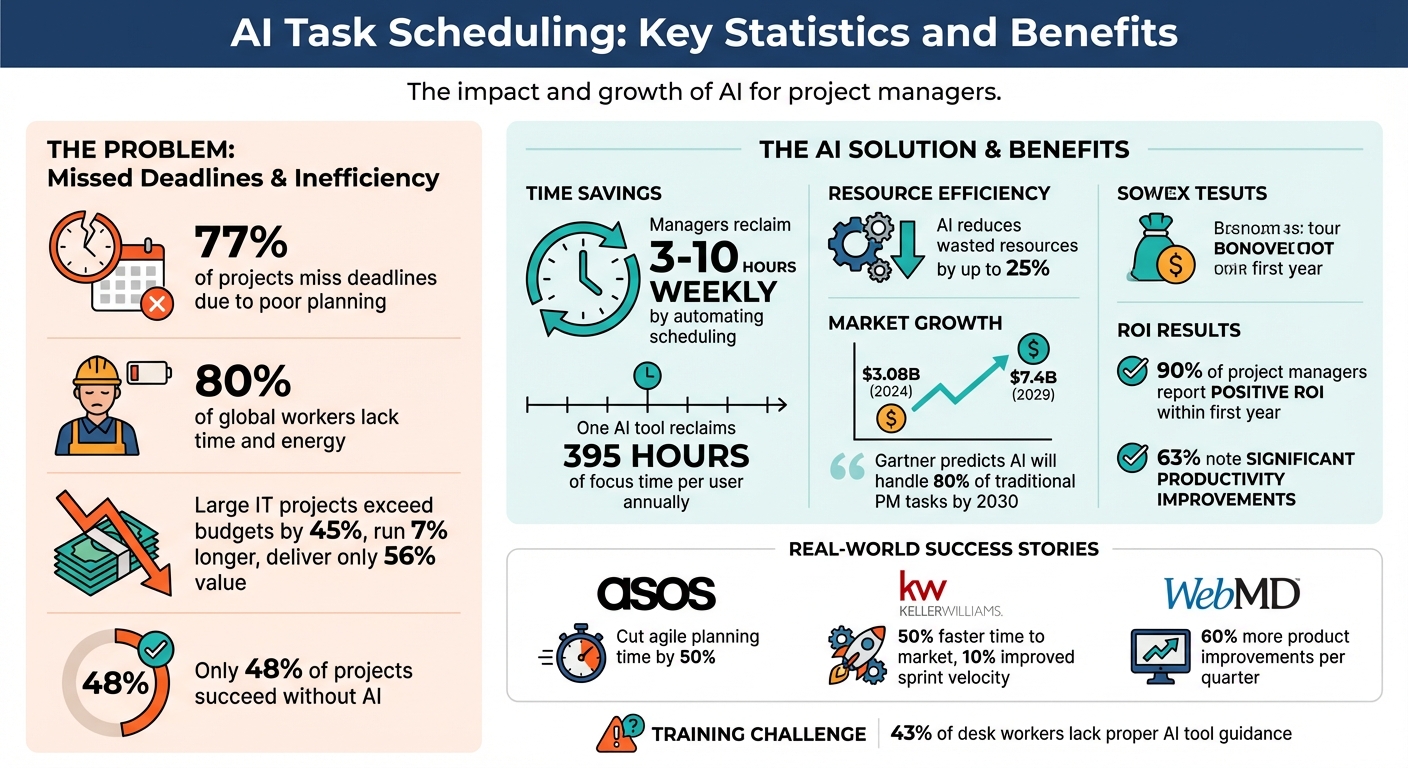
AI Task Scheduling Benefits and ROI Statistics for Project Managers
AI-Powered Project Scheduling: How to Automate Your Workflow for Maximum Efficiency
How AI Task Scheduling Works
AI task scheduling combines data analysis with machine learning to create efficient and adaptable schedules. By processing information from various sources, these systems predict task durations, identify dependencies, and adjust plans automatically when changes arise. This approach leverages both historical and real-time data to deliver precise and dynamic scheduling.
Analyzing Historical and Real-Time Data
AI scheduling tools start by analyzing historical data to establish realistic expectations. By reviewing past projects, they create benchmarks for task durations and resource requirements, offering a grounded approach to planning instead of relying on overly optimistic estimates.
But historical data is just one piece of the puzzle. These tools also incorporate real-time information, such as current project progress, team availability, and even personal calendar commitments like meetings or appointments. For instance, platforms like Motion sync professional and personal calendars to provide a complete overview of an individual's schedule. When delays or priority shifts occur, the AI swiftly updates the plan - rescheduling tasks, adjusting deadlines, and redistributing workloads to keep everything on track.
"AI project scheduling tools are designed to handle these changes dynamically. By continuously analyzing project data and dependencies, AI algorithms can automatically adjust schedules to accommodate changes in real time."
– Alli Tunell, Content Strategist, Motion
This combination of historical and real-time insights allows AI to fine-tune its scheduling capabilities.
Machine Learning and Task Optimization
The true strength of AI scheduling lies in its machine learning algorithms, which get better with each project. Supervised learning helps refine predictions by comparing planned versus actual task durations, while reinforcement learning experiments with different task sequences to improve workflows.
AI also tackles complex challenges that would be daunting for manual planners. It prioritizes tasks, meets deadlines, matches resources to skills, and manages intricate dependencies among multiple tasks. Using natural language processing, AI can even transform unstructured inputs - like meeting notes or email threads - into actionable tasks. These tasks are then slotted into the schedule based on their priority. Over time, this continuous learning enhances accuracy and ensures smarter resource allocation for project managers.
Benefits of AI Task Scheduling for Project Managers
AI task scheduling takes the hassle out of manual planning and improves timeline accuracy, transforming project management from reactive problem-solving to forward-thinking leadership.
Better Accuracy and Time Management
By examining historical project data, AI sets precise benchmarks for how long tasks should take and the effort they require, removing the need for guesswork.
On average, managers dedicate 3–10 hours each week to scheduling tasks. AI steps in to automate these repetitive chores - assigning tasks, sending reminders, and updating project statuses - giving managers more time to focus on big-picture decisions. One AI tool even boasts reclaiming 395 hours of focus time per user every year. Beyond saving time, AI acts as an early warning system, monitoring task dependencies and progress trends to flag potential bottlenecks before they turn into major delays.
Improved Resource Allocation
AI enhances resource allocation by pairing tasks with team members based on their skills, workloads, and availability in real time. This approach prevents overloading individuals while ensuring no resources go underutilized.
The results speak for themselves. For instance, ASOS cut its agile semester planning time in half by incorporating AI-assisted tools. Similarly, Keller Williams sped up its time to market by 50%, improved sprint velocity by 10%, and WebMD achieved 60% more product improvements per quarter using AI to guide project reviews. These examples show how AI’s ability to consider multiple factors - like team capacity, material availability, budgets, and skills - leads to smarter, more efficient planning.
Real-Time Adjustments and Flexibility
Traditional static schedules often crumble under unexpected changes. AI scheduling tools, however, adapt dynamically to disruptions like team absences, extended meetings, or shifting priorities during a sprint. They automatically update timelines while respecting task dependencies, eliminating the need for manual adjustments.
This adaptability is crucial, especially since 80% of global workers and leaders feel they lack the time and energy to complete their work. AI integrates both professional and personal calendar commitments to craft realistic daily plans that account for all demands. When deadlines shift or new priorities arise, the system recalculates the best way forward without requiring managers to start over.
These real-time adjustments make integrating AI into project workflows a smooth and impactful process.
sbb-itb-bec6a7e
Implementing AI Task Scheduling for Project Managers
Assessing Your Current Workflow
Before diving into AI solutions, take a close look at your current scheduling process. Pinpoint inefficiencies by tracking how much time your team spends on tasks like sending reminders, generating status reports, or manually updating schedules - these are prime candidates for automation. Consider this: large IT projects often exceed budgets by 45%, run 7% longer than planned, and deliver only 56% of their expected value.
A good starting point is to review your historical data. Look at how past tasks performed in terms of duration, budget adherence, and resource allocation. Identify bottlenecks in your workflow. Are delays happening because team members are overburdened, roles are unclear, or workloads aren’t evenly distributed? Also, map out key task dependencies to see where AI could optimize your critical path. Instead of attempting a complete overhaul, focus first on your biggest challenge. A phased, deliberate approach will help you integrate AI more effectively.
Phased Implementation and Team Training
Adopting AI scheduling works best when done step by step. Start with simple integrations, like syncing team calendars, and gradually add features like auto-scheduling tasks. Later, fine-tune advanced settings such as working hours and priority levels. A great example of this is Keller Williams’ phased adoption of AI in their Big Room Planning process. By moving to a collaborative digital workspace, they achieved smoother transitions. Chris Cox, their VP of Engineering, explained:
"Miro brings us all the way from ideation through the discovery work and ultimately...into production".
However, a major hurdle remains: 43% of desk workers feel they lack proper guidance on using AI tools effectively. To bridge this gap, train your team to treat AI as a support tool rather than a replacement. Teach them to review AI-generated schedules for errors. Standardize calendar usage across devices and ensure it’s regularly updated. Encourage manual time blocking for deep work, appointments, and vacations to prevent AI from scheduling over these periods. Once these steps are in place, the focus can shift to tracking performance improvements.
Best Practices for Success
To gauge the impact of AI, define key performance indicators (KPIs) that measure productivity, risk reduction, and team collaboration. Start by automating tasks with high return on investment, such as repetitive administrative work and status updates, to quickly demonstrate value.
WebMD saw a 60% increase in product improvements per quarter by leveraging AI-powered data clustering during project retrospectives to identify and address bottlenecks.
Feedback is critical. Create channels for your team to report when AI-generated schedules fall short so you can fine-tune the system. For better accuracy, use three-point estimation when setting task durations - include optimistic, pessimistic, and most likely timeframes. While Gartner predicts AI will handle 80% of traditional project management tasks by 2030, human oversight will always be necessary. Cross-check AI recommendations with your own expertise to ensure they align with your business goals.
Measuring the Impact and ROI of AI Task Scheduling
As AI continues to reshape task scheduling, tracking its effectiveness through clear metrics and ROI analysis is crucial for driving ongoing improvements.
Key Metrics for Success
To gauge the success of AI in task scheduling, focus on critical metrics like administrative time savings, forecasting accuracy, resource utilization, risk mitigation speed, project velocity, and project success rate. For instance, you can measure forecasting accuracy by comparing AI-generated predictions for timelines and budgets against actual results.
Resource utilization is another key area to monitor. This involves assessing whether workloads are distributed more effectively and if team members are now handling tasks better aligned with their skills. Similarly, risk mitigation speed - how quickly your team responds to potential issues flagged by AI - can highlight the tool's impact on risk management.
Keep an eye on project velocity, which could manifest as shorter sprint cycles or faster time-to-market for deliverables. Finally, track your project success rate by evaluating how often projects are completed on time and within budget. With only 48% of projects succeeding without AI, even small gains in this area can deliver meaningful results.
Statistics reinforce the potential benefits: 90% of project managers reported a positive ROI from AI within the first year, and 63% noted significant productivity improvements. To make the most of AI, set clear KPIs before implementation, targeting areas like productivity gains or risk reduction. Begin with pilot projects in low-risk areas, measuring time saved on tasks like reporting and accuracy improvements before scaling up across the organization.
By defining these metrics, you can lay the groundwork for calculating the ROI of your AI investments.
Calculating ROI
Once you’ve established your metrics, calculating ROI involves comparing your initial investment to the long-term benefits. Subtract the costs of technology, training, and system integration from the gains achieved through improved productivity, reduced overruns, and faster delivery times. For a more detailed view, multiply the hours saved by the average hourly rate and include cost avoidance from early risk detection.
"AI isn't replacing project managers - it's unlocking new opportunities for them"
– Hannah Wren, Staff Writer at Airtable
To maximize ROI, focus on automating tasks that yield immediate benefits, such as routine administrative duties and status updates. However, maintaining human oversight remains essential. Project managers should review AI-generated outputs to ensure they align with strategic goals and to catch potential errors before they escalate. Additionally, regularly auditing and cleaning your historical data is vital, as the accuracy of ROI calculations heavily depends on the quality of your data.
Conclusion
AI-powered task scheduling is reshaping project management, shifting it from a reactive process to a more forward-thinking approach. By automating routine tasks like creating status reports and summarizing meetings, AI allows project managers to dedicate their time to strategy and leadership instead of getting bogged down in administrative work. It uses historical data and real-time updates to fine-tune resource allocation, anticipate potential risks, and adapt schedules automatically when priorities change.
As highlighted throughout this guide, the demand for AI in project management is growing rapidly. Organizations are turning to these tools to address the limitations of traditional planning methods, enabling them to respond more effectively in a competitive environment.
"AI augments human capabilities; while it excels at data analysis, project managers remain essential for strategic decisions." – Miro Team
To make the most of AI's potential, consider starting small. Use straightforward automation tools, establish clear KPIs, and regularly evaluate AI-generated insights to ensure alignment with your business objectives. Tools like AI for Businesses offer a range of AI solutions tailored to project management, scheduling, and workflow improvements. These platforms are especially valuable for SMEs and growing companies looking to optimize their operations efficiently.
FAQs
How can AI task scheduling help ensure projects stay on track?
AI task scheduling plays a crucial role in keeping projects on track by using historical data to craft practical timelines and efficiently managing resources. It keeps an eye on team workloads, adjusts task assignments when necessary, and spots potential risks or bottlenecks early - before they escalate into delays.
By automating these tasks, AI streamlines workflows, minimizes the need for constant manual supervision, and helps teams stick to deadlines more effectively. This allows project managers to dedicate more energy to high-level strategic planning and decision-making.
How can project managers start using AI for task scheduling?
To get started with AI-powered task scheduling, the first step is to define your objectives. Pinpoint specific workflow issues - whether it's manual task distribution or frequent missed deadlines - and set clear, measurable goals. For example, you might aim to cut scheduling time by 20% or boost resource utilization above 85%. Lay out clear parameters for the AI, such as workload caps, task prioritization rules, and project milestones, to ensure it works in line with your requirements.
Once your goals are set, select an AI scheduling tool that integrates smoothly with the platforms you already use, like Outlook or Asana. Focus on finding a tool that's intuitive, scalable, and fits your budget. Start with a small-scale test run, train your team thoroughly on how to use the tool, and collect their feedback to refine the system. Keep an eye on metrics like scheduling accuracy and time saved, making tweaks as needed before rolling it out across your entire organization.
How can project managers evaluate the ROI of using AI for task scheduling?
Project managers can evaluate the return on investment (ROI) of AI-powered task scheduling by weighing the tool's cost against measurable benefits like fewer project delays, better on-time delivery rates, and increased efficiency. To start, establish baseline metrics before implementing the tool - such as average project completion times and resource utilization rates. After adopting the AI solution, monitor these metrics to measure improvements and determine its effectiveness.
For instance, you might calculate cost savings by reducing downtime or reallocating resources more efficiently. By examining these factors, project managers can assess whether the AI scheduling tool brings measurable value to their projects and overall operations.