AI task automation is transforming how remote teams work by addressing common productivity challenges like time zone coordination, meeting overload, and repetitive tasks. Teams are using AI tools to save time, reduce costs, and improve workflows. Key takeaways from the article include:
- Time Saved: Workers using AI tools reclaim up to 90 minutes weekly by automating tasks like scheduling, summarization, and documentation.
- Cost Savings: Companies like Remote saved $500,000 annually by automating 27.5% of IT help desk tickets.
- Improved Efficiency: AI-driven systems reduced task completion times significantly - for example, Deel cut a 2-week immigration process down to 5 minutes.
- Employee Retention: Automating incident management helped reduce turnover by 20% for a Nordic SaaS provider.
Remote teams are adopting AI for meeting summaries, IT support, HR tasks, and project management. Tools like Zapier, Otter.ai, and Glean are widely used to streamline operations. The article highlights practical case studies showing how AI helps teams focus on higher-value work while minimizing the "remote work tax."
Takeaway: Start small by automating repetitive, high-volume tasks, and scale up with the right tools and metrics to measure success.
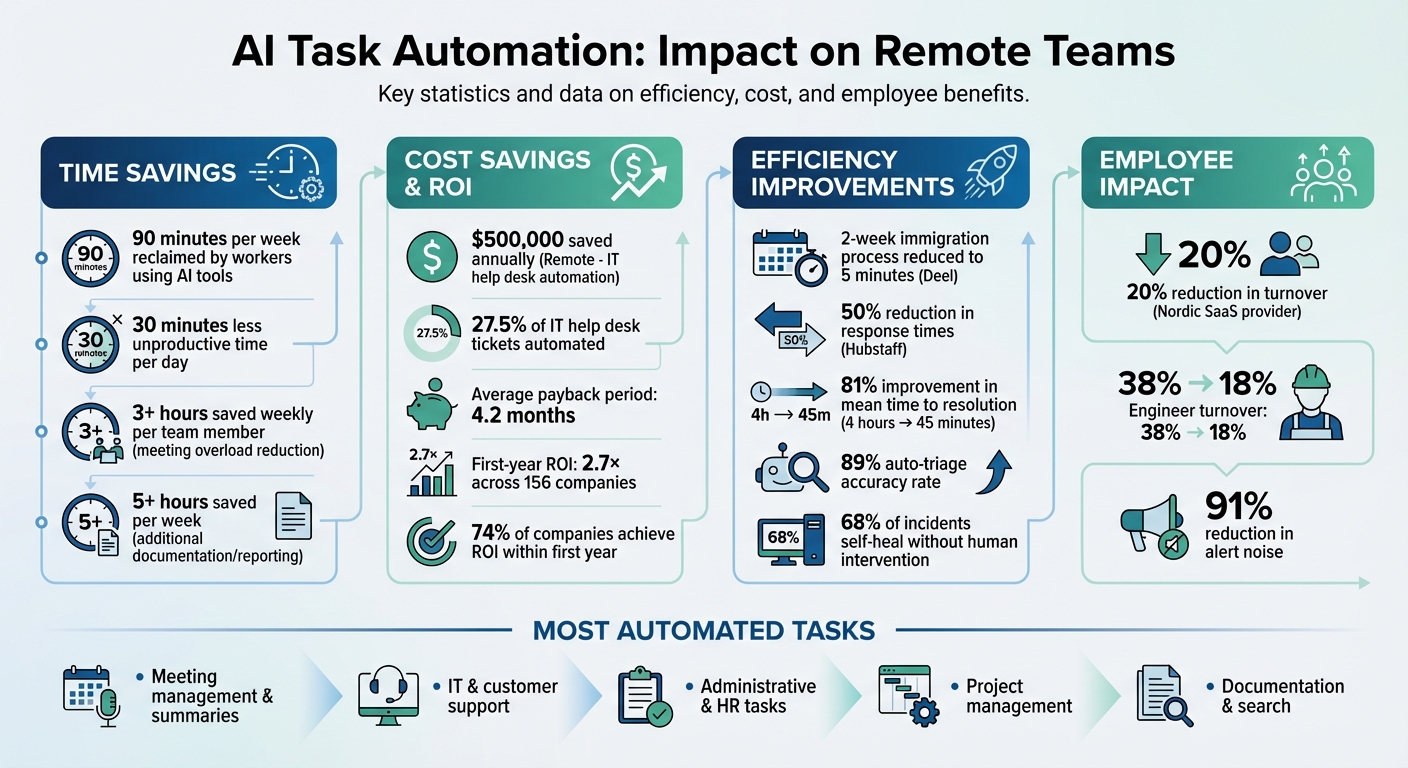
AI Task Automation Impact on Remote Teams: Key Statistics and ROI
Cal Krome on Scaling IT for Remote Teams with Trust & Automation | Go Beyond the Connection Podcast
sbb-itb-bec6a7e
How Remote Teams Use AI to Improve Efficiency
Remote teams often face challenges like missed updates due to time zone differences, endless email chains for scheduling, and scattered documentation across platforms like Slack, Google Drive, and Jira. These inefficiencies can slow down productivity and create frustration.
AI automation steps in to bridge these gaps. For instance, AI-powered search tools like Glean can instantly locate documents across multiple platforms, saving time and effort. Meanwhile, AI assistants such as x.ai handle complex scheduling tasks, including cancellations and time zone adjustments, without requiring human intervention. The result? Workers save about 30 minutes of unproductive time daily.
Tasks Remote Teams Automate Most Often
AI's ability to streamline repetitive workflows has made it a go-to tool for remote teams. Tasks like reformatting, summarizing, and transferring data between tools are some of the most automated processes. Here's where AI shines:
- Meeting Management: Tools like Otter.ai and Fireflies generate detailed meeting transcripts, summaries, and action items. This allows team members to skip unnecessary calls and stay updated through concise recaps.
-
IT and Customer Support: AI-powered help desks use chatbots to handle FAQs, triage tickets by urgency, and automate responses for straightforward requests. For example, Hubstaff leverages AI-generated ticket drafts to cut response times by 50%, maintaining high efficiency without increasing staff. Jared Brown, CEO of Hubstaff, shared:
"People using AI had 30 minutes less unproductive time per day. They stayed in flow longer because AI helped push through blocks."
-
Administrative and HR Tasks: AI transforms tedious workflows. Deel, for example, streamlined its immigration process from two weeks to just five minutes by using AI for document validation and case drafting. As Pearce, Head of Product at Deel, put it:
"We reduced a 2-week immigration workflow to 5 minutes using AI. It's one of the most transformative things we've done."
AI also supports project management by identifying blockers and updating task statuses, assists in content creation, and orchestrates workflows across connected apps.
AI Tools Remote Teams Use for Productivity
The success of these automated workflows depends on specialized AI tools tailored for specific needs. Here are some examples:
- Meeting Transcription and Summarization: Tools like Otter.ai, Fireflies, and Zoom AI Companion help teams stay aligned without attending every call.
- Writing and Content Creation: Platforms such as Writesonic, Grammarly, and Notion AI refine drafts and improve tone.
- Automation and Integration: Zapier, Workato, and Slack Workflow Builder connect various tools, ensuring seamless operations.
- Project Management: Asana's AI Intelligence, ClickUp's Brain, and Monday.com AI simplify task prioritization and subtask creation.
- Search and Documentation: AI-powered search tools like Glean enable quick access to internal files, eliminating the hassle of digging through multiple platforms.
For teams looking to explore these solutions, resources like AI for Businesses provide curated collections of tools to address common challenges like scheduling conflicts, support ticket backlogs, and scattered documentation. These tools lay the groundwork for the case studies shared later in the discussion.
Case Studies: How Remote Teams Implemented AI Task Automation
Case Study 1: Remote Slashes Ticket Resolution Time with AI
Remote, a global HR platform, faced a growing challenge as it expanded: a three-person IT team was responsible for supporting 1,800 employees spread across multiple time zones. Led by Marcus Saito, Head of IT and AI Automation, the team struggled to keep up with help desk tickets, often letting requests fall through the cracks.
To address this, between 2024 and 2026, Remote introduced an AI-powered help desk using Zapier. This system automated ticket intake and triage through Slack, handling routine tasks while directing complex issues to the appropriate team members. This shift not only improved efficiency but also allowed the IT team to focus on proactive system enhancements rather than constantly putting out fires.
Co-founder Marcelo Lebre highlighted the transformation:
"Without having automation, we would have to at least be double our size. Doubling is a bit of a euphemism because I think we would have died or fallen back into oblivion."
This example demonstrates how AI can turn routine support tasks into opportunities for strategic growth in remote teams.
Case Study 2: AI Summaries Help Remote Teams Escape Meeting Overload
Building on its success with IT automation, another remote team tackled a different challenge: meeting overload. A globally distributed product team found themselves stuck in back-to-back video calls, as members felt compelled to attend every meeting to avoid missing key details. This constant cycle left little room for deep, focused work.
The solution? AI-powered transcription and summarization tools. By adopting a "summary-first" mindset, they provided non-essential team members with AI-generated recaps instead of requiring their attendance. Essential participants continued to join live meetings, but the reduced need for full attendance saved each team member over three hours weekly. The team also reclaimed an additional five hours per week by automating meeting documentation and reporting.
This approach not only improved productivity but also created more time for meaningful, uninterrupted work.
Case Study 3: SaaS Team Boosts Retention with AI Incident Management
While AI helped streamline administrative tasks and reduce meeting fatigue, another team focused on addressing operational stress. A Nordic SaaS provider with 850 employees faced a major retention crisis in early 2024. Their engineering team, overwhelmed by incident management, was dealing with 2,400 monthly alerts - 92% of which were false positives. The constant on-call demands and manual processes contributed to a staggering 38% turnover rate among engineers and a mean time to resolution of four hours.
Under the leadership of VP of Engineering Lars Bergström, the company implemented 32 self-hosted n8n workflows on Azure, integrating PagerDuty, Datadog, and Azure OpenAI GPT-4. This AI-driven system automatically triaged incidents, prioritized severity, and resolved 68% of issues without human intervention. The results were dramatic: mean time to resolution dropped to just 45 minutes (an 81% improvement), alert noise reduced by 91%, and engineer turnover fell to 18%. Additionally, the project delivered €1.4 million in annual cost savings.
Bergström summed up the impact:
"Our on-call engineers can actually sleep at night now. The AI-powered triage gets it right 89% of the time, and 68% of incidents self-heal before anyone is paged."
These examples showcase how AI can address diverse challenges, from streamlining operations to improving employee well-being, setting the stage for broader adoption across enterprises. For organizations just starting, following an AI integration checklist can help ensure a smooth rollout.
How Large Organizations Scale AI Task Automation
Large organizations, much like remote teams, use AI to tackle operational hurdles. However, scaling AI automation across such vast systems requires a more structured and deliberate approach. Success often hinges on the right balance - 30% invested in technology and 70% focused on people and processes. For instance, IBM created a Center of Excellence to unify tools, governance, and ROI tracking across its massive workforce of over 280,000 employees. This initiative led to $4.5 billion in productivity gains over just two years.
A smart starting point for scaling AI is automating high-volume, low-complexity tasks before moving to more intricate processes. Cineplex exemplifies this strategy. Under the leadership of Bo Wang, VP of Tax and Treasury, the company automated tasks like gift card activation and email management using Microsoft Power Platform, saving 30,000 hours annually. Similarly, Morningstar adopted Asana AI Studio to streamline content intake across its 11,000 employees. This move saved 14,976 hours each year and cut costs by over $600,000. These examples show how organizations can evolve from smaller AI experiments to large-scale transformations.
Another effective approach is embedding AI into existing workflows. Salesforce did this with its Einstein app, which processed 370,000 queries in a single quarter, saving 50,000 hours. Nathalie Scardino, President & Chief People Officer, highlighted a 50% reduction in reliance on tech agents and an impressive 93% self-service rate. By integrating AI directly into daily operations, Salesforce avoided the inefficiencies of switching between tools, which encouraged adoption and improved productivity.
Financial outcomes from AI implementations vary significantly depending on the project's scale and execution. While 74% of companies report achieving AI ROI within the first year, only 16% manage to scale AI across the entire organization. The key often lies in strong executive sponsorship and fostering what IBM calls "cultural permission" for AI. This means leadership actively models AI usage and promotes experimentation across departments.
The table below highlights these strategies with real-world examples from leading enterprises.
Enterprise AI Implementation Comparison
| Organization | AI Solutions Used | Implementation Scope | Time Savings | ROI / Results |
|---|---|---|---|---|
| IBM | watsonx, AskHR | 280,000+ employees; 80+ HR processes | 3.9 million hours saved (2024) | $4.5B productivity gain; 94% HR automation rate |
| Salesforce | Einstein for Slack, Ask Concierge | Enterprise-wide; 50+ AI tools | 50,000 hours saved in one quarter | 93% self-service rate; 50% reduction in tech agent reliance |
| Morningstar | Asana AI Studio | 11,000 employees; Research & Tech teams | 14,976 hours saved annually | $600,000+ annual savings; 2-week reduction in request reviews |
| Cineplex | Microsoft Power Platform, AI Builder | Finance, HR, Guest Services, IT | 30,000 hours saved per year | Automated gift card activation and email processing |
| SLB | Power Platform, AI Builder | Global supply chain & tax teams | Workload of 11 full-time employees saved | $10M export duties recovered; $500K annual labor savings |
Success Metrics and Implementation Strategies for AI Adoption
Which Metrics Matter for AI Task Automation
To determine if AI automation is delivering results, remote teams need to track the right metrics. One critical measure is time saved - successful teams often aim to reclaim at least 5 hours per person each week. The impact varies across departments: marketing teams might save up to 40% of their time using top AI writing tools for content creation, while customer support teams can recover as much as 60% of their time by automating responses.
Financial performance is another key area to monitor. On average, AI investments have a payback period of just 4.2 months, with a first-year return on investment of 2.7× reported across 156 companies. Many remote teams have also avoided hefty hiring costs by automating routine tasks. For instance, in early 2024, Klarna introduced an AI assistant that managed two-thirds of customer service chats. This move replaced 700 full-time agents and cut average resolution time from 11 minutes to under 2 minutes.
Quality metrics, like auto-resolution rates, are equally critical. These measure the percentage of tasks completed entirely by AI, with a target accuracy of over 90% to match human standards. A Nordic SaaS provider offers a compelling example: they reduced their mean time to resolution from 4 hours to just 45 minutes using AI-driven incident management. The system achieved an 89% auto-triage rate, saving about $1.5 million annually. Lars Bergström, their VP of Engineering, reflected:
"We went from drowning in 2,400 alerts per month to 220 actionable incidents - our on-call engineers can actually sleep at night now".
Metrics related to employee impact also highlight the advantages of automation. The same Nordic SaaS provider saw a drop in on-call engineer turnover from 38% to 18% after automating incident management. Similarly, Unilever saved around 100,000 hours of interviewer time annually, translating to $1.3 million in savings. These examples show how precise metrics not only validate AI investments but also enhance employee retention and streamline operations.
Steps for Implementing AI in Remote Teams
With clear metrics in hand, remote teams can roll out AI by conducting targeted audits and pilot projects. Start with a workflow audit to identify repetitive tasks by using essential AI tools for meeting summaries, status reports, or invoice processing. Track these processes over 4–6 weeks to establish a baseline.
Next, focus on a single high-volume, low-risk workflow for a pilot project instead of spreading efforts too thin. Tax Management New Zealand followed this approach by integrating n8n with multiple AI models to automate HR and Finance workflows. By 2024, their system was handling 150,000 operations monthly and saving 400 hours per month. CTO Eric Troebner shared:
"n8n hits the sweet spot. Our engineers can easily adapt workflows... and it is actually easy for less technical staff to help build workflows across Marketing, Finance and HR".
Incorporate human oversight for critical decisions. AI can draft responses while humans provide the final approval to ensure quality and maintain trust. A support lead at a mid-sized SaaS company explained:
"The agent doesn't replace our team - it handles the boring stuff they hate. They focus on complex issues that actually need human judgment. Morale improved significantly".
For complex tasks, use advanced models like GPT-4, while simpler tasks can rely on more cost-effective options.
Before scaling, establish security and governance protocols, especially in industries with strict regulations. Hubstaff CEO Jared Brown emphasized:
"We only use AI tools that let us turn off training on our code. No exceptions".
This includes setting clear legal guidelines, secure procurement procedures, and guardrails to protect sensitive data.
Finally, scale AI efforts by creating dedicated automation roles. Remote, for example, formed a team of three automation specialists to move beyond ad-hoc solutions. Marcus Saito, Head of IT and AI Automation at Remote, noted:
"Zapier makes our team of three feel like a team of ten".
This strategic approach allowed them to automate over 11 million tasks annually, reclaiming 2,219 workdays every month.
Wrapping Up
Real-world examples highlight how remote teams using AI automation can reshape their operations. Take Remote, for instance - they saved $500,000 in hiring costs while managing 1,800 employees with just a three-person IT team. Deel’s sales team reclaimed an impressive 60 hours every week, and Tax Management New Zealand freed up 400 hours every month. These aren't just productivity boosts - they're opportunities for teams to focus on bigger, strategic goals.
By automating repetitive tasks like ticket routing, meeting summaries, or status reports, teams can shift their energy toward more impactful decisions. Marcelo Lebre, Co-Founder and President of Remote, put it bluntly:
"Without having automation, we would have to at least be double our size. Doubling is a bit of a euphemism because I think we would have died or fallen back into oblivion [without it]".
The takeaway? Start small. Conduct a workflow audit and focus on automating high-volume, time-consuming tasks. That’s how companies like Remote, Deel, and Tax Management New Zealand successfully scaled their AI initiatives. Their stories show that smart implementation of AI can redefine how remote teams operate, making them more efficient and scalable.
Ready to take the plunge? Check out AI for Businesses, a curated directory of tools designed for SMEs and scale-ups. Whether you're looking for productivity platforms or niche automation solutions, you'll find options tailored to your team's needs.
AI automation isn't just an emerging trend - it’s a game-changer for remote teams right now. The real question isn’t whether to automate, but which workflow you’ll tackle first.
FAQs
Which workflow should we automate first?
Start by focusing on automating tasks that are repetitive, time-consuming, and follow clear, predictable rules. Think about processes like handling IT support tickets, responding to customer inquiries, or generating sales leads. These types of workflows are perfect starting points because they often lead to quick wins - like saving thousands of hours each year.
You can also look at automating daily tasks, such as creating meeting summaries or preparing status reports. These small changes can free up a lot of time, allowing teams to experience immediate benefits. Plus, seeing these early successes can boost confidence in taking on more automation projects down the line.
How do we measure AI automation ROI fast?
To gauge the ROI of AI automation effectively, aim for quick payback periods - ideally seeing positive results within 30 days. Focus on processes that deliver noticeable savings in as little as 8 to 30 days. By monitoring these metrics closely, you can quickly evaluate how well the tools are performing and their overall value.
How do we keep company data safe with AI?
To keep company data safe while using AI, businesses need to establish governance controls. This includes setting clear purpose limitations - defining exactly how AI systems can and cannot use data - and maintaining consistent monitoring of these systems. However, many organizations struggle with this because they lack the necessary safeguards. Addressing these gaps early can help reduce risks and protect sensitive information.