Predictive analytics is no longer exclusive to large corporations. In 2026, small and medium-sized enterprises (SMEs) can leverage affordable, cloud-based tools to forecast trends, optimize operations, and reduce errors. Platforms like AI for Businesses Directory, Looker Studio, Google Cloud Predictive Analytics, and Microsoft Power BI are making data-driven decisions accessible even for businesses without in-house expertise.
Key takeaways:
- AI for Businesses Directory simplifies tool selection with no-code options and ROI-focused metrics.
- Looker Studio offers free visualization features but requires external tools for forecasting.
- Google Cloud Predictive Analytics excels with advanced modeling but demands technical expertise.
- Microsoft Power BI integrates seamlessly with Microsoft 365 but has a learning curve for advanced analytics.
SMEs can now cut forecasting errors by up to 25%–40% and save hours monthly. Start by focusing on specific challenges like customer retention or inventory planning and ensure you have 6–12 months of clean data for reliable predictions. Following an AI integration checklist can help ensure your data and infrastructure are ready.
AI for Small Business: Predictive Analytics for Small Business Decisions
sbb-itb-bec6a7e
1. AI for Businesses Directory
The AI for Businesses Directory is a resource designed to help small and medium-sized enterprises (SMEs) navigate predictive analytics tools. By using industry benchmarks and real-world ROI data, it evaluates how well these tools can turn operational data into actionable insights [5].
Rachel, an AI researcher, explains the challenge many SMEs face:
"Small businesses face a critical bottleneck: they possess immense volumes of unstructured data... but lack the dedicated data science budgets required to extract meaningful intelligence." [5]
To bridge this gap, the directory takes a no-code approach, categorizing tools by SME roles like "Data-Driven Founders", "Project Managers", and "Sales Professionals." This structure allows non-technical users to implement solutions without needing advanced coding skills or expertise in data science [5].
Key Features
The directory highlights tools with independent performance benchmarks, such as the DABstep financial analysis standard, which boasts a 94.4% accuracy rating. It provides detailed pros-and-cons analyses, showcasing strengths like handling over 1,000 files per prompt while addressing limitations such as hallucination risks and steep learning curves. The "Time-Saving ROI" metric identifies tools that can save SMEs an average of three operational hours daily [5].
Additionally, the directory ensures transparency by providing clear pricing information, helping SMEs make well-informed decisions.
Pricing
The directory itself is free to access, offering industry reports and comparison tools at no cost to businesses [5]. The AI tools featured range from free trials, such as Energent.ai, to subscription plans costing between $50 and $500 per month. For instance, ForecastIQ’s starter plan begins at $99/month, while Atlas Analytics starts at $199/month [4,8,9].
SME Suitability
This directory is especially helpful for SMEs that collect operational data but lack the expertise to translate it into insights. Tools are ranked based on their ability to address specific business challenges. For example, platforms focused on cash flow forecasting can reduce quarterly revenue projection errors from 25–40% to 10–15% [3].
Limitations
While the directory simplifies the process of finding AI tools, it doesn’t solve every data-related challenge. Many AI models require 12 to 24 months of consistent transaction data to outperform manual methods and detect seasonal trends accurately. SMEs with poorly categorized or inconsistent data may face issues with inaccurate predictions. Furthermore, predictive analytics tools struggle with "black swan" events - like pandemics or sudden regulatory changes - and may lag behind if a business undergoes a major strategic shift, such as transitioning from B2B to B2C, until new patterns are established [3].
These limitations provide important context when comparing this directory to other platforms.
2. Looker Studio
Looker Studio is a free business intelligence tool from Google, designed to integrate with over 800 data sources. It's an excellent option for small and medium-sized enterprises (SMEs) that may not have the budget for dedicated analytics platforms. While its strength lies in visualizing historical data, it doesn't natively support predictive modeling. Instead, it works as a presentation layer when paired with forecasting tools [10].
Key Features
One standout feature is Gemini AI, which allows users to generate charts and identify trends through natural language queries [9]. Looker Studio also supports blending up to five data sources - like Google Ads, GA4, and CRM platforms - into unified dashboards using calculated fields and conditional logic [9].
A great example comes from Wpromote, a performance marketing agency. They used Looker Studio alongside BigQuery to manage reports for over 300 clients. This integration reduced the time needed for new client reporting from days to just minutes, all while delivering AI-driven revenue forecasts with about 98% accuracy [9].
Pricing
The standard version of Looker Studio is free, offering unlimited reports and access to more than 800 connectors [6][7]. For businesses needing advanced features like team workspaces and administrative controls, the Pro version is available for $9 per user per project per month. That said, most companies with fewer than 50 employees may not find these extras necessary [6][8].
However, SMEs should keep in mind potential indirect costs. Third-party connectors can cost anywhere from $39 to $500 per month, and processing large datasets with BigQuery may incur additional fees [9].
SME Suitability
Looker Studio works particularly well for marketing, e-commerce, and operations teams that need to centralize data from platforms like Shopify, HubSpot, and Facebook Ads [8]. As ToolWise Review put it:
"For the vast majority of small businesses doing standard marketing and operations reporting, no other tool offers this much capability for free" [8].
Businesses already using Google tools like Google Analytics, Google Ads, and Google Sheets will appreciate the seamless connections at no additional cost [8].
Limitations
While Looker Studio is powerful, it does have its drawbacks. It cannot build predictive models or train algorithms on its own [10]. The platform's slow data refresh rate can hinder real-time tracking [8], and advanced features like data blending can be challenging to learn due to limited documentation [8]. To incorporate predictive capabilities, SMEs will need to rely on external tools like GA4's purchase and churn models [11].
3. Google Cloud Predictive Analytics
Google Cloud's offerings focus on tools like BigQuery ML and Vertex AI to handle large-scale data processing. BigQuery ML allows users to build models using SQL, while Vertex AI simplifies the process of training and deploying models by reducing the need for complex infrastructure [10][13]. These tools are designed to handle heavy data workloads, giving them an edge over other platforms.
Key Features
One of the standout features is its ability to process billions of rows of structured data, making it a great fit for businesses anticipating rapid data growth [10]. The platform also includes real-time prediction APIs, enabling businesses to make quick, data-driven decisions. Automated ETL/ELT workflows further streamline data preparation - a task that can consume as much as 60% to 80% of the effort in predictive analytics projects [12]. For example, finance teams using these tools have reported a 20–30% reduction in forecast variance [12].
Another exciting addition is Gemini integration within Workspace tools like Sheets and Docs. This no-code feature allows businesses to organize data, pull details from receipts, and generate insights using natural language queries, which can be particularly useful for small and medium-sized enterprises (SMEs) [14].
Pricing
Google Workspace provides a 14-day free trial for SMEs to explore AI tools like Gemini [14]. Both BigQuery ML and Vertex AI operate on a pay-as-you-go pricing model based on the compute resources used [12]. However, SMEs should plan for additional expenses, as costs for data engineering, professional services, and connector maintenance can increase the total investment by 200–300% during the first year [10]. Additionally, the implementation process typically takes 4 to 12 weeks, from setup to generating the first predictions [10].
SME Suitability
Google Cloud's tools cater to SMEs that already have analytics teams or staff with SQL expertise. BigQuery ML, in particular, is designed for high-complexity tasks, making it ideal for businesses managing large datasets - 10,000 records or more - and those needing advanced security features like SOC 2 and HIPAA compliance [10][12]. For companies already using Google's ecosystem, integration is relatively smooth. However, smaller teams lacking technical expertise might find the platform challenging to adopt.
Limitations
The platform's reliance on technical expertise makes it less accessible to non-technical users [10]. Using Gemini effectively requires learning prompt techniques, and the AI outputs often need manual refinement, as they generally serve as a starting point [14]. The quality of predictions also depends heavily on data quality; SMEs with less than six months of historical data or fewer than 1,000 conversions may see limited success [10]. Additionally, the platform's focus on desktop-based modeling and analysis can pose challenges for teams working remotely or relying on mobile devices. These factors highlight why Google Cloud is better suited for SMEs with dedicated analytics teams and robust data resources.
4. Microsoft Power BI
Microsoft Power BI stands out as an accessible, budget-friendly option for small and medium-sized enterprises (SMEs) looking to adopt predictive analytics. With the ability to connect to over 100 data sources - like Excel, Azure, Salesforce, and SAP - it fits seamlessly into the Microsoft 365 ecosystem. For teams already familiar with Excel, this integration simplifies adoption and reduces the time spent learning new tools. By breaking down data silos, Power BI empowers teams to uncover actionable insights without needing advanced technical skills [15].
Here, we'll dive into Power BI's standout features, pricing, suitability for SMEs, and some of its drawbacks.
Key Features
Power BI offers real-time dashboards that track key metrics such as sales performance and cash flow. Users have reported creating reports 42% faster and spending 48% less time preparing data. Over three years, businesses using Power BI have seen an impressive 366% return on investment (ROI) [15]. The platform also incorporates AI-driven tools like natural language queries and automated pattern detection, which are especially helpful for SMEs exploring predictive analytics.
Pricing
Power BI's pricing structure is designed to be attractive for SMEs. The Power BI Desktop version is free for individual users, making it an excellent starting point for businesses wanting to test the waters. For more advanced features, the Pro plan costs around $14 per user per month, while the Premium Per User (PPU) plan is priced at approximately $24 per user per month [16]. For a team of 10, this adds up to about $1,680 annually. However, it's worth noting that advanced AI features, such as Copilot, require additional licensing, which can increase costs for smaller teams. SMEs are encouraged to take advantage of the 60-day Pro trial to experiment with real business data before committing [15].
SME Suitability
Power BI is best suited for SMEs with a minimum of 6 to 12 months of consistent historical data [3]. Businesses using the platform are reportedly 23 times more likely to attract customers and 19 times more likely to achieve profitability [15]. With over 20 million active users each month, Power BI has proven its scalability. Its cloud-based setup eliminates the need for costly on-premise servers, and companies already using Microsoft 365 benefit from effortless integration [15].
Limitations
While Power BI is marketed as a self-service tool, achieving accurate predictive analytics often requires expertise in advanced data modeling - a hurdle for many SMEs [15][17]. Its reliance on DAX and Power Query can present a moderate learning curve [16]. For optimal performance, SMEs may need to work with specialized consultants during the initial setup to ensure the platform aligns with their revenue goals. Another challenge is that inconsistencies in data categorization can lead to inaccurate forecasts [15][3]. Additionally, while Power BI excels at analyzing historical data, it struggles to account for rare, unpredictable events - like sudden market disruptions - making human oversight essential [3].
Platform Comparison: Advantages and Disadvantages
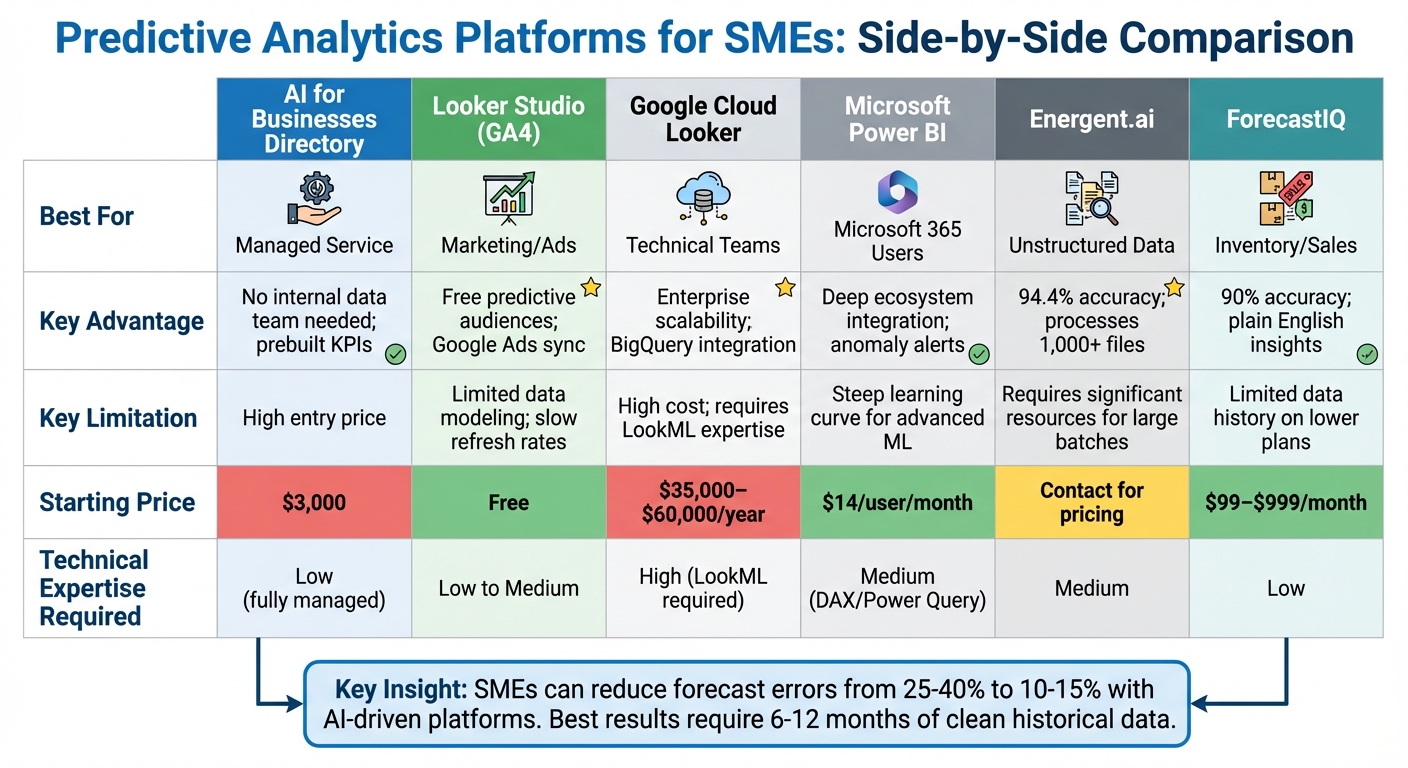
Predictive Analytics Platforms Comparison for SMEs: Features, Pricing & Best Use Cases
When selecting a predictive analytics platform, your decision should align with your budget, technical expertise, and business goals. Each platform has its own strengths and limitations, so understanding these trade-offs is essential for small and medium-sized enterprises (SMEs). Here’s a closer look at how these platforms compare and what they bring to the table.
AI for Businesses Directory provides a fully managed service for $3,000. This includes handling data pipelines and refreshing dashboards, eliminating the need for an internal data team[2].
Looker Studio stands out as the most cost-effective option, offering free core features. It integrates easily with Google Analytics 4, allowing predictive audiences to sync with Google Ads for remarketing[1]. However, it falls short in advanced modeling capabilities and has slower data refresh rates[8].
Microsoft Power BI is an excellent choice for teams already using Microsoft 365. It offers strong integration within the Microsoft ecosystem and includes features like anomaly detection within familiar dashboards[18]. However, its Pro plan recently increased to $14 per user/month (up from $10), and advanced features like Copilot require additional licensing[16]. Users should also be prepared for a steep learning curve when tackling advanced machine learning tasks[18].
Google Cloud Looker is designed for SMEs with advanced technical expertise. With an annual cost ranging from $35,000 to $60,000, it offers enterprise-level scalability and integrates seamlessly with BigQuery, but requires expertise in LookML for effective use[19].
For context, 72% of small businesses still rely on spreadsheets, which result in 25–40% forecast errors. By adopting AI-driven platforms, these errors can drop to 10–15%[3]. Keep in mind that platforms perform best with 6 to 12 months of clean, well-organized historical data[3].
Energent.ai is ideal for processing unstructured data, achieving an impressive 94.4% accuracy rate. However, it demands significant resources when working with large data batches[4].
ForecastIQ specializes in sales and inventory forecasting, offering 90% accuracy and plain-English insights. While its lower-tier plans have limited data history, pricing ranges from $99 to $999 per month[4][5].
Here’s a quick comparison of these platforms:
| Platform | Best For | Key Advantage | Key Limitation | Starting Price |
|---|---|---|---|---|
| AI for Businesses | Managed Service | No internal data team needed; prebuilt KPIs | High entry price | $3,000[2] |
| Looker Studio (GA4) | Marketing/Ads | Free predictive audiences; Google Ads sync | Limited data modeling; slow refresh rates | Free[8] |
| Google Cloud Looker | Technical Teams | Enterprise scalability; BigQuery integration | High cost; requires LookML expertise | $35,000–$60,000/year[19] |
| Microsoft Power BI | Microsoft 365 Users | Deep ecosystem integration; anomaly alerts | Steep learning curve for advanced ML | $14/user/month[16] |
| Energent.ai | Unstructured Data | 94.4% accuracy; processes 1,000+ files | Requires significant resources for large batches | Contact for pricing |
| ForecastIQ | Inventory/Sales | 90% accuracy; plain English insights | Limited data history on lower plans | $99–$999/month[4] |
For SMEs, many emerging tools now offer one-click integration with platforms like Shopify, QuickBooks, Stripe, and Salesforce[2][4]. Review your current subscriptions - tools like HubSpot, GA4, or ActiveCampaign may already include predictive features. To get the most out of these platforms, start by focusing on a specific challenge, such as churn prediction or demand forecasting[1].
Conclusion
Finding the right predictive analytics platform boils down to aligning it with your budget, technical expertise, and business goals. Before jumping into a new subscription, check if your current tools already include predictive features that just need to be activated [1]. This simple step can save money and help you ease into data-driven decision-making.
For small and medium-sized businesses (SMEs) ready to take the plunge, the landscape has changed significantly. Many of today’s predictive analytics platforms bring enterprise-level capabilities within reach at a fraction of their former cost. The shift from relying on spreadsheets to leveraging advanced data insights is accelerating. As Monsoft Solutions aptly states:
"The gap between data-driven businesses and intuition-driven businesses is growing - and it's growing in favor of businesses that act on predictions, not gut feelings" [1].
Begin by tackling one key issue - like reducing customer churn, managing inventory surges, or prioritizing leads - and tie predictions directly to actions. For example, set up a re-engagement email when churn risk increases or adjust stock levels ahead of a demand spike [1][17]. Keep in mind, though, that reliable AI models require 6 to 12 months of clean historical data to perform effectively [3].
Looking ahead to 2026, predictive analytics isn't just about forecasting - it’s about platforms offering actionable recommendations in plain language [17]. For the 72% of small businesses still relying on spreadsheets, adopting predictive tools can significantly cut forecast errors and provide a real edge over competitors [3]. The challenge is making the move from gut-based decisions to a data-driven approach.
FAQs
What’s the fastest way for an SME to get started with predictive analytics?
Small and medium-sized enterprises (SMEs) can dive into predictive analytics without heavy technical know-how by leveraging self-serve platforms. These tools are designed for ease of use, offering quick setup and seamless data integration.
Platforms like Echolon, ForecastIQ, and PredictIQ connect effortlessly with popular systems such as Shopify, QuickBooks, and Google Analytics. In just a few minutes, businesses can start analyzing their data without needing specialized expertise. These tools automatically process the data and provide actionable insights, enabling faster and smarter decision-making.
For businesses looking for more tailored solutions, options like Preditrix and Purposh offer customized AI-driven tools to meet specific needs. Whether you're just starting or need something more advanced, these solutions make predictive analytics accessible and practical.
How much clean historical data do I need for reliable forecasts?
The volume of historical data needed for accurate forecasting varies based on the platform and the complexity of the predictions. However, most AI-driven forecasting tools typically require a minimum of 12 months of transaction history to produce dependable results. To enhance the accuracy of predictions, it's crucial to ensure the data is both clean and relevant.
How do I estimate ROI before paying for a predictive analytics tool?
To figure out ROI, start by analyzing potential benefits like better decision accuracy, time saved, and how it could impact revenue. Look at how your current forecasting performs compared to the results the tool promises, focusing on areas like faster decisions and fewer risks. Pay attention to specifics like cutting down errors, improving inventory control, and reducing customer churn to estimate the financial upside. Then, compare these projected gains to the tool’s subscription cost to see if it’s worth the investment.