If I had to boil this down to one point, it’s this: GDPR retention works when I turn policy into system rules. The case studies show the same pattern across banks, SaaS teams, and support platforms - map the data, set retention by record type and legal basis, trigger deletion from events like account closure, and log every action. That matters because GDPR fines can reach €20 million or 4% of global annual revenue, and manual deletion can carry error rates of up to 20%.
Here’s the short version:
- I need to know what data I have, where it lives, and why I keep it
- I should set retention by record type, not one rule for everything
- I should use event-based triggers like closure, final payment, or ticket resolution
- I need legal holds to stop purge jobs during disputes or reviews
- I should choose between deletion and anonymization based on the use case
- I need timestamped audit logs that show what happened and why
- For most U.S. SMEs, built-in SaaS controls can go far without a custom stack
A few case-study facts stand out. One UK bank used a central retention engine across 1,000+ systems. A German automotive bank deleted millions of records within hours after archive and reload steps. On the SME side, Zendesk app setups handled retention rules like 2, 3, 7, and 15 years, plus daily deletion requests and bulk anonymization.
How Does GDPR's Storage Limitation Principle Affect Data Retention? - AI and Technology Law
sbb-itb-bec6a7e
Quick Comparison
| Model | Best fit | Setup effort | Audit depth | Example from the article |
|---|---|---|---|---|
| Central policy engine | Large regulated firms | High | High | UK bank with 1,000+ systems |
| Built-in SaaS controls | U.S. SMEs and lean teams | Low to medium | Medium | MOIA and Zyxel in Zendesk |
My takeaway: if I’m a U.S. SME serving EU customers, I do not need a bank-style rollout to get started. I should begin with high-risk systems, test rules in non-production, set hold logic first, and make sure my tools can export logs.
Retention automation patterns in banking and regulated services
In regulated sectors, retention automation has to do more than delete old data. It also has to follow sector rules on holding periods and audit trails. Across these cases, the pattern is pretty consistent: setup choices first, workflow changes next, audit controls throughout. Governed deletion and traceable exceptions sit at the center.
How a European bank automated retention across production, archive, and test systems
Banking makes this pattern easy to see. Retention rules have to line up with legal holds, archive policies, and downstream reporting. A large UK commercial bank and DXC Technology built a central retention engine across 1,000+ systems [1]. The hard part was coordinating deletion across all of those systems without breaking reporting or running into conflicts with 5-year MLR retention rules for transaction and KYC records [7].
The bank tagged records at the point of collection into 3 categories [7]:
- must keep - statutory hold
- keep until closure or a fixed period
- delete on request
Because the tagging happened up front, later deletion could run automatically. That matters. If classification is sloppy at intake, deletion turns into a manual mess later on.
The same setup extended beyond production systems. In test systems, anonymization stripped identifiers while keeping data structures usable for testing [8][9].
A second banking case follows the same model inside a legacy SAP setup. A German automotive bank used a data-reduction framework in SAP Bank Analyzer to archive data first, reload it for audits, and then delete millions of records within hours [8].
Central policy engines and audit logs in financial services
Across these banking examples, one pattern keeps showing up: a single policy engine linked to CRM, ERP, and legal archive systems, instead of separate scripts maintained by different teams.
Deletion triggers usually fall into 2 buckets. Some are time-based, like 5 years after the end of a business relationship. Others are event-based, like account closure kicking off the deletion chain. Legal hold flags stop deletion automatically when a record is tied to an active dispute or regulatory review [9].
Most banks still kept a manual validation step. Records managers reviewed automated recommendations before deletion [1]. If a record was flagged, it moved to a review queue for department-level approval instead of going straight to purge [8].
Audit evidence also shifted into central logs and KPI reports, which cut down the manual prep work needed for reviews [1][10].
The same control model can work for smaller teams too, but they usually deal with fewer systems and lighter automation.
Retention automation patterns in SaaS, analytics, and smaller teams
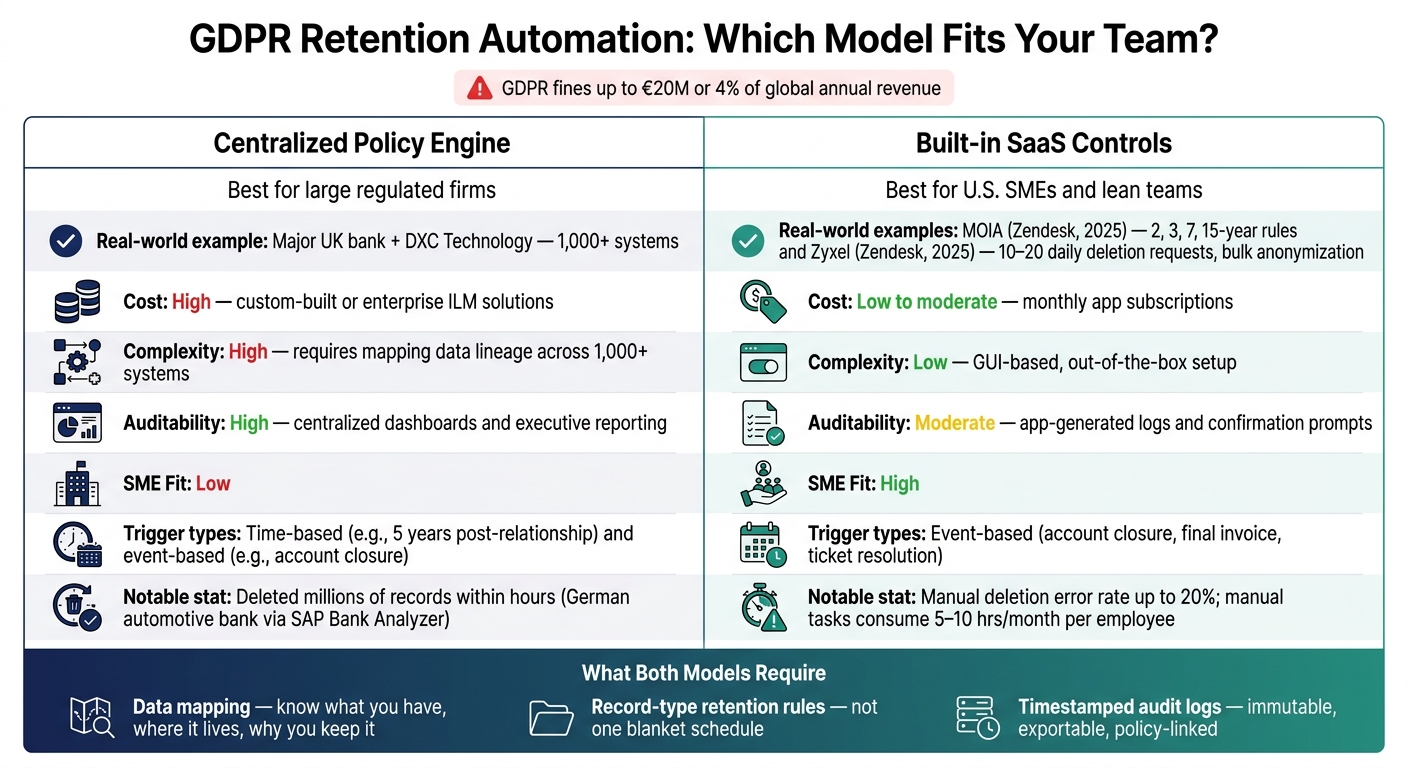
GDPR Retention Automation: Centralized Engine vs. Built-in SaaS Controls
Smaller teams follow the same retention logic as larger companies. The difference is how they enforce it. Instead of a central policy engine, they usually rely on built-in SaaS settings and light automation.
How analytics teams moved from indefinite raw-data storage to scheduled purging
A lot of analytics teams used to keep raw data forever. That’s changing. More teams now set fixed retention windows, then keep aggregated or anonymized metrics longer so they can still track trends. The ICO caps website analytics retention at 26 months [3], and over-retention appeared in 15% of ICO enforcement actions in 2023 [3].
That setup cuts personal-data exposure without losing reporting. But there’s a catch: teams need to aggregate or anonymize the data before deletion. For smaller teams, those retention windows are usually enforced inside the tools they already have.
SME setups using built-in SaaS controls and simple automation
Most SMEs do not need a custom policy engine. In many cases, the tools they already use already have retention settings, and those controls are enough to reduce a large share of the risk.
For SMEs, event-based triggers usually work better than calendar-based ones. A retention clock should start when something happens - like account closure, final invoice payment, or support ticket resolution - not just from the date a record was created. That approach is cleaner and easier to manage.
In May 2025, MOIA Operations Germany GmbH used the GDPR Compliance app by GrowthDot inside Zendesk to set ticket-deletion rules at 2, 3, or 15 years based on data type and local rules, replacing expensive native Zendesk workflows [6]. In July 2025, Zyxel applied the same app to seven years of unmanaged Zendesk data, handling 10 to 20 daily deletion requests and bulk anonymization across EMEA and the U.S. [4].
Those two cases point to the same SME pattern: a marketplace app inside an existing SaaS platform can handle structured, rule-based deletion and anonymization without a separate compliance stack.
The labor case is simple too. Manual data retention tasks can consume 5 to 10 hours per month per employee, and manual deletion processes have an estimated error rate of up to 20% [3].
The lesson for smaller teams is straightforward: make retention a system rule, not a manual task.
What changed across teams that implemented retention automation
From written retention policies to live rules and triggers
The biggest change was simple: teams stopped treating retention schedules as documents and started turning them into system rules.
In practice, that meant classifying data by business purpose and legal requirements, then separating what should be deleted right away from records that had to stay for a set period [10].
Teams also moved away from manual, calendar-based cleanup. Instead of reviewing records every month or quarter, they tied deletion to specific events like account closure, contract termination, or certain ticket types [4]. That same move showed up in audits and exception handling too - not just in how triggers were set.
At DXC Technology's bank case, a records specialist stayed in the loop as the final approver. So the system could recommend deletion, but it did not act on its own [1]. That approval model affected how teams logged exceptions and showed compliance.
Audit results, controls, and handling exceptions
Automation pushed audit evidence into centralized logs and dashboards [11]. One global financial services provider brought 350+ structured datasets into compliance through a 7-step automated framework [10]. The process also generated reporting for executives and regulators [1].
Exception handling got tighter too. Legal holds and court orders were flagged and left out of purge runs. Some workflows sent notices to downstream teams before purge [10]. Large jobs were staggered to avoid system slowdowns [11].
For SMEs, one detail stands out: granular controls let teams delete attachments while keeping ticket metadata [5]. That's a very different setup from a bank-wide policy engine, and it points straight to the trade-offs in the cases below.
Comparison table: setup choices and trade-offs across the cases
The cases in this summary fall into 2 broad implementation models:
| Approach | Example | Cost | Complexity | Auditability | SME Fit |
|---|---|---|---|---|---|
| Centralized policy engine | Major UK bank + DXC Technology [1] | High; custom-built or enterprise ILM solutions [1] | High; requires mapping data lineage across 1,000+ systems [1] | High; centralized dashboards and executive reporting [1] | Low |
| Built-in SaaS controls | MOIA and Zyxel [4][6] | Low to moderate; monthly app subscriptions [4][5] | Low; often out-of-the-box with GUI-based setup [4][6] | Moderate; app-generated logs and confirmation prompts [5] | High |
For SMEs, the core trade-off is straightforward: lower implementation effort usually comes with less audit depth. The final section turns those trade-offs into practical guidance for U.S. SMEs on implementing AI.
Conclusion: What U.S. SMEs can take from these retention automation cases
These cases point to one simple lesson: retention only started working once teams knew what data they had, where it sat, and why they were keeping it [1][6]. That pattern shows up again and again, whether the team is a bank, a SaaS company, or a small analytics shop.
The next step is just as plain. Apply retention by record type and legal basis, not with one blanket schedule [2][3]. Once that schedule is set, teams need to decide whether each record should be deleted or anonymized.
Those 2 actions are not interchangeable. Use hard deletion when a record no longer serves a business purpose, especially for erasure requests. Use anonymization when the data still needs to stay in place for reporting or analysis, but it should no longer point back to a person [2].
What ties these cases together is evidence. Timestamped, immutable logs that show what was deleted, when it happened, and which policy triggered the action are what make automation audit-ready [2][3]. Manual deletion opens the door to mistakes. Automation cuts that risk and reduces the labor behind the work.
For U.S. SMEs serving EU customers, the safer path is to start with high-risk systems, test rules on non-production data, and put legal holds in place before rolling out more broadly [3]. When evaluating tools, focus on:
Across these cases, the line between compliance and exposure came down to execution, not intent. The gap between a written retention policy and live retention controls is where GDPR risk starts. U.S. SMEs need mapped data, defined triggers, and audit logs.
FAQs
How do I choose between deletion and anonymization?
Choose deletion when the data no longer matters once its first job is done - like raw analytics, expired session tokens, or abandoned signups.
Choose anonymization when you still need the data for aggregate analytics or reporting, but you can strip out personal identifiers.
If legal or financial retention rules apply, archive the data in a restricted, secure environment instead of deleting or anonymizing it.
What should an SME automate first?
For SMEs, the best first step is a clear, repeatable data retention and deletion policy.
Focus first on the data that creates the most risk or piles up the fastest - support tickets, customer PII, and expired transaction logs are common examples. Then automate the lifecycle wherever you can.
Start with a simple question: what data no longer serves a business purpose? Once you know that, set automatic triggers to delete or anonymize it instead of relying on manual cleanup. That cuts clutter, lowers risk, and makes the process easier to follow every time.
How do legal holds work in retention automation?
In retention automation, legal holds take priority over normal deletion rules. If a dataset is tied to an active legal review or lawsuit, the hold stops automated deletion for that specific data.
That means expired data can still be deleted as usual, while records tied to legal claims or compliance needs stay in place. Those records are usually stored in a restricted archive with limited access until the hold is removed and the retention period has run out.