Legacy systems drain IT budgets and slow progress. AI tools are now transforming how businesses modernize outdated systems, cutting costs, improving security, and speeding up timelines. Here are the top 5 AI tools for upgrading legacy systems:
- ModernizeAI: Automates code analysis, maps dependencies, and supports gradual system upgrades. Starts at $900/month.
- CodeRevive: Balances automation with expert oversight for quality code transformation. Speeds up migrations by 75%. Pricing starts at $3,000/month.
- APIConnect Pro: Focuses on API modernization, turning monolithic systems into microservices with minimal disruptions.
- DataShift AI: Streamlines legacy data migration with automated schema conversions and validation tools.
- TransformOps Suite: Uses AI and compiler validation to modernize systems while reducing risks and costs.
Quick Comparison
| Tool | Key Feature | Deployment Options | Starting Price |
|---|---|---|---|
| ModernizeAI | Dependency mapping, AST analysis | AWS Cloud | $900/month |
| CodeRevive | Expert-supervised AI transformations | SaaS, On-Prem, Air-Gapped | $3,000/month |
| APIConnect Pro | API lifecycle automation | Cloud, Hybrid, On-Prem | Custom Pricing |
| DataShift AI | Automated data migration | Cloud-Based | Free Tier Available |
| TransformOps Suite | Compiler-validated transformations | Linux, Windows, Mainframes | Custom Pricing |
AI tools are reshaping modernization efforts, offering faster, safer, and more cost-effective solutions. Select the right tool based on your system's needs and deployment requirements.
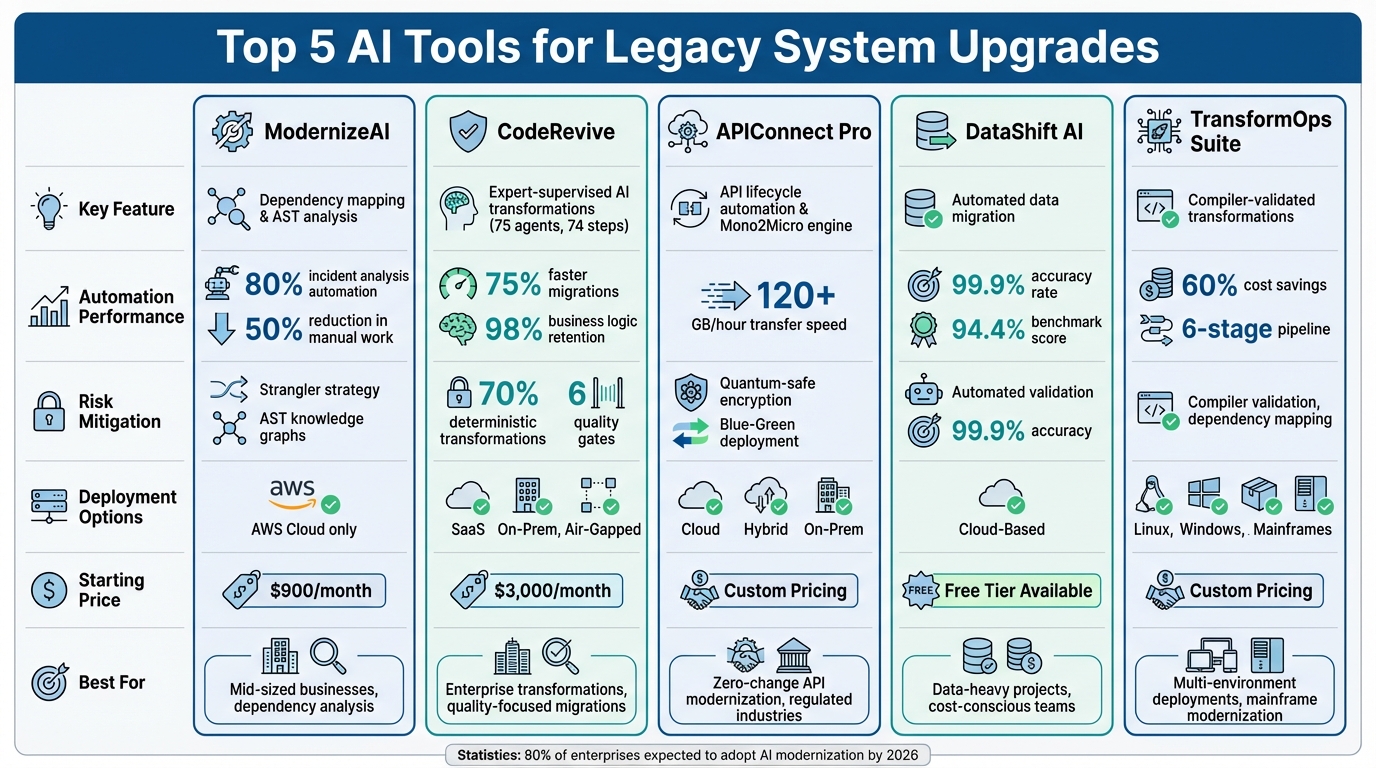
Comparison of Top 5 AI Tools for Legacy System Modernization
Accelerate app modernization with generative AI: A McKinsey perspective
sbb-itb-bec6a7e
1. ModernizeAI
ModernizeAI takes on one of the biggest hurdles in legacy system upgrades: figuring out how your current system works. By using Abstract Syntax Tree (AST) knowledge graphs, the platform breaks down legacy code and creates detailed system documentation. It even maps out visual blueprints of dependencies, saving teams from months of tedious manual work and reliance on institutional memory.
Automation Capabilities
ModernizeAI’s multi-agent AI system handles the most time-consuming tasks that often slow down modernization efforts. It can automate up to 80% of incident analysis and resolution tasks, translating natural language questions into actionable insights. For example, instead of combing through logs, developers can simply ask, "What caused yesterday's database timeout?" and get clear answers powered by advanced graph algorithms like Leiden. Its "Chat with Code" interface also bridges the gap between business requirements and technical architecture, cutting onboarding time significantly. On top of that, it reduces manual work for development teams by up to 50% through automated updates to documentation. While automation is a key feature, the platform doesn’t stop there - it also prioritizes minimizing risks.
Risk Mitigation Features
ModernizeAI employs a "strangler" strategy, allowing organizations to gradually replace outdated components without risking a complete system overhaul. By analyzing system architecture, it pinpoints high-impact areas, or "hotspots", where modernization can deliver the most value. Its AST knowledge graphs dig deep to uncover hidden dependencies that might cause cascading failures during migration. This ensures that critical system logic is preserved, even as expertise leaves the organization.
Deployment Flexibility
To match its powerful analysis and risk management tools, ModernizeAI offers flexible deployment options. For industries with strict regulations, the platform supports on-premise installations to keep sensitive code and data secure within your own environment. This setup ensures compliance and protects intellectual property without sacrificing performance. ModernizeAI is designed to handle a wide range of legacy systems - from COBOL mainframes to older C++ applications - using its AST-based methods to decode even the most complex architectures.
2. CodeRevive
CodeRevive approaches legacy code modernization by combining automation with hands-on expert supervision. Its supervised AI agent model ensures that every transformation is reviewed by experienced engineers, delivering production-ready code while avoiding the pitfalls of purely AI-generated results. This method strikes a balance between speed and quality, ensuring the updated code remains maintainable for the long term.
Automation Capabilities
CodeRevive’s automation is driven by two key components: Lens and Platform. Lens operates as a command-line tool that automatically generates dependency graphs and extracts business rules. Meanwhile, the Platform utilizes 75 agents across 74 steps to handle the transformation process. This setup delivers migration timelines that are 75% faster than manual rewrites, all while retaining 98% of the original business logic. Additionally, the platform conducts in-depth code analysis, examining architecture, business rules, and dependencies. This helps prevent the loss of critical institutional knowledge, particularly when original developers are no longer available.
Risk Mitigation Features
To reduce risks, CodeRevive relies on a 70% deterministic transformation approach, ensuring most changes follow established and tested patterns. The platform incorporates six quality gates throughout the migration process, catching issues before they reach production. It also addresses security concerns by migrating applications away from unsupported software versions with known vulnerabilities, updating them to secure, modern technology stacks.
Deployment Flexibility
CodeRevive offers three deployment options: SaaS, on-premise, and air-gapped installations. This flexibility is especially valuable for organizations with strict compliance needs, such as those in healthcare, finance, or government. These options ensure sensitive code remains within the organization’s infrastructure while still benefiting from AI-powered modernization.
Cost Efficiency
By automating much of the transformation process and maintaining quality through expert oversight, CodeRevive achieves an 80% cost reduction compared to traditional rewrite projects. This makes it a practical choice for organizations working with limited budgets or juggling multiple priorities. Its cost-effective approach helps minimize the financial risks often associated with legacy modernization.
3. APIConnect Pro
APIConnect Pro is designed to help enterprises stuck with outdated systems modernize their API infrastructure with ease. Launched in May 2025, this platform automates the entire API lifecycle, simplifying the transition from legacy architectures to modern services. It’s especially suited for older environments like z/OS, COBOL, and CICS.
Automation Capabilities
The platform’s Mono2Micro engine takes the complexity out of modernization by analyzing legacy system behavior and converting monolithic codebases into modular microservices. This eliminates the need for manual boundary identification. Using machine learning, it identifies anomalies, tags sensitive data for compliance, and provides insights into error rates and latency. These features help teams make secure and informed refactoring decisions.
APIConnect Pro integrates seamlessly with DevOps pipelines, offering automated testing for continuous delivery and validation. The upgraded API Gateway manages traffic automatically, ensuring smooth performance even during high-demand periods. Additionally, it generates API documentation using Swagger and OpenAPI standards. These automation tools provide a solid foundation for a secure and efficient modernization process, as highlighted in the risk mitigation features below.
Risk Mitigation Features
To reduce migration risks, APIConnect Pro employs a phased approach with human approval gates for high-risk actions and maintains detailed audit trails. Automated validation tools create stub endpoints for testing logic before full deployment, helping catch potential issues early. It also incorporates quantum-safe encryption, ensuring systems are prepared for future regulatory and security demands. For businesses concerned about uptime, its Kubernetes-based Blue-Green deployment capabilities allow for zero-downtime transitions when migrating from legacy systems to modern API endpoints. Together, these features deliver both security and operational stability throughout the modernization process.
Deployment Flexibility
APIConnect Pro is tailored to connect on-premises mainframe systems with modern cloud platforms, supporting a gradual and lower-risk modernization strategy. This hybrid capability ensures business continuity while allowing critical systems to transition at a manageable pace. It’s particularly beneficial for industries like financial services and government, where maintaining uptime and stability is a top priority. With over 70% of enterprises still relying on legacy code, this flexibility meets the pressing need for tools that can bridge old systems with modern cloud environments.
4. DataShift AI
DataShift AI tackles the challenges of moving large volumes of legacy data to modern cloud platforms with precision and efficiency. This open-source tool streamlines the migration process by automating tasks like converting complex database schemas and validating data accuracy after the transfer is complete.
Automation Capabilities
This tool takes care of the entire migration workflow, from start to finish. It transforms legacy database structures from systems like Oracle, DB2, or SQL Server into formats compatible with modern platforms such as PostgreSQL, Databricks, and Snowflake. Using multi-threaded, chunk-based processing, DataShift AI can transfer data at speeds exceeding 120 GB per hour. This not only slashes migration timelines but also ensures a 99.9% accuracy rate, thanks to its built-in validation features and detailed audit logs. Real-time dashboards keep teams informed at every step, making it easier to spot and resolve any bottlenecks along the way.
Risk Mitigation Features
DataShift AI is designed to reduce risks during migrations. It uses automated validation to check data integrity at every stage of the process. By converting complex schemas - including indexes and constraints - automatically, the tool minimizes the potential for human error. Post-migration, it continues to synchronize incremental data loads and conducts automated quality audits to maintain data accuracy. These features are particularly important for businesses managing sensitive information or working under strict regulatory requirements. With its focus on validation and quality checks, DataShift AI helps ensure a smooth and reliable migration experience.
Deployment Flexibility
Whether a business operates in the cloud or on-premises, DataShift AI adapts to fit its needs. Its ecosystem-agnostic design eliminates concerns about vendor lock-in, as it integrates effortlessly with platforms like Azure, AWS, Databricks, and Snowflake. The tool's lightweight architecture also keeps resource usage low during large-scale transfers, helping to control costs without sacrificing performance. This flexible deployment approach gives businesses the freedom to modernize their systems without unnecessary constraints.
5. TransformOps Suite
TransformOps Suite is a platform designed to streamline legacy system modernization while delivering up to 60% cost savings. By combining the Language Server Protocol (LSP) with AI, it ensures that transformations are validated by compilers from the very beginning. This hybrid approach significantly reduces the need for expensive manual fixes that are often required with AI-only code generation.
Automation Capabilities
The suite automates modernization through a six-stage pipeline: semantic indexing, impact analysis, strategy generation, code transformation, LSP validation, and test generation. This comprehensive automation eliminates the hassle of managing multiple tools or processes manually. For mainframe environments - where risks can be substantial - the platform simplifies the entire transformation process, from initial planning and analysis to code refactoring. This not only boosts efficiency but also helps reduce risks.
Risk Mitigation Features
TransformOps Suite goes beyond automation by integrating advanced risk management features. It uses AI agents for continuous, automated validation, ensuring quality and control at every stage. The platform also maps system dependencies to uncover potential failure points and fragile connections before changes are implemented. This proactive mapping is crucial for avoiding chain reactions where one system change disrupts others unexpectedly. Additionally, compiler-validated transformations catch errors early, preventing issues from reaching production environments.
Deployment Flexibility
To meet the needs of diverse IT setups, the suite offers strong DevOps and cloud integration. Whether a business operates on-premises, in the cloud, or in a hybrid environment, the platform supports multiple deployment models. This flexibility allows organizations to modernize systems gradually, moving workloads at their own pace instead of risking a large-scale "big bang" migration.
Tool Comparison
These tools each tackle legacy modernization risks in their own way, offering different deployment options and pricing structures. For example, ModernizeAI operates exclusively on AWS cloud infrastructure, featuring auto-scaling for B2B SaaS workflows, with pricing starting at $900 per month. On the other hand, CodeRevive supports both cloud and on-premises deployment, starting at $3,000 per month. APIConnect Pro offers cloud, hybrid, and on-premises options by wrapping legacy systems in modern REST APIs without altering the underlying code. DataShift AI is a browser-based cloud platform that includes a free tier and can process up to 1,000 unstructured files in a single prompt. Meanwhile, TransformOps Suite provides broad deployment flexibility, running on Linux, Windows, containers, and even mainframes, delivering consistent results across all environments. Let’s dive into how these tools differ in automation, risk management, and cost efficiency.
Automation Capabilities
Each tool takes a unique approach to streamline modernization tasks. CodeRevive employs real-time indexing across more than 400,000 files, achieving a 70–75% first-pass compilation success rate. DataShift AI shines in data-intensive tasks, boasting a 94.4% accuracy rate on the Hugging Face DABstep financial analysis benchmark. APIConnect Pro adopts a "zero-change" approach, wrapping legacy code without modifying it, which minimizes risks tied to code transformation. ModernizeAI, on the other hand, focuses on speed by quickly converting spreadsheets into APIs.
Risk Management
Modernization risks are handled differently across platforms. APIConnect Pro avoids code changes altogether, ensuring business continuity during migrations. CodeRevive addresses the limitations of manual refactoring - where developers typically analyze only 50–100 lines of code relationships - by expanding its context analysis to detect distant dependencies. This proactive validation is critical, as 74% of companies struggle with legacy modernization due to its complexity.
Cost Efficiency
Cost performance largely depends on the scale and specific needs of a business. ModernizeAI, at $900 per month, saves three to six months of cloud setup time, making it a solid choice for mid-sized businesses. DataShift AI offers a free tier and helps engineering teams save an average of three hours per day, which is ideal for data-heavy projects. CodeRevive, priced at $3,000 per month, is geared toward enterprise transformations, cutting maintenance costs by 40–50%. Both APIConnect Pro and TransformOps Suite use custom enterprise pricing models based on factors like API usage, transaction volume, CPU capacity, and user count.
Deployment Considerations
For organizations in highly regulated industries, tools supporting on-premises or hybrid deployments are essential to maintain data sovereignty. This is particularly crucial in sectors like finance or telecommunications, where uptime is critical, and hybrid options help ensure smooth migrations. Conversely, cloud-native platforms are ideal for transforming legacy workflows into multi-tenant SaaS products with built-in tenant isolation.
Ultimately, the best choice depends on your priorities: whether it’s minimizing code changes (APIConnect Pro), accelerating code transformation (ModernizeAI and CodeRevive), or optimizing data handling (DataShift AI). For those needing deployment flexibility across diverse environments, TransformOps Suite stands out as a versatile option.
Conclusion
AI tools are reshaping the way businesses tackle legacy modernization, delivering efficiency that goes far beyond small improvements. Instead of spending up to 80% of IT budgets on maintaining outdated systems, companies can now automate tasks like generating unit tests, creating documentation, and producing infrastructure as code - while safeguarding critical institutional knowledge.
By 2026, more than 80% of large enterprises are predicted to adopt AI-driven legacy modernization tools. These platforms can operate up to 87% faster than manual methods, even as 74% of companies face challenges completing modernization projects and over 70% of digital transformations are hindered by legacy bottlenecks. These numbers highlight why selecting the right tool is so crucial.
"Used well, AI shortens the path from 'we should modernize' to running software." – Nick Femia, Tech Lead, Veruna
This quote underscores how integrating AI effectively can simplify the journey from planning to execution. Choosing the right tool depends on your specific needs. For example, if you’re dealing with tightly coupled code and missing documentation, look for platforms offering features like visual dependency mapping and architecture reverse-engineering. In regulated industries such as finance or telecommunications, tools that support on-premises or air-gapped deployments are essential for maintaining data integrity. A phased approach, like the "strangler fig" model, can also help reduce disruptions and maintain business operations.
The tools highlighted in this discussion address modernization challenges through automation, risk management, and adaptable deployment options. Modernization has evolved from simple "lift-and-shift" strategies to sophisticated AI-driven transformations. Whether your goal is minimizing code changes, speeding up timelines, or improving data management, aligning your tool choice with these priorities - while maintaining human oversight - is key to ensuring quality in mission-critical systems.
For more resources and a detailed list of AI tools designed to support legacy system upgrades, check out AI for Businesses.
FAQs
Which tool fits my legacy stack best?
When choosing an AI tool for your legacy stack, it all comes down to your specific needs.
Legacyleap is designed for full-scale modernization, automating 50-70% of code upgrades while ensuring your system's functionality stays intact. On the other hand, SiliconAgent Transform excels in automated refactoring, offering detailed risk assessments and preserving critical business logic - all while keeping downtime to a minimum.
If you're looking for a complete modernization solution, go with Legacyleap. For precise, pattern-based refactoring and validation, SiliconAgent Transform is the better choice.
Can these tools run on-prem or air-gapped?
Yes, certain AI tools designed for legacy modernization can operate in on-premise or air-gapped environments. For instance, AirgapAI offers a fully on-premise deployment, complete with enterprise-level features. Similarly, Byteable's AI Code Auditor is specifically built for secure use within an organization's internal infrastructure.
How can I reduce modernization risk without downtime?
To reduce the risks of modernization while avoiding downtime, AI-assisted tools can be a game-changer. These tools excel at analyzing and refactoring codebases, pinpointing dependencies, and automating essential processes - all while keeping systems functional and disruption-free. For instance, platforms like Legacyleap streamline system upgrades, ensuring everything continues to work smoothly. By automating these steps, they minimize errors and lower the risks that often come with traditional upgrade methods.