Behavioral baseline tracking is a game-changer for identifying cyber threats that bypass traditional tools. By learning what "normal" activity looks like for users, devices, and systems, it can quickly flag unusual behavior, like logging in from unfamiliar locations or accessing sensitive data at odd hours. This approach is especially effective against modern threats like stolen credentials, insider attacks, and zero-day exploits, which accounted for 79% of malware-free detections in 2024.
Key takeaways:
- Tracks "normal" behavior for users and systems to spot anomalies.
- Reduces false positives by learning legitimate patterns over time.
- Speeds up response to threats by providing context-rich alerts.
- Ideal for small and mid-sized businesses with limited security resources.
With attackers moving laterally within 48 minutes and breaches costing an average of $4.44 million, implementing this method is essential for staying ahead of evolving threats.
What Are Behavioral Baselines?
Defining Behavioral Baselines
A behavioral baseline acts as a dynamic profile capturing the usual activities of individuals or systems within an organization. Think of it as a "digital fingerprint" created from historical data - such as login patterns, file access habits, resource usage, and network traffic metadata.
Unlike rigid, rule-based systems that only catch known threats, baselines set a standard for what’s considered normal behavior. For example, if a marketing coordinator routinely downloads customer data during business hours, that becomes their norm. But if the same user suddenly accesses financial databases at 2:00 AM from an unusual location, it raises a red flag.
Adding peer group analysis makes detection even smarter. It compares an individual's actions to those in similar roles. For instance, if everyone in the finance team accesses specific files during month-end, that’s expected. But if someone outside that team starts poking around those files, the system flags it as unusual.
"A user behavior baseline is a set of typical patterns established by tracking actions, access patterns, and interaction frequencies of users within an organization's systems and networks." - ITU Online
Building these profiles takes time. Initial baselines form in about three weeks, but collecting data over 60 to 90 days provides a more accurate picture of business cycles and seasonal trends. And they’re not static - baselines must evolve with changes like new software rollouts, role shifts, or transitions to remote work. For organizations adopting these technologies, following an AI integration checklist ensures that security baselines are updated alongside new capabilities.
This evolving profile is essential for spotting threats effectively.
Why Baselines Matter for Threat Detection
Once behavioral profiles are in place, they become vital for identifying deviations that might signal a threat. Baselines excel at catching what traditional tools often miss, such as "unknown unknowns" - zero-day exploits, new malware, or attackers misusing legitimate tools.
Take the December 2020 SolarWinds breach, for example. FireEye detected the attack not through a signature match but by identifying a behavioral anomaly: an unusual remote login from an unfamiliar computer and a suspicious IP address. This activity stood out because it didn’t align with the established baseline for that user account. This kind of detection is increasingly important as 79% of security detections in 2024 were malware-free, with attackers relying on stolen credentials and trusted tools.
Baselines also help identify compromised accounts through patterns like "geographic impossibilities" - logins from two distant locations within minutes - or shifts in communication behavior that suggest an account takeover. This is especially relevant since 60% of security breaches involve human factors like social engineering or stolen credentials.
"Instead of asking 'who are you,' behavioral analytics asks 'why are you acting differently?'" - Fidelis Security
sbb-itb-bec6a7e
Behavioral Threats - Suspicious User Activity Detection
How Behavioral Baseline Tracking Works
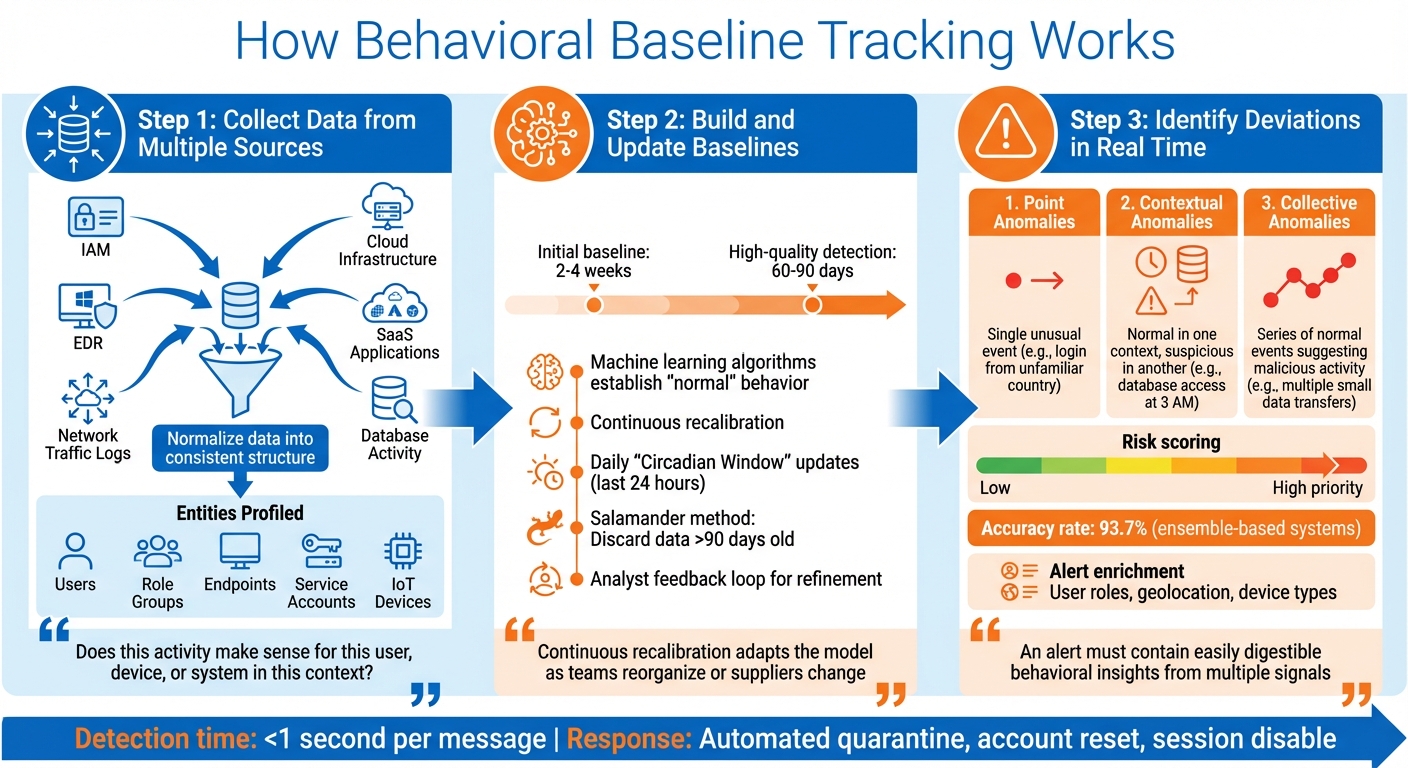
How Behavioral Baseline Tracking Works: 3-Step Process for Threat Detection
Behavioral baseline tracking follows a structured three-step process to transform raw data into actionable insights for identifying potential threats. This method connects the theoretical concept of baselines with practical threat detection.
Step 1: Collect Data from Multiple Sources
The process begins by gathering data from various sources within your digital ecosystem. This includes identity and access management (IAM) platforms, endpoint detection and response (EDR) tools, network traffic logs, cloud infrastructure, SaaS applications, and database activity. To make this data usable, it’s crucial to normalize it - standardizing different formats into a consistent structure. For example, a login event from Microsoft 365 should align with authentication data from a VPN or file server access logs.
The collection process also involves profiling specific entities, such as individual users, role-based groups, endpoints, service accounts, and even IoT devices. Advanced systems go further, capturing metadata from network traffic and mapping patterns across communication platforms like email, Slack, and Microsoft Teams. This helps detect subtle behavioral shifts. Additionally, inventorying authorized administrative tools (like osascript or system_profiler) is essential to differentiate legitimate IT activities from potential misuse by attackers employing "living-off-the-land" techniques.
"Behavioral analytics asks: 'Does this activity make sense for this user, device, or system in this context?'" – Seceon Inc.
Step 2: Build and Update Baselines
Once the data is standardized, the next step is to create accurate and adaptable baselines. Machine learning algorithms establish what constitutes "normal" behavior for each entity. Initial baselines typically take 2 to 4 weeks to form, but achieving high-quality anomaly detection requires 60 to 90 days of data collection to account for factors like business cycles, seasonal trends, and role-specific activities.
After the initial setup, these baselines evolve continuously. Models are recalibrated to reflect changes in teams, suppliers, or software. Many platforms use a "salamander method", where older records - usually beyond 90 days - are discarded to keep profiles current and conserve system resources. Daily updates, often referred to as "Circadian Window" updates, integrate the last 24 hours of activity to refresh the baseline.
Security analyst feedback is critical in refining these baselines. Analysts label alerts as false positives or confirmed threats, and this feedback is used to retrain algorithms overnight. This process helps the system differentiate between legitimate changes - like a data engineer downloading large files - and actual threats.
"Continuous recalibration adapts the model as teams reorganize or suppliers change, maintaining detection accuracy while reducing false positives." – Abnormal AI
With updated baselines in place, the system is ready to monitor for real-time deviations.
Step 3: Identify Deviations in Real Time
Once baselines are established, the system continuously monitors incoming activity and compares it to the expected patterns. Any deviation is flagged as an anomaly, which can fall into one of three categories:
- Point anomalies: A single unusual event, such as a login from an unfamiliar country.
- Contextual anomalies: Behaviors that are normal in one context but suspicious in another, like significant database access outside business hours.
- Collective anomalies: A series of individually normal events that, when combined, suggest malicious activity. For instance, multiple small data transfers could indicate data exfiltration.
The significance of anomalies varies. Systems assign risk scores based on the degree of deviation, contextual details, and relational analysis. For example, a data engineer downloading large files during work hours might generate a low risk score, but the same activity at 3:00 AM from a new device would trigger a high-priority alert. Ensemble-based systems, which combine multiple machine learning models, achieve impressive accuracy rates of 93.7%.
Alerts are enriched with metadata - such as user roles, geolocation, and device types - to help security teams quickly determine whether an anomaly is a genuine threat or a harmless variation. This added context sets modern behavioral detection apart from basic outlier detection, enabling faster and more effective responses.
"To successfully engage SOC and IR teams, an alert must contain easily digestible behavioral insights originating not from one (atomic) signal but multiple ones." – Alex Teixeira, Threat Detection Engineer
Benefits of Behavioral Baseline Tracking for SMEs
Small and medium-sized businesses (SMEs) face the same advanced cyber threats as large enterprises but often lack the resources to match their defenses. Behavioral baseline tracking helps bridge this gap by offering three key advantages that strengthen security operations.
Better Threat Detection
Behavioral tracking takes threat detection to the next level, identifying risks that traditional tools often miss. For instance, it can uncover zero-day exploits and stealthy, payload-less attacks that don't rely on known malware signatures. This is particularly important for threats like Business Email Compromise (BEC) and vendor fraud, which accounted for $2.77 billion in losses. These attacks often succeed by using social engineering tactics rather than malware, making them harder to catch with conventional filters. By analyzing factors like communication tone, timing, and relationship context, behavioral systems can spot these subtle but dangerous anomalies.
Additionally, behavioral tracking helps prevent account takeovers by flagging unusual patterns, such as impossible travel scenarios. With 79% of cyber threats in 2024 being malware-free, this approach provides crucial visibility into credential misuse and insider threats. For SMEs managing sensitive data or navigating strict compliance regulations, this added layer of security is especially valuable.
Fewer False Positives
One standout feature of behavioral baseline systems is their ability to adapt to legitimate changes, like employees traveling internationally or using new devices. This adaptability reduces the number of unnecessary alerts, cutting down on "alert fatigue." For example, during busy periods when work schedules shift or new devices are introduced, the system recognizes these as normal variations and avoids flagging them as threats.
"Higher precision means fewer false positives disrupting users... Lower operational load means AI handles the noise, not your analysts." - Lily Prest, Abnormal AI
By minimizing low-priority alerts, small security teams can concentrate on real threats instead of wasting time on benign activities. This streamlined approach improves efficiency and ensures quicker handling of genuine incidents.
Faster Response to Incidents
Speed matters in cybersecurity, and behavioral tracking enables teams to respond in seconds rather than hours. Alerts come with detailed, context-rich insights, allowing threats to be identified in under one second per message. Instead of manually piecing together logs from different systems, analysts get a complete view of the attack chain in one place. Automated tools can then take immediate action - quarantining malicious emails, resetting compromised accounts, or disabling suspicious sessions.
This rapid response significantly reduces "dwell time", the period attackers stay hidden within a system. By cutting dwell time, SMEs can prevent small incidents from escalating into full-blown breaches. For businesses without 24/7 security teams, automated responses provide around-the-clock protection without requiring additional staff.
"Small and medium-sized businesses benefit most when they handle sensitive data, face regulatory compliance, employ distributed workforces, or lack large security teams." – Abnormal AI
How to Implement Behavioral Baseline Tracking
Now that we've covered the concept of behavioral baselines, let’s dive into practical steps for tracking them effectively. You don’t need a massive budget or complex systems to get started. The key is selecting the right tools, integrating your data sources correctly, and ensuring everything evolves alongside your business.
Step 1: Choose AI-Powered Tools
Start by picking tools that adapt to your business operations instead of relying on outdated signature-based systems. Modern AI tools use dynamic modeling, which means they learn what’s normal for your organization and adjust automatically, saving you from constant manual updates.
Look for platforms that create individual user profiles instead of grouping everyone into broad categories. This granular approach helps detect subtle anomalies. For example, if your CFO downloads large files at 3:00 AM from a new device, the system should flag it - even if late-night activity is common for others on the finance team.
Cross-channel monitoring is another must-have. Attackers often use multiple entry points. Take the 2024 case where cybercriminals stole $60 million from a carbon products supplier by combining spoofed vendor emails with compromised tokens. The right tool should monitor activity across email, Slack, Microsoft Teams, and SaaS apps to catch these complex, multi-stage attacks.
Platforms listed on AI for Businesses can help you compare options tailored for SMEs. Prioritize tools with API-native architecture for quick deployment - often in under 30 minutes - and features like explainable AI, which clarifies why something was flagged (e.g., unusual timing, new location, sensitive file access) instead of issuing vague alerts.
"We have been seeing really interesting things out of the SecOps AI Agent already. It is driving faster decision-making and dispositioning of alerts, especially in cases of anomalous behavior." - Justin Lachesky, Director of Cyber Resilience, Redis
Here’s how AI-powered tools compare to traditional systems:
| Feature | Traditional Rule-Based Tools | AI-Powered Behavioral Tracking |
|---|---|---|
| Detection Method | Matches activity against known signatures | Learns "normal" and flags deviations |
| Maintenance | Requires constant manual updates | Self-adapts to organizational changes |
| Context | Analyzes events in isolation | Correlates signals across identity and behavior |
| Threat Type | Best for known malware/phishing | Best for zero-day, BEC, and insider threats |
| Alert Quality | High false-positive rates (noise) | High-fidelity, risk-scored alerts |
Step 2: Integrate and Configure Data Sources
Once you’ve chosen the right tools, the next step is integrating your data sources. Behavioral baselines are only as good as the data they rely on. Start by cataloging all legitimate tools your organization uses - this includes administrative software, department-specific apps, and system utilities. This inventory helps the AI differentiate between normal usage and potential threats.
Use API-based ingestion to connect your SaaS platforms seamlessly. Pull in signals from user behavior, identity, and external threat intelligence. For example, if someone runs a system profiler command, the AI should analyze the specific arguments to determine if sensitive data is being accessed. Authentication data, such as DKIM, SPF, and geolocation, can expose spoofing attempts or "impossible travel" scenarios.
Peer-group baselining adds another layer of precision. Instead of comparing everyone’s behavior to a single organizational standard, the AI compares users to their peers. For example, it might flag unusual activity by one finance analyst compared to others in the same department.
"Behavioral signals become far more actionable when paired with security-relevant attributes – such as identity permissions, network exposure, and sensitive data access." - Wiz
Step 3: Regular Monitoring and Updates
Behavioral baselines aren’t a one-and-done solution. Your business evolves - new employees join, roles change, and departments restructure. Keeping your baselines updated is crucial. Rolling baselines adjust automatically to these changes, ensuring that legitimate activities, like an executive’s international business trip, don’t trigger unnecessary alerts.
Begin with a 60–90 day training period to allow the AI to capture seasonal patterns, business cycles, and role-specific behaviors. After the initial phase, update baselines daily to catch real-time deviations. Regularly prune historical data - typically anything older than 90 days - to maintain system efficiency. Establish a feedback loop where your security team refines the model based on investigation outcomes, improving the AI’s accuracy over time.
Organizations that embrace AI tools extensively in 2025 are expected to reduce their data breach lifecycle by 80 days compared to those that don’t.
"The continuous learning loop is critical. Without it, baselines become stale, and false positive rates climb." - Vectra AI
Start small by focusing on high-risk users like IT admins, finance teams, and executives before expanding to the entire organization. This phased approach builds trust in the system while delivering quick results. With the average cost of a data breach now at $4.44 million, investing in proper monitoring and regular updates is a smart move that pays off in the long run.
Conclusion
Key Takeaways
Behavioral baseline tracking offers small and medium-sized enterprises (SMEs) a way to detect threats that traditional security tools often overlook. Remember, many recent cyber threats are malware-free, which makes signature-based systems ineffective against attacks like Business Email Compromise, credential theft, and social engineering. By understanding what "normal" looks like, AI-driven tracking can identify anomalies - such as unusual login activity, accessing data during off-hours, or unexpected communication patterns.
The results speak for themselves: businesses using behavioral analytics report 44% fewer insider threat incidents. They also experience fewer false positives, saving valuable time for security teams, and benefit from faster incident responses that can isolate threats in seconds rather than hours. Additionally, organizations leveraging AI security tools shorten their data breach lifecycle by 80 days, reducing both the financial and operational impact of an attack.
With these compelling benefits in mind, here’s how you can start incorporating behavioral tracking into your security strategy.
Next Steps for SMEs
To get started, focus on identifying your organization's most vulnerable areas - these typically include email systems, identity platforms, and employees with access to financial or sensitive data. Seek out API-based tools that integrate smoothly with your current infrastructure without requiring major network changes. Plan for a 60–90 day baseline training period to allow the system to adapt to your business’s unique cycles and seasonal variations.
Consider platforms like AI for Businesses to explore AI-powered security tools tailored for SMEs. Look for solutions that offer explainable AI, which helps clarify why certain activities are flagged, and prioritize systems with continuous learning capabilities to evolve alongside your business. With data breaches costing an average of $4 million and attackers moving laterally within 48 minutes, implementing behavioral baseline tracking is a critical step toward stronger, more proactive security.
FAQs
How long does it take to build an accurate behavioral baseline?
Building a precise behavioral baseline typically requires 2–4 weeks of monitoring user activity without setting off alerts. This period gives the system enough time to observe and recognize patterns of normal behavior, which is critical for identifying potential threats effectively.
What data sources should I connect first for baseline tracking?
To get started, focus on user activity data - things like login habits, how often users access systems, what resources they use, and how they interact with sensitive information. Then, bring in external data sources, such as IT and security logs, endpoint activity, and any behavioral data unique to your organization. Combining these inputs helps create detailed baselines that make it easier to spot anomalies and understand what "normal" behavior looks like.
How do I keep baselines current without increasing false alerts?
To keep behavioral baselines up-to-date and reduce false alerts, rely on dynamic modeling that learns and adjusts to normal activity patterns over time. Regular updates ensure the system evolves alongside legitimate changes, helping to lower the chances of false positives. Using real-time detection methods that are transparent and easy to interpret ensures that alerts are triggered only by genuinely unusual behaviors. This ongoing learning and adjustment process is essential for effective threat detection with minimal interruptions.