I’d start with native ad tools, then add software only where your team needs more control or less manual work. These 10 options cover ad delivery, catalog design, ad generation, testing, and reporting - but they don’t all do the same job.
My first check: channels, audience inputs, catalog connections, test controls, reporting, and total cost. The 7 specialized vendors need direct verification, so I’d treat their listed roles as evaluation targets, not confirmed features.
Quick Comparison
| Tool | What I’d evaluate it for | Main check |
|---|---|---|
| Meta Advantage+ and Catalog Ads | Social catalog personalization | Catalog setup, pixel data, and test controls |
| Google Performance Max and Responsive Search Ads | Search and shopping automation | Feed quality and reporting limits |
| Amazon Sponsored Ads and Performance+ | Retail media and DSP delivery | Product data, attribution, and spend terms |
| Smartly | Campaign and ad-production automation | Channels, feed templates, and reporting links |
| Hunch | Feed-based paid-social automation | Product and location inputs |
| Confect | Catalog ad design | Templates, product rules, and usage limits |
| Marpipe | Ad-element testing | Test safeguards and traffic needs |
| Criteo | Commerce ad delivery | Product-specific inventory and attribution |
| AdCreative.ai | AI ad generation | Formats, usage limits, and test handoff |
| Segwise | Ad performance analysis | Data connections and reporting consistency |
Before buying, I’d check data rights, assign feed and reporting owners, and run 1 capped pilot. My buying rule: <u>scale only when the results justify the full cost</u> - including software, setup, media, and review time.
4 Best AI Ad Generators in 2026 (I Tried Them ALL…)
sbb-itb-bec6a7e
2. Native Advertising Tools
These 3 platforms pair personalization with ad delivery, but each serves a different role. Costs come through media spend, not separate software licenses. Amazon DSP may have minimum-spend requirements or other commercial terms. [7]
| Comparison field | Meta Advantage+ Creative and Catalog Ads | Google Performance Max and Responsive Search Ads | Amazon Sponsored Ads and Performance+ |
|---|---|---|---|
| Channel coverage | Facebook, Instagram, and Audience Network where eligible | Search, Shopping, YouTube, Display, Maps, and Gmail | Amazon search and product pages; Performance+ extends reach through Amazon DSP to off-Amazon inventory |
| Personalization capabilities | Dynamic creative optimization (DCO), catalog-based 1:1 ads | Automated asset combinations, intent-based assembly | Shopping signal-based display/video, dynamic product ads |
| Targeting inputs | Look-alike audiences, pixel data, interest groups | Search intent, Merchant Center signals, customer lists | ASIN-based signals, in-market/lifestyle segments |
| Feed support | Meta Catalog (Shopify/BigCommerce) | Google Merchant Center / Shopping Feed | Amazon Listing / ASIN data |
| Testing options | Creative A/B testing, Advantage+ split testing | Automated asset testing (limited factorial control) | Audience split testing, A/B testing for Sponsored Brands |
| Reporting depth | Ads Manager (ROAS, attribution) | Cross-channel attribution, reporting limits in PMax | ACOS, ROAS, New-to-Brand metrics |
| Pricing model | Media spend | Media spend | Media spend (DSP may have minimums) |
| Mid-market fit | High (DTC focus) | High (Omnichannel focus) | High (Retail-centric brands) |
1. Meta Advantage+ Creative and Catalog Ads
Meta is strongest for social catalog retargeting. Advantage+ Creative adjusts visuals and copy, while Catalog Ads choose products based on catalog and pixel signals. Shopify teams can connect a catalog to show visitors ads for products they viewed. Ads Manager reports attributed results and ROAS.
2. Google Performance Max and Responsive Search Ads
Google covers broader search and shopping intent. Performance Max automates delivery across Google inventory. Responsive search ads assemble supplied text assets on Search.
A Merchant Center feed supports PMax’s Shopping activity; RSA does not select products from a catalog. Focus on feed quality first, then use supported experiments to compare asset groups or bidding setups.
Automated asset combinations are not controlled factorial tests. Google optimizes delivery rather than assigning traffic evenly across every combination. PMax reporting helps teams assess results, but it does not fully explain why each asset or placement was selected.
3. Amazon Sponsored Ads and Performance+
Amazon is the most commerce-native of the 3. Amazon Ads ties Sponsored Ads closely to shopping activity and product listings. Performance+ uses Amazon DSP to reach shoppers across off-Amazon inventory.
Review attributed sales alongside ACOS and ROAS, and add new-to-brand metrics where supported.
3. Specialized Ad Personalization Tools
Use specialized vendors when native platform tools don't cover feed control, ad generation, or cross-channel analysis. These tools can fill gaps in automation, feed design, ad production, and measurement.
The source material does not verify these 7 tools. Treat the notes below as questions to check with each vendor, not confirmed comparisons.
4. Smartly
Check automation workflows, supported channels, and campaign activation. Confirm feed-based templates, audience inputs, and reporting connections. Get pricing and setup terms in writing, and check how controlled experiments stay separate from automated optimization.
5. Hunch
Check feed-based paid-social workflows using your product and location data. Confirm feed refresh requirements, localization rules, conversion connections, test controls, and product-level reporting. Request pricing based on your variant volume and implementation needs.
6. Confect
Check catalog design workflows, supported catalog destinations, feed enrichment, product rules, templates, and overlays. Clarify which tasks happen in the tool and which happen on the ad platform. Confirm subscription limits and how design variations connect to testing and measured results.
7. Marpipe
Check testing workflows, supported channels and feeds, ad-element tests, and experiment reporting. Confirm statistical safeguards and how the tool handles uneven delivery. Assess testing capacity against your traffic - don't assume a minimum traffic threshold.
8. Criteo
Check commerce delivery against written specifications for the specific product. Confirm inventory, commerce signals, catalog requirements, recommendations, testing terms, and onboarding terms. Get attribution windows and reporting access in writing before comparing performance or costs.
9. AdCreative.ai
Check ad-generation workflows, supported brand inputs, formats, catalog integrations, and reporting connections. Confirm subscription limits and any separate requirements for campaign activation. Check how generated variants enter controlled tests, and treat predictive scores as estimates, not results.
10. Segwise
Check performance analysis, supported data connections, ad metadata, cross-network reporting, and current pricing. Verify feed analysis, campaign activation, and test execution as separate capabilities. Confirm that conversion definitions and attribution windows stay consistent across accounts.
4. Choose and Set Up Your Tools
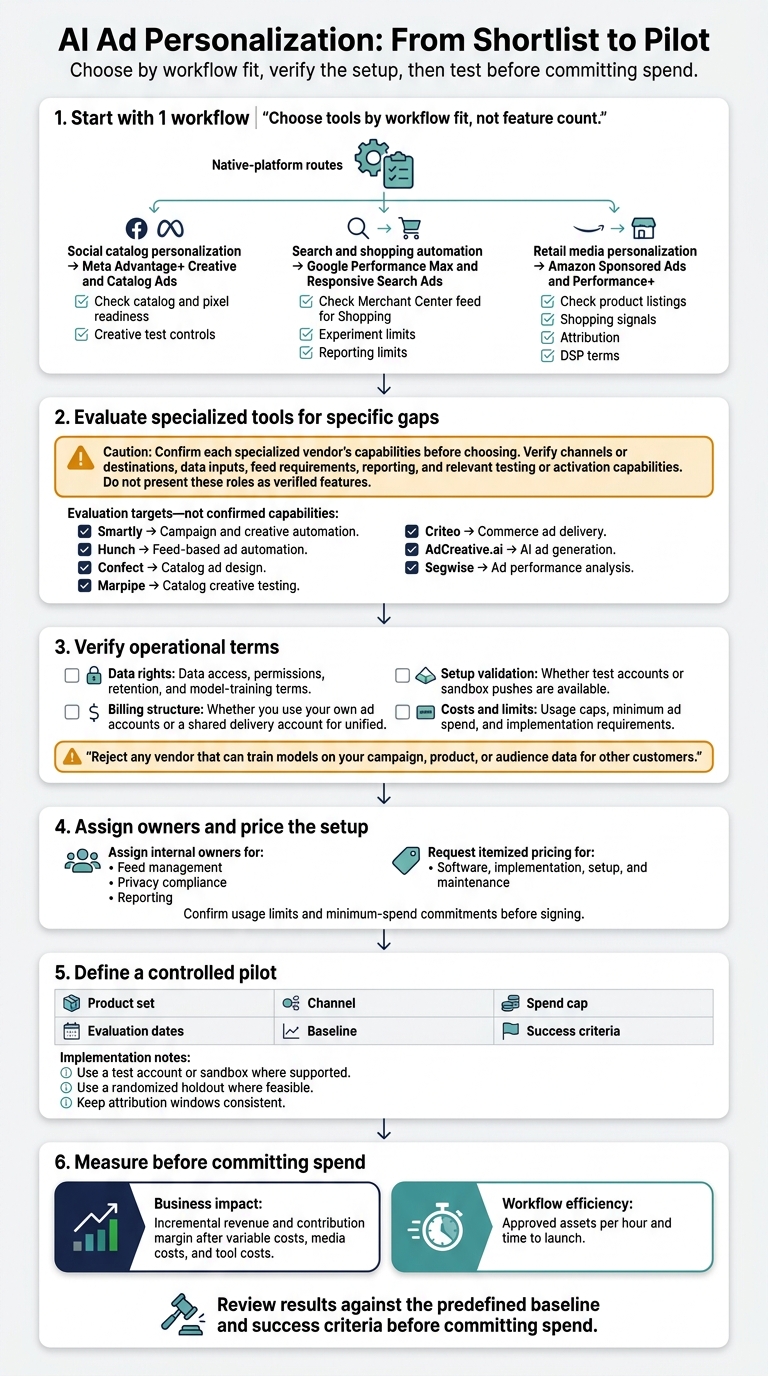
AI Ad Personalization: From Shortlist to Pilot
Match Tools to Team Needs
Choose tools by workflow fit, not feature count. After comparing capabilities, narrow your shortlist by channel and team capacity. Start with 1 workflow.
| Workflow need | Channel | Tool to evaluate | Selection check |
|---|---|---|---|
| Social catalog personalization | Facebook and Instagram | Meta Advantage+ Creative and Catalog Ads | Catalog and pixel readiness; creative test controls |
| Search and shopping automation | Google inventory | Google Performance Max and Responsive Search Ads | Merchant Center feed for Shopping; experiment and reporting limits |
| Retail media personalization | Amazon and Amazon DSP inventory | Amazon Sponsored Ads and Performance+ | Product listings, shopping signals, attribution, and DSP terms |
| Campaign and creative automation | Confirm supported channels | Smartly | Feed templates, audience inputs, testing controls, and reporting connections |
| Feed-based ad automation | Confirm paid-social destinations | Hunch | Product and location inputs, refresh requirements, and product-level reporting |
| Catalog ad design | Confirm catalog destinations | Confect | Templates, overlays, product rules, and subscription limits |
| Catalog creative testing | Confirm supported channels | Marpipe | Feed support, experiment safeguards, and traffic requirements |
| Commerce ad delivery | Confirm product-specific inventory | Criteo | Commerce signals, catalog requirements, attribution, and onboarding terms |
| AI ad generation | Confirm formats and activation destinations | AdCreative.ai | Brand inputs, catalog integrations, usage limits, and test handoff |
| Ad performance analysis | Confirm network connections | Segwise | Ad metadata, reporting alignment, and separate activation or testing capabilities |
Use these options to build your shortlist, not as a feature-by-feature comparison. Confirm each specialized vendor’s capabilities before choosing.
Check Data, Ownership, and Costs
Verify the terms that affect launch and control before selecting a vendor.
| Operational check | What to verify |
|---|---|
| Data rights | Data access, permissions, retention, and model-training terms |
| Billing structure | Whether you use your own ad accounts or a shared delivery account for unified billing |
| Setup validation | Whether test accounts or sandbox pushes are available |
| Costs and limits | Usage caps, minimum ad spend, and implementation requirements |
Assign internal owners for feed management, privacy compliance, and reporting. Check data-use terms, and reject any vendor that can train models on your campaign, product, or audience data for other customers [7].
Ask for itemized pricing covering software, implementation, setup, and maintenance. Confirm usage limits and minimum-spend commitments before signing.
Run a Pilot and Measure Results
Validate the setup with a controlled pilot before committing spend. Define the product set, channel, spend cap, evaluation dates, baseline, and success criteria. Use a test account or sandbox where supported [7].
Use a randomized holdout where feasible, and keep attribution windows consistent. Measure incremental revenue and contribution margin after variable costs, media costs, and tool costs. Also track approved assets per hour and time to launch.
For broader planning, AI for Businesses is a directory for finding and adopting AI tools, not executing ads.
5. Conclusion: Choose for Your Workflow
Start with native tools for baseline personalization. Add specialized software only when feed control, ad production, testing, or reporting becomes a bottleneck. Meta Advantage+ or Google Performance Max is enough for many mid-market teams. Across paid social, search, display, and retail media, choose based on your workflow, not a feature checklist.
Match tools to your channels, data rights, and approval process. Use clean feeds and approved audience data, and make clear who owns approvals. Buy only when the time saved outweighs software, setup, and review costs.
Run a narrow pilot before scaling. Test whether it reduces manual work, delivers usable ad content faster, and improves ROAS, CPA, or CTR against your baseline. Measure incremental revenue and contribution margin, too. Expand only when the pilot beats baseline after media and software costs.
FAQs
How much conversion data do I need to start?
You can start without a large conversion history. Some platforms draw on large datasets: ADXL uses 5 million conversion activities to inform its models [1].
Others work with limited data. Vue.ai automatically switches to content-based suggestions when conversion data is insufficient, helping maintain performance [2]. Zeely lets you launch campaigns immediately with tested templates and product data, without an extensive conversion history [3].
How can I tell if personalized ads drive incremental sales?
Use platforms with cross-channel analytics and attribution modeling to link conversions to UTM parameters, channel signals, and timing [1][2][3]. Run A/B tests to measure how specific ad variations affect revenue and growth [4][5].
Track real-time return on ad spend (ROAS) and conversion metrics in a central dashboard. Use it to see which channels and ad concepts drive incremental performance and which waste spend [6][2][4].
How do I keep AI-generated ads on-brand?
Choose platforms with brand DNA or voice training features. Zeely lets you save logos, colors, fonts, and tone to keep ad content consistent [1]. Jasper and Typeface analyze your brand guidelines and assets to train your brand voice [2].
For campaign management, ADXL lets you upload your own assets and logos [3]. Trapica provides brand safety and security features to keep automated campaigns aligned with your guidelines [4].