SMEs are under attack. In 2026, 43% of cyberattacks target small businesses, and 60% of those hit shut down within six months. The rise of AI-powered attacks - like phishing emails with a 54% click rate or voice cloning in 80% of vishing scams - makes traditional defenses obsolete.
But there’s hope. AI-driven security systems can detect zero-day threats, reduce alert fatigue, and respond to breaches in hours instead of months. Here’s how SMEs can protect themselves:
- Identify vulnerabilities: From poisoned training data to shadow AI, understand risks across the AI lifecycle.
- Adopt AI tools: Use systems that monitor behavior, detect anomalies, and automate responses.
- Vet third-party tools: Ensure vendors follow strict data usage policies and security standards.
- Set governance policies: Simplify AI usage rules and assign clear roles for oversight.
- Train staff: Focus on AI-specific threats like phishing and shadow AI misuse.
- Secure data pipelines: Encrypt, control access, and validate inputs to block adversarial attacks.
- Automate response: Deploy playbooks to handle incidents faster and more effectively.
AI is both a weapon and a shield in today’s cybersecurity landscape. For SMEs, the key is to act now - before the next attack hits.
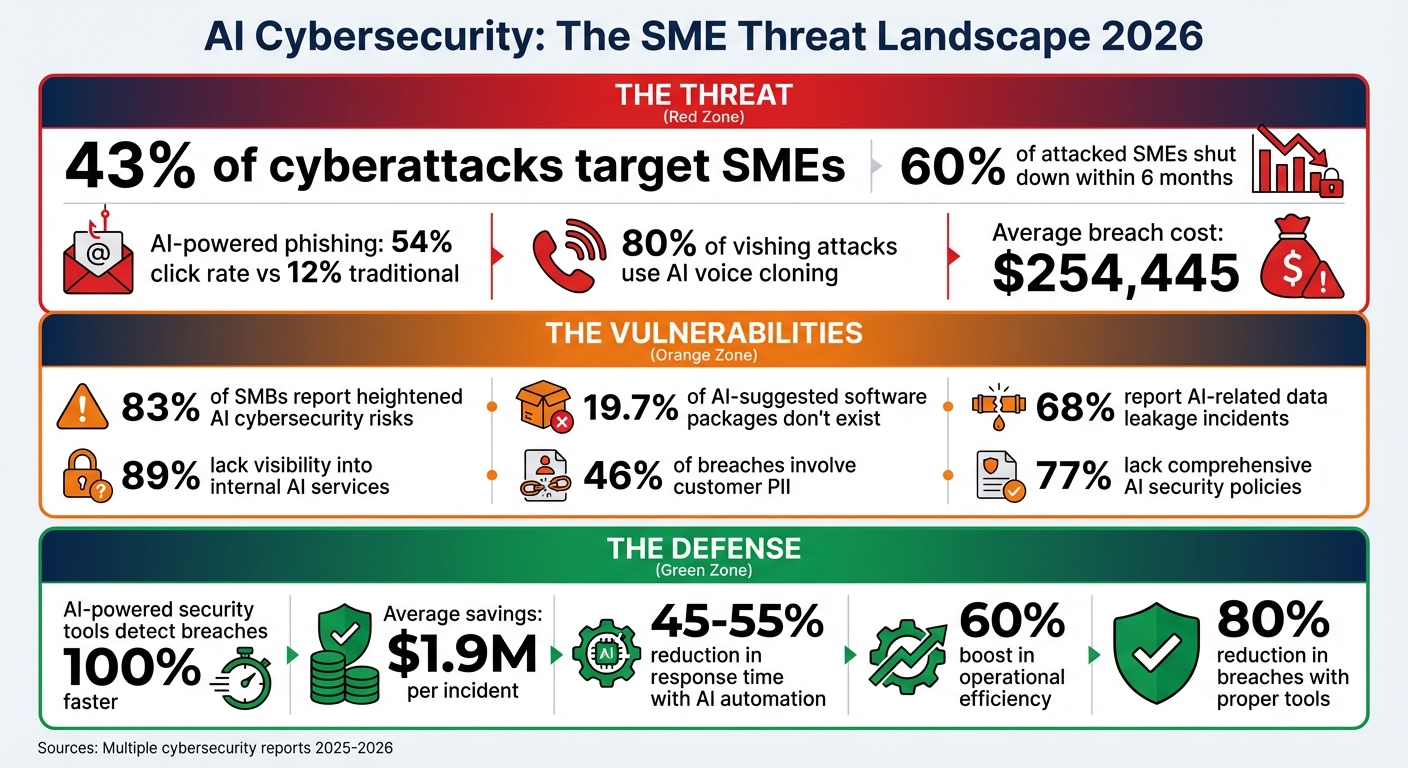
AI Cybersecurity Threats and Defense Statistics for SMEs 2026
AI & Cybersecurity: How AI Is Transforming Small Business Security
Identifying AI Risks Throughout the System Lifecycle
AI systems face a range of vulnerabilities from the moment they are developed to when they are actively used. A staggering 83% of small and medium-sized businesses (SMBs) report heightened cybersecurity risks tied to AI systems. Unlike traditional software, which tends to fail in predictable ways, AI operates on probabilities. Even with 99% accuracy, an AI model will still make errors 1% of the time - and those errors can be unpredictable.
During the development phase, threats like data poisoning can take hold. This happens when attackers manipulate training data to embed backdoors or skew predictions. A newer threat, known as slopsquatting, has also emerged. Here, attackers register fake software package names that AI coding tools may "hallucinate", tricking developers into downloading malicious software. Shockingly, 19.7% of software packages suggested by AI coding assistants don’t exist, and 43% of these fake packages remain persistent.
In the deployment phase, shadow AI - or unauthorized AI use - poses serious risks. A surprising 89% of organizations admit they lack visibility into internal AI services. Additionally, insecure APIs without proper authentication can allow attackers to reverse-engineer proprietary model logic.
"Deploying AI at your organization introduces a variety of new and often complex security risks. As such, it is essential to understand your unique AI threat landscape to properly safeguard AI systems."
- Ethan Heller, GRC Subject Matter Expert, Vanta
Once deployed, maintenance introduces its own set of challenges. These include model drift (where the model's performance degrades over time), prompt injection attacks, and sponge attacks, where overly complex queries overload the system. These evolving threats highlight the need for proactive measures to address vulnerabilities.
Common Vulnerabilities in AI Systems
Breaking down these lifecycle risks reveals some of the most common and dangerous vulnerabilities in AI systems:
- Adversarial attacks: Small, subtle changes to inputs can cause major prediction errors. For instance, altering a single pixel might make an AI misidentify a stop sign.
- Training data bias: Incomplete or unbalanced datasets can lead to discriminatory outputs. Given that 46% of data breaches involve customer personally identifiable information (PII), biased AI systems could unintentionally expose sensitive data.
- Model supply chain risks: Many businesses rely on open-source components or pre-trained models, which may contain malicious elements. This risk is compounded when AI coding tools hallucinate dependencies, leading to compromised software.
- Misconfigured infrastructure: Issues like public cloud storage, hardcoded credentials, or unsecured APIs can create easy entry points for attackers. For SMBs, the average cost of a breach is $254,445 per incident, with many breaches stemming from simple configuration errors.
Reviewing Third-Party AI Tools
When using third-party AI tools, it’s essential to move beyond one-time security checks. AI systems evolve, so continuous monitoring is critical. Key factors to investigate include:
- Training origins: Understand where the vendor’s AI was trained and whether third-party models are in use.
- Vulnerability testing: Ensure the vendor tests for issues like prompt injection or model extraction.
- Data usage policies: Confirm whether your data will be used to train or improve their models. Alarmingly, 13% of organizations have experienced breaches tied to such practices by 2025.
Also, watch for fourth-party dependencies - when multiple vendors rely on the same underlying AI infrastructure, one failure can ripple across systems. Contracts with vendors should include AI-specific clauses, such as:
- Prohibiting the use of your data for training without explicit consent.
- Defining liability for AI errors.
- Allowing security audits.
For added assurance, look for vendors with SOC 2 Type II certification. In healthcare, a Business Associate Agreement (BAA) is mandatory. Vendors should also provide model cards - documentation detailing their AI’s decision-making process - and have manual fallback procedures in case of system failures.
Finally, use automated tools like GitHub Dependabot or Snyk to scan for malicious or hallucinated packages before deploying them. Establishing a formal approval process for new AI tools can prevent costly mistakes. For an SMB, avoiding a $254,445 breach could mean the difference between survival and shutting down after a cyberattack. Careful vetting of third-party tools is a crucial step in building a secure AI strategy.
Creating AI Governance and Policies
Once you've identified AI risks, the next step is to establish a governance framework to manage them effectively. Here's a surprising statistic: 68% of organizations have reported AI-related data leakage incidents. The bright side? 95% of businesses now acknowledge the need to update governance practices to keep pace with AI advancements. A straightforward framework can help address risks like Shadow AI - where nearly half of employees (45%) use AI tools without formal approval - while still encouraging innovation.
Setting Up AI Usage Policies
When it comes to AI usage policies, simplicity wins. A single-page policy that non-technical staff can easily understand often works better than a dense manual that no one reads. Focus on three key areas: approved tools, prohibited use cases, and mandatory human review.
Start by classifying your data into clear categories that align with AI usage. For instance:
- Public data: Safe for any AI tool.
- Internal data: Restricted to approved enterprise tools.
- Confidential/Restricted data: Only handled by self-hosted or no AI tools.
This straightforward system can help prevent issues, especially since 46% of data breaches involve customer PII.
Your policy should also require human oversight for high-stakes outputs. For example, any AI-generated customer communications, financial forecasts, or legal advice must be reviewed by a qualified professional before being released.
"Accountability should never become ambiguous simply because a model contributed to the draft." - TMG, llc
Real-world examples highlight the value of strong governance. In 2025, an 85-person firm in England risked losing a £180,000 ($234,000) contract due to AI governance concerns. By consolidating 17 separate ChatGPT accounts into one enterprise license, they saved £2,100 ($2,730) annually. Within six months, they achieved 87% policy compliance and cut content production time by 33%. This success was managed by just the Managing Director and a systems administrator - proving that effective governance doesn’t require a massive team.
Vendor management is another critical piece. Before approving any AI tool, confirm that your data won’t be used for model training and ensure clear data retention policies. Consider this: AI-related data breaches cost an average of £3.8 million ($4.94 million) and take about 290 days to detect and contain. Thorough vendor checks can save you from these costly risks.
If you're unsure about legal compliance, an external review can help. Legal reviews of AI policies typically cost between £500 and £1,200 ($650 to $1,560). For a structured approach, explore the NIST AI Risk Management Framework, which is free to use and focuses on four functions: Govern, Map, Measure, and Manage.
Once your usage policies are in place, assign specific roles to ensure they’re enforced and refined.
Defining AI Governance Roles
You don’t need to create new roles to manage AI governance - leverage your existing team. Assign an IT Lead, Data Manager, or COO to take charge.
"Designating one person or team responsible for all AI initiatives also provides a single point of contact for any AI-related inquiries or updates." - Jason Holloway, Conosco
Form a cross-functional governance group that meets quarterly. This team should include representatives from IT (security), operations (business context), and legal or compliance (regulatory alignment). Organizations with such teams report 40% fewer compliance incidents, and the time commitment is minimal - about 10% of a manager’s time.
Train internal champions in each department to serve as resources for their peers. A 4-hour training session on prompt engineering and quality checks is often enough. This decentralized approach builds support and lightens the load on your central team.
For more critical decisions, consider creating an AI Ethics Committee to act as an internal watchdog. And don’t underestimate the importance of executive sponsorship. Without visible support from a C-level executive like the CEO or Managing Director, governance efforts may lack the traction and resources they need.
Here’s a quick breakdown of key roles and their responsibilities:
| Role | Primary Responsibility | SME Implementation Tip |
|---|---|---|
| Executive Sponsor | Resource allocation & strategic alignment | Typically the CEO or Managing Director |
| AI Lead/Data Manager | Single point of contact for AI ethics | Can be an existing IT Lead or Data Manager |
| Internal Champions | Peer support & prompt engineering | Choose champions from various departments |
| Governance Working Group | Risk assessment & policy creation | Includes IT, Legal, and Operations |
As Karthik Ravindran from Microsoft puts it:
"Effective governance of AI is more than just a set of policies and procedures; it's a strategic imperative for organizations seeking to thrive."
Start small. Document your decisions, learn from the process, and refine your approach over time. Even a basic governance structure can put you ahead of the 77% of organizations that still lack comprehensive AI security policies. With roles defined, the next step is implementing technical security measures to safeguard your AI systems.
Applying Security Controls
Securing AI systems requires thoughtful measures to reduce risks effectively. With 13% of organizations experiencing AI-related breaches in 2025, and 97% of those breaches linked to inadequate access controls, it's clear that even basic safeguards can make a huge difference. The good news? You don’t need a massive budget or specialized security team to protect your AI infrastructure.
Protecting Data Pipelines
The data pipeline - spanning collection, processing, and output - is a critical area to secure. A breach here can expose sensitive records, compromise model outputs, or leak proprietary data.
Start by prioritizing encryption. Use TLS protocols to secure data in transit and encrypt stored data at rest. This ensures that unauthorized parties can’t access your information. For particularly sensitive data, such as Social Security numbers or payment details, consider tokenization. This method replaces real data with placeholders during processing, adding an extra layer of protection.
Access controls are just as important. Implement Role-Based Access Control (RBAC) to ensure that employees and AI systems only access the data necessary for their specific tasks. Limiting access drastically reduces the chance of exposure.
To detect tampering, track data lineage using digital signatures and cryptographic checksums. This is crucial because even a tiny fraction - just 0.1% of poisoned training data - can introduce backdoors into an AI system.
Deploy Data Loss Prevention (DLP) tools to stop sensitive information from being inadvertently shared with AI tools. For example, Microsoft Purview, included in Microsoft 365 Business Premium ($22/user/month), can automatically identify and block sensitive data like PII or proprietary code from being submitted to AI interfaces. This step addresses a common vulnerability: employees accidentally pasting confidential information into consumer AI platforms.
"Deploying AI at your organization introduces a variety of new and often complex security risks. As such, it is essential to understand your unique AI threat landscape to properly safeguard AI systems." - Ethan Heller, GRC Subject Matter Expert, Vanta
When retiring datasets, follow NIST Special Publication 800-88 guidelines. These outline three disposal methods: Clear (overwriting data), Purge (cryptographic erasure), and Destroy (physical shredding). The method you choose should align with the sensitivity of the data. Proper disposal is often overlooked, especially by smaller organizations, but it’s critical to prevent unauthorized recovery.
Finally, audit third-party AI tools. Many consumer platforms, like ChatGPT, use input data to train their models, whereas enterprise versions (e.g., ChatGPT Enterprise or Microsoft 365 Copilot) explicitly opt out of such practices. Upgrading to enterprise tiers often involves minimal cost differences but provides much stronger security measures.
Once your data pipeline is secure, the next step is defending against adversarial threats.
Preventing Adversarial Attacks
Adversarial attacks manipulate inputs to trick AI systems into making errors. For example, researchers demonstrated how placing a printed poster over a stop sign caused a self-driving car’s AI to misclassify it as a speed limit sign.
Input sanitization serves as your first defense. Techniques like "feature squeezing" (reducing input precision or color bit-depth) can disrupt adversarial patterns before they reach your system. Random transformations, such as cropping or rotating images, can also make it harder for attackers to exploit vulnerabilities.
Incorporate adversarial training into your model's development. This involves exposing the model to both clean and malicious data during training. Methods like FGSM (Fast Gradient Sign Method) and PGD (Projected Gradient Descent) can create adversarial examples that help your model learn to identify and resist such attacks.
Restrict access to system details. Avoid exposing sensitive information like model architecture or weights through APIs. Instead, return only predicted labels rather than detailed probability scores. This makes it harder for attackers to reverse-engineer your model.
Rate limiting is another simple yet effective measure. By capping the number of API queries a user can make within a specific timeframe, you can prevent attackers from repeatedly probing your model for weaknesses. This is especially vital for public-facing AI services.
For applications where security is paramount, consider ensemble methods. By combining predictions from multiple diverse models, you make it exponentially harder for an attacker to craft inputs that deceive all models simultaneously. This strategy adds resilience without requiring major infrastructure changes.
| Attack Type | Description | Defense Strategy |
|---|---|---|
| Poisoning | Manipulating training data | Data validation and anomaly detection |
| Adversarial | Crafting deceptive inputs | Adversarial training and input preprocessing |
| Prompt Injection | Embedding harmful instructions | Input sanitization and prompt isolation |
| Model Inversion | Reverse-engineering outputs | Differential privacy and output obfuscation |
| Backdoor | Embedding hidden triggers | Regular audits and verified models only |
Regular red teaming - simulated attacks on your own systems - helps identify vulnerabilities before real attackers do. Even a basic quarterly review can reveal gaps in your defenses.
Lastly, anonymize inputs before submitting them to third-party AI tools. Remove identifiers like names and addresses to maintain compliance and safeguard customer trust. AI-powered security tools can also help. Organizations using such tools report identifying breaches 100% faster and saving an average of $1.9 million per incident. These protections are not just smart - they’re cost-effective.
With these safeguards in place, you can now explore how AI itself can enhance your incident response strategy.
sbb-itb-bec6a7e
Using AI to Automate Incident Response
Expanding on existing security measures, AI-driven automation significantly reduces response times and minimizes operational hiccups. Modern threats evolve too quickly for manual incident response to keep up. Security teams face an overwhelming number of alerts daily, making it nearly impossible to address them all manually. Here's the good news: AI can handle much of this workload, cutting your Mean Time to Respond (MTTR) by 45–55%.
AI shines at handling repetitive, time-draining tasks that often slow down security teams - like prioritizing alerts, enriching data, and gathering context. It can automatically link related alerts, pull information from threat intelligence feeds, and separate genuine threats from false alarms. This frees up your team to focus on more complex decisions instead of getting bogged down in manual investigations. For instance, in 2024, Grammarly's security engineering team adopted an AI-assisted workflow to automate cloud context gathering. By reconstructing event sequences and correlating identities automatically, they slashed their average investigation time by 90%, reducing it from 30–45 minutes per alert to just four minutes.
"AI doesn't replace SOC decision-making. Analysts still validate the narrative, confirm impact, and choose next steps; AI simply removes the manual, repetitive work required to get there." - Wiz
The key to success lies in starting small. Focus on automating 3–5 high-value workflows, such as phishing email analysis or malware containment, before attempting more extensive automation. This approach creates a solid foundation for broader response strategies.
Building Automated Response Protocols
Automated response protocols, often called playbooks, are predefined digital workflows that execute automatically when specific threats are detected. These playbooks can take over as much as 70% of repetitive investigation tasks.
Start by identifying repetitive, high-volume tasks that consume your team's time. Examples include phishing triage, malware containment, and account compromise response. For each scenario, design a playbook that outlines the exact actions the system should take. Take ransomware as an example: a playbook might isolate the affected host, block related IP addresses, terminate active sessions, and notify the team immediately.
Integration is a vital step. Your automation platform (commonly referred to as SOAR - Security Orchestration, Automation, and Response) needs to connect seamlessly with your existing tools, such as SIEM (Security Information and Event Management), EDR (Endpoint Detection and Response), firewalls, and identity management systems. By integrating these systems, AI can gather data, correlate alerts, and execute containment actions across your network.
A risk-based approach ensures your team focuses on the most critical incidents. Configure your platform to prioritize alerts based on factors like asset importance, user privileges, and threat severity. For instance, a suspicious login attempt on a regular employee account might warrant monitoring, while the same activity on an admin account could trigger immediate containment and escalation.
For actions that could disrupt essential operations, implement human-in-the-loop controls. Decisions like shutting down a critical server should always require human approval, even with automation in place.
Before full deployment, test your automated protocols in shadow mode. This means logging potential actions without executing them, allowing you to identify and address edge cases. Once fine-tuned, these systems can operate with minimal risk.
Finally, ensure every automated action is logged with detailed audit trails. Include timestamps, decision rationales, and outcomes in the logs. This documentation supports compliance, aids in post-incident reviews, and helps refine your processes over time.
Setting Up Real-Time Monitoring
While automated protocols enable quick responses, real-time monitoring ensures threats are detected as they happen. AI-powered monitoring offers constant oversight of your networks and systems, identifying threats as they emerge. Unlike traditional monitoring methods that rely on known threat signatures, AI uses behavioral baselines and anomaly detection to spot suspicious activities - even from previously unknown attack methods.
Start by defining what "normal" looks like within your environment. AI systems use User and Entity Behavior Analytics (UEBA) to establish baselines for typical user and system behavior. Deviations from these baselines often signal insider threats, compromised accounts, or active breaches.
One challenge with real-time monitoring is alert fatigue. Without proper tuning, your team could be inundated with false positives. AI helps by filtering out noise and prioritizing alerts based on their potential impact.
Confidence thresholds play a critical role in maintaining reliability. Automated actions, like isolating a device or blocking an IP address, should only occur when the AI's confidence score meets a predefined level. This ensures a balance between speed and accuracy.
"Confidence thresholds and human-in-the-loop controls aren't optional - they're what keeps automation from causing more damage than it prevents." - Secure.com
Accurate monitoring depends on high-quality data. Ensure consistent data normalization across all sources and maintain comprehensive coverage of your infrastructure. Gaps in log collection can create blind spots, leaving your systems vulnerable.
Continuous feedback loops are essential for improving monitoring accuracy. Track metrics like override rates (how often analysts disagree with AI decisions), model accuracy, and false positive rates. Use this data to refine detection rules and adjust confidence thresholds. Keep an eye out for model drift - when an AI model's performance degrades over time - and concept drift, which occurs when relationships between data features change. Regular retraining ensures your AI adapts to evolving threats and operational changes.
For smaller organizations without a 24/7 in-house security team, partnering with a Managed Detection and Response (MDR) provider can be a smart move. Many MDR services now include AI-powered monitoring, offering enterprise-level capabilities without the cost of building your own Security Operations Center.
Lastly, implement circuit breakers - features that let you disable AI-powered systems immediately if they start producing unreliable results. This safeguard allows you to quickly revert to manual processes, preventing automated errors from escalating issues further.
Training Staff and Updating Systems
The best AI security tools won’t protect your business if your team isn’t prepared to use them effectively. With 82% of ransomware attacks targeting small and medium-sized enterprises (SMEs) and 60% of breached small businesses closing within six months, employee training is not optional - it’s essential. Instead of overwhelming your team with long, tedious sessions, consider microlearning modules. These short, three-to-five-minute lessons delivered via platforms like Slack or Teams can improve retention by 60%.
Training should focus on AI-specific threats that traditional programs often miss. For instance, AI-generated phishing emails have a staggering 54% click-through rate, compared to just 12% for human-written ones. Similarly, 80% of vishing attacks now involve AI-driven voice cloning. Employees need to understand that even flawless grammar doesn’t guarantee an email is safe. Highlight emerging tactics like deepfakes and "slopsquatting", where attackers exploit fake software packages suggested by AI tools. To combat these risks, establish out-of-band verification protocols - like confirming financial requests through a trusted phone call. These steps align with broader automated threat response measures.
"Make sure you have a culture of shared responsibility, where every single person in your organization... feels accountable for protecting your data and brand." - Siroui Mushegian, CIO, Barracuda
Regular tabletop exercises involving everyone from interns to executives can help clarify roles during a security incident. These exercises also expose gaps in your response plan. Shockingly, only 11% of businesses have a formal incident response plan, and of those, 30% rarely or never test it. Alongside training, regular system audits ensure your human safeguards work hand-in-hand with technical controls.
Teaching Employees About AI Security
Start by addressing "shadow AI" - unapproved AI tools that might compromise sensitive data. Make it clear which AI tools are authorized for business use. For instance, free AI chatbot versions could process and retrain on your input data, while enterprise solutions often provide stronger data protection.
Incorporate AI-powered phishing drills to simulate advanced attacks. These drills can reduce phishing click rates by 20–40%, though their effectiveness fades within six months without regular reinforcement.
For technical teams, adopt a human-in-the-loop approach for AI-generated code. Require peer reviews for all AI-suggested code. Research shows 19.7% of software packages recommended by AI coding assistants don’t actually exist, creating potential vulnerabilities. Developers should verify package names against official registries, especially for new or lightly downloaded packages.
Tailor training to your organization’s size:
- Small teams (10–50 employees): Focus on AI usage policies and vishing verification.
- Mid-sized teams (50–200 employees): Implement phishing drills and dependency scanning.
- Larger SMEs (200–500 employees): Conduct comprehensive tabletop exercises and enforce strict AI code review protocols.
This targeted approach equips employees to handle threats while complementing automated AI-driven security measures.
| SME Size | Typical IT Resource | Recommended Training Focus |
|---|---|---|
| 10–50 Employees | Part-time or outsourced help | AI usage policies & vishing verification |
| 50–200 Employees | 1–2 general IT staff | Phishing drills & dependency scanning |
| 200–500 Employees | 3–8 person IT department | Tabletop exercises & AI code review |
While training addresses human vulnerabilities, regular audits ensure technical defenses remain strong.
Running Regular System Audits
Training helps reduce human error, but technical audits are vital to catch hidden threats. Establish a tiered audit schedule to stay ahead:
- Monthly: Check AI-driven decisions for anomalies or discriminatory patterns.
- Quarterly: Review data access logs and evaluate the demographic impact of AI decisions to ensure fairness.
- Annually: Conduct a full security review and bias audit to confirm your AI systems remain secure and equitable.
Leverage tools like Snyk, GitHub Dependabot, or OWASP Dependency-Check to automate dependency scanning and block risky or fake software packages.
Enable automatic updates to maintain a strong patching schedule, but manually patch critical systems when needed. Test your immutable backups monthly to ensure they’re clean and accessible, a crucial safeguard against ransomware attacks.
Before signing contracts with vendors, audit their AI practices to confirm they follow strong security standards. Track key metrics - such as override rates, false positives, and response times - to meet the 1-10-60 standard: detect threats within 1 minute, investigate within 10 minutes, and contain breaches within 60 minutes. These steps ensure your systems stay resilient against evolving threats.
Using AI for Businesses to Improve Threat Response
Expanding on the earlier strategies, small and medium-sized enterprises (SMEs) can strengthen their security measures by incorporating specialized AI tools into their operations.
What AI for Businesses Offers
For SMEs without a dedicated IT team, finding the right AI security tools can feel overwhelming. AI for Businesses simplifies the search by providing a curated directory of AI tools tailored specifically for SMEs and growing companies. This platform helps businesses evaluate tools based on key factors like return on investment (ROI), compatibility with existing systems (like Slack or Gmail), and ease of use. To make implementation smoother, it also includes integration guides that show how these tools can work together, making it easier to build a cohesive security system.
The directory features tools with pricing that fits various budgets, ranging from $3 per user/month for basic endpoint protection to $999/month for advanced, enterprise-level threat intelligence. These options make it possible for businesses to enhance their security without breaking the bank.
Recommended Tools for Threat Response
Through AI for Businesses, SMEs can access tools designed to tackle their unique security challenges. For instance:
- QShield: Offers enterprise-level email threat protection starting at $199/month. By using natural language processing, it identifies AI-generated phishing emails, addressing the fact that 91% of cyberattacks originate from email.
- ThreatLight: Provides 24/7 managed detection and response services, ensuring compromised systems are isolated within minutes.
- ThreatMon AI: Delivers real-time risk assessments and monitors the dark web, helping businesses identify threats before they infiltrate their networks. Companies using these tools have reported a 60% boost in operational efficiency and an 80% reduction in breaches.
- Writesonic: Focuses on crisis management by monitoring social media sentiment to uncover potential risks to a brand’s reputation.
When selecting tools, prioritize features like behavioral threat detection (which identifies 99.8% of threats), automated ransomware remediation, and vulnerability prioritization to avoid alert fatigue. Leveraging the right tools from this directory can simplify incident response and enhance overall data protection efforts.
Conclusion
AI-driven threat response has become a lifeline for small and medium-sized enterprises (SMEs). The stakes are high - studies reveal that 60% of SMEs shut down within six months of a cyberattack, with the average breach setting businesses back roughly $254,445 per incident. By automating tasks traditionally handled by large security teams, AI brings enterprise-level security to SMEs, even those with limited IT resources.
A key area to focus on is email security, as over 90% of successful breaches target SMEs through this channel. To tackle this, consider a phased approach:
- First 30 days: Enable multi-factor authentication and create a device inventory.
- Next 30 days: Roll out hardware security keys and train employees on cybersecurity best practices.
- By day 90: Conduct recovery testing and run incident response drills.
This step-by-step method strengthens defenses without overburdening your team.
"AI-related risk is manageable when usage is governed by clear policy, data-handling controls, and repeatable incident response. Most failures come from unmanaged adoption, not from AI usage itself." – Valydex
While AI can enhance security, it should complement, not replace, human judgment. For example, train your team to apply the "5-Minute Rule" - taking five minutes to verify any urgent or suspicious request through a trusted alternative channel before acting. This simple habit can significantly reduce the risk of falling for AI-generated phishing scams.
For businesses with fewer than 50 employees, investing in Managed Detection and Response (MDR) services could be a game-changer. These services provide 24/7 monitoring at an annual cost of approximately $36,000–$48,000. Paired with AI tools and clear governance policies, this investment can help prevent breaches - saving your business from the far greater costs of recovery.
FAQs
What’s the fastest way to start AI threat response with a small IT team?
The easiest way for a small IT team to get started with AI threat response is by using automated email threat detection tools. These tools can integrate seamlessly with platforms like Microsoft 365 or Google Workspace through APIs, skipping complicated setups. Plus, they quickly establish a baseline to accurately identify and block threats.
Another effective option is deploying AI-powered endpoint protection or integrated security tools. These solutions are designed to enhance detection and response capabilities with very little effort - often up and running in just 15 minutes.
How can we prevent employees from using 'shadow AI' with confidential data?
To keep confidential data safe from 'shadow AI' use, it's important to take several steps. Start by creating clear policies that outline how AI tools can and cannot be used. Pair these policies with strong security protocols to protect sensitive information.
Train your employees on secure AI practices so they understand the risks and know how to handle data responsibly. Tools designed to detect unauthorized AI activity can help you monitor and address potential issues. Additionally, offering a set of approved AI tools ensures employees have compliant options to work with.
By educating your team on the risks and providing secure alternatives, you can promote responsible AI use while safeguarding your data.
What should we require in contracts when buying third-party AI tools?
When buying third-party AI tools, it’s important to include certain contractual terms to protect your organization. Pay attention to these critical areas:
- Ownership and data rights: Clearly define who owns the data and the rights to use it.
- Performance guarantees and liability limits: Ensure the tool meets agreed-upon standards and outline liability boundaries.
- Training rights and model use: Specify how the AI model can be used and whether your data can be used for training.
- Security and data privacy: Address how your data will be protected and comply with privacy regulations.
- Internal governance alignment: Make sure the tool fits within your organization’s policies and compliance framework.
These provisions are essential for safeguarding your data, staying compliant, and reducing risks associated with AI tools.